Programming languages · Beginner · 20 min
See why 0.1 + 0.2 is not 0.3: floating point explained
By Padding · Updated 18 Nov 2026
python:3.15-slim (Debian) · Python 3.15.2
You will open up a Python float bit by bit, see exactly why 0.1 + 0.2 prints 0.30000000000000004, and finish with tested habits for comparing, summing and storing numbers safely.
On this page
Type 0.1 + 0.2 into Python and you get 0.30000000000000004. JavaScript prints the same thing, and so does Go once the values are variables rather than constants, because both store decimals the way Python does: as IEEE 754 double-precision binary numbers, 64 bits each. This is not a bug in Python. It is what happens when a base-2 format has to hold base-10 fractions.
In this tutorial you write a handful of short Python scripts that take a float apart. You will see the exact value Python stores for 0.1, read its 64 bits, find out which decimals binary can hold and which it cannot, and then learn the fixes that follow from that: compare with a tolerance, sum with math.fsum, watch large integers and treat NaN with care. It ends with a checklist you can keep next to your editor.
Everything uses the Python 3.15 standard library. One step shows the same results in Node.js and Go, which you can skip.
Step 1 · Reproduce the surprise
Make a throwaway folder and write the first script:
mkdir -p ~/float-demo
cd ~/float-demo
python3 --version
cat > surprise.py <<'PY'
a = 0.1 + 0.2
print(a)
print(a == 0.3)
print(f"{0.1:.20f}")
print(f"{0.3:.20f}")
print(f"{a:.20f}")
PY
python3 surprise.py
When Python prints a float, it shows the shortest decimal that turns back into exactly the same stored number. For the value stored for 0.1, that shortest decimal is 0.1, which hides the error. Asking for 20 decimal places with an f-string shows more of the truth: none of these three numbers is exactly what you typed.
Check it worked
The first line is Python 3.15.2 or a later 3.15 release. Then you see:
0.30000000000000004
False
0.10000000000000000555
0.29999999999999998890
0.30000000000000004441
Step 2 · Look at the exact value inside a float
A float holds a whole number multiplied by a power of two. Python can show you both parts. Write a script that prints, for a few values, the hexadecimal form, the exact fraction and the full decimal expansion:
cd ~/float-demo
cat > inside.py <<'PY'
from decimal import Decimal

for x in (0.1, 0.2, 0.3, 0.1 + 0.2, 0.5, 0.375):
    num, den = x.as_integer_ratio()
    print(f"{x!r:<20} {x.hex():<22} {num}/{den}")

print()
print(Decimal(0.1))
print(Decimal(0.1 + 0.2))
PY
python3 inside.py
Read the hex() column like scientific notation in base 16 and 2: 0x1.999999999999ap-4 means hexadecimal 1.999999999999a times 2 to the power of -4. The repeating 9s are a repeating binary pattern that had to stop somewhere, and the final a is where it was rounded up.
as_integer_ratio() gives the stored value as an exact fraction. Look at the denominators: every one is a power of two. That is the whole story in one column. Decimal(x) turns the float into a decimal without any rounding, so you see every digit of what is really stored.
Check it worked
The output starts like this:
0.1                  0x1.999999999999ap-4   3602879701896397/36028797018963968
0.2                  0x1.999999999999ap-3   3602879701896397/18014398509481984
0.3                  0x1.3333333333333p-2   5404319552844595/18014398509481984
0.30000000000000004  0x1.3333333333334p-2   1351079888211149/4503599627370496
0.5                  0x1.0000000000000p-1   1/2
0.375                0x1.8000000000000p-2   3/8
The last two lines are 0.1000000000000000055511151231257827021181583404541015625 and 0.3000000000000000444089209850062616169452667236328125. Note that 0.3 and 0.1 + 0.2 differ only in the last hex digit: 3 against 4.
Step 3 · Read the 64 bits
A double has three parts packed into 64 bits: one sign bit, eleven exponent bits and 52 fraction bits. The struct module can pack a float into its raw bytes, and from there you can print the bits:
cd ~/float-demo
cat > bits.py <<'PY'
import struct
import sys


def show_bits(x):
    (raw,) = struct.unpack(">Q", struct.pack(">d", x))
    bits = f"{raw:064b}"
    sign, exponent, fraction = bits[0], bits[1:12], bits[12:]
    power = int(exponent, 2) - 1023
    print(f"{x!r}")
    print(f"  sign     {sign}")
    print(f"  exponent {exponent} = {int(exponent, 2)}, minus 1023 = {power}")
    print(f"  fraction {fraction}")


for arg in sys.argv[1:]:
    show_bits(float(arg))
PY
python3 bits.py 0.1 0.5 -2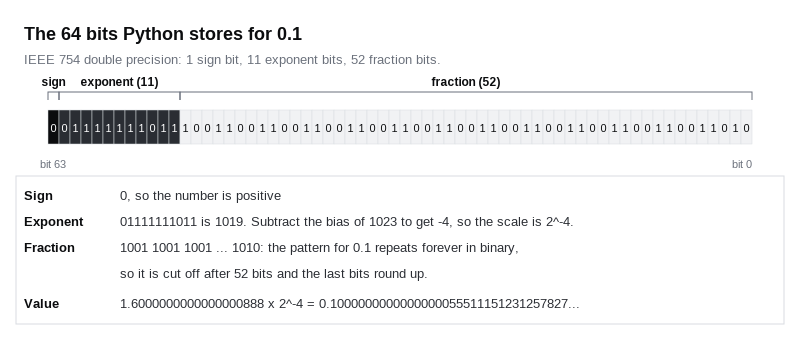
The exponent is stored with a bias of 1023 so it never needs its own sign. The fraction holds the digits after a leading 1. that is not stored, because every normal binary number starts with 1. So the value is (-1)^sign × 1.fraction × 2^(exponent - 1023).
Compare the three numbers. 0.5 is 1.0 × 2^-1, so its fraction is all zeros. -2 only differs from 2 in the sign bit. 0.1 has a fraction that repeats 1001 until the bits run out, then rounds.
Check it worked
For 0.1 the script prints sign 0, exponent 01111111011 = 1019, minus 1023 = -4, and a fraction of 1001 repeated that ends in 1010. For 0.5 the fraction is 52 zeros. For -2.0 the sign is 1 and the exponent is 10000000000 = 1024, minus 1023 = 1.
Step 4 · Find which decimals binary can hold
In base 10 you cannot write one third exactly: 0.3333... goes on forever, because 3 does not divide any power of ten. Base 2 has the same problem with every fraction whose denominator is not a power of two. One tenth is 1/(2 × 5), and the 5 can never be cleared. So 0.5, 0.25 and 0.375 fit exactly, and 0.1, 0.2 and 0.6 do not.
Test it. A decimal string fits exactly when the float made from it has the same exact value as the decimal itself:
cd ~/float-demo
cat > exact.py <<'PY'
from decimal import Decimal

for text in ["0.5", "0.25", "0.375", "0.75", "0.1", "0.2", "0.6", "19.99"]:
    fits = Decimal(text) == Decimal(float(text))
    print(f"{text:>6}  {'exact' if fits else 'rounded'}")
PY
python3 exact.py
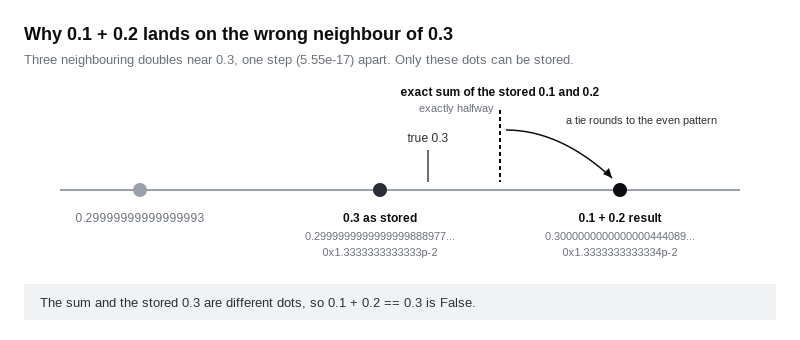
Now the original question has a full answer. The stored 0.1 is a little above one tenth, and the stored 0.2 is a little above two tenths. Their exact sum falls between two doubles, precisely halfway. IEEE 754 breaks ties by choosing the neighbour whose last bit is even, and that neighbour is one step above the double Python uses for 0.3.
Check it worked
0.5, 0.25, 0.375 and 0.75 print exact. 0.1, 0.2, 0.6 and 19.99 print rounded. That last one is a price, which is why money needs its own approach.
Step 5 · Compare floats with a tolerance
Because tiny errors are normal, == between two computed floats is a bug waiting for a different input. Compare with a tolerance instead. math.isclose checks that two numbers are within a relative tolerance of each other, by default one part in a billion:
cd ~/float-demo
cat > compare.py <<'PY'
import math

a = 0.1 + 0.2
print("==        ", a == 0.3)
print("isclose   ", math.isclose(a, 0.3))
print("step size ", math.ulp(0.3))
print("next up   ", math.nextafter(0.3, 1.0))

# Near zero, a relative tolerance is too strict on its own.
tiny = 0.1 + 0.2 - 0.3
print("near zero ", math.isclose(tiny, 0.0))
print("with abs  ", math.isclose(tiny, 0.0, abs_tol=1e-9))
PY
python3 compare.py
math.ulp(0.3) is the gap between 0.3 and the next double: about 5.55e-17. math.nextafter(0.3, 1.0) is that next double, and it is exactly the result of 0.1 + 0.2.
The near-zero case trips people up. A relative tolerance scales with the size of the numbers, so when one side is 0.0 nothing but 0.0 is close. Add abs_tol whenever a value can be near zero, and pick it from what the numbers mean: a millimetre in metres, a cent in a currency.
Check it worked
The output shows == False, isclose True, a step size of 5.551115123125783e-17, next up 0.30000000000000004, then near zero False and with abs True.
Step 6 · Watch error pile up in a long sum
One rounding error is tiny. A million of them add up. Add 0.1 one million times with a loop, then with sum() and with math.fsum():
cd ~/float-demo
cat > summing.py <<'PY'
import math

values = [0.1] * 1_000_000

total = 0.0
for v in values:
    total += v

print("loop ", total)
print("sum  ", sum(values))
print("fsum ", math.fsum(values))
PY
python3 summing.py
The loop rounds after every addition, and the errors all lean the same way. Since Python 3.12, the built-in sum() uses a compensated algorithm for floats on most builds, which keeps a running record of the lost low bits, so it does much better than a hand-written loop. math.fsum() goes further: it is designed to give a correctly rounded result for the whole list, and in practice it does on ordinary IEEE 754 builds. Use fsum when you add many floats and the total matters, for example in a report or a data-cleaning script.
This applies beyond Python. A loop of total += x in JavaScript, Go or a spreadsheet macro drifts in exactly the same way.
Check it worked
The loop prints 100000.00000133288. fsum prints 100000.0, and on most builds so does sum.
Step 7 · Meet the edges: big integers, NaN and infinity
Fifty-two fraction bits plus the hidden leading 1 give 53 bits of precision. Every whole number up to 2^53 (9,007,199,254,740,992) fits exactly. Above that, doubles skip numbers. Python's int has no such limit, but the moment you turn one into a float it is rounded:
cd ~/float-demo
cat > edges.py <<'PY'
import math
import sys

big = 2**53 + 1
print("int        ", big)
print("as float   ", float(big))
print("same float ", float(2**53) == float(big))

nan = float("nan")
print("nan == nan ", nan == nan)
print("isnan      ", math.isnan(nan))
print("overflow   ", sys.float_info.max * 2)
print("inf - inf  ", math.inf - math.inf)
print("digits     ", sys.float_info.dig)
PY
python3 edges.py
This matters most in JavaScript, where every ordinary number is a double. A 64-bit bigint primary key, a snowflake-style ID such as the ones some social platforms use, or any other integer in a JSON payload above 2^53 can be silently changed when JavaScript reads it. Send such IDs as strings, or use BigInt in JavaScript.
NaN ("not a number") comes from operations with no sensible answer, such as infinity minus infinity. It is not equal to anything, itself included, so x == x is False for NaN. Test with math.isnan. Overflow does not raise an error: it gives inf. Both can spread quietly through a calculation, so check inputs where they enter your program.
sys.float_info.dig says a double reliably holds 15 significant decimal digits. Anything you need to keep to more digits than that needs another type.
Check it worked
The output shows int 9007199254740993, as float 9007199254740992.0, same float True, nan == nan False, isnan True, overflow inf, inf - inf nan and digits 15.
Step 8 · Get the same answer from Node.js and Go
Nothing here is special to Python. If you have Node.js 26 installed, run:
node -e 'console.log(0.1 + 0.2); console.log(0.1 + 0.2 === 0.3); console.log(2 ** 53 + 1); console.log(Number.MAX_SAFE_INTEGER); console.log(2n ** 53n + 1n)'It prints 0.30000000000000004, false, 9007199254740992, 9007199254740991 and 9007199254740993n. The last line uses BigInt, which holds whole numbers of any size.
With Go 1.27, put this in ~/float-demo/main.go:
package main

import "fmt"

func main() {
	fmt.Println(0.1 + 0.2)

	a, b := 0.1, 0.2
	fmt.Println(a + b)
	fmt.Println(a+b == 0.3)
}
and run it:
cd ~/float-demo
go run main.go
The first line prints 0.3, which looks like Go got it right. It did not compute anything at run time: 0.1 + 0.2 written with constants is worked out by the compiler with exact arithmetic, then stored as the double nearest 0.3. Once the values are float64 variables, Go gives 0.30000000000000004 and false, like every other language.
Check it worked
Each language prints 0.30000000000000004 for the variable sum. If Node.js or Go are not installed, skip this step; nothing later depends on it.
Step 9 · Keep the checklist and clean up
Floats are the right tool for measurements, science, graphics and statistics, where 15 significant digits is far more than the data holds. Keep these habits:
- Never use
==or!=on floats you computed. Usemath.isclosewith anabs_tolthat fits your units when values can be near zero. - Print with a fixed number of places (
f"{x:.2f}") for people, and keep full precision for storage. - Add long lists with
math.fsum, not a hand-written+=loop. - Never use floats for money. Store whole minor units (kobo, cents, pesewas) as integers, or use
decimal.Decimal. When a mobile money or card API sends an amount, check which of the two it uses. - Keep IDs and anything above 2^53 out of JavaScript numbers. Send them as strings in JSON.
- Test for NaN with
math.isnan(orNumber.isNaNin JavaScript), and validate inputs before they reach a calculation. - Expect the same result in every language. If two systems disagree, look for different rounding or formatting, not a broken float.
When you are done, remove the demo folder:
cd ~
rm -rf ~/float-demoCheck it worked
ls ~/float-demo reports that the folder does not exist. Python itself stays installed.
Next steps
- Put the money rule into practice: handle money in code without rounding errors.
- Go back over how Python treats
int,float,strandbool: understand values and types in Python. - The same "what is really stored" approach, for text: understand text encoding, bytes, UTF-8 and Unicode normalisation.
Related tutorials
- Write safer PHP with strict types, enums and readonly classesYou will take a loosely typed PHP 8.5 order script that gets totals quietly wrong and turn it into a typed domain model with strict types, a backed enum, readonly value objects and match, then prove it with a clean PHPStan 2.3 run.
- Write reusable TypeScript with genericsYou will replace three copy-pasted lookup functions with one generic function, then build a type-safe pluck, a Result type, a hand-written mapped type and a tested fetchJson helper in TypeScript 7.
- Write regular expressions you can read and testYou will build a small, tested Python module that pulls dates, money amounts and Nigerian and Kenyan phone numbers out of messy SMS text, and know how to port its patterns to JavaScript and when to stop using a regex.
Need this done for you?
Padding does this work for growing companies, from the first diagnosis to a system that keeps working.
Get new tutorials