Databases · Advanced · 24 min
Set up PostgreSQL streaming replication with a read-only standby
By Padding · Updated 18 Nov 2026
Ubuntu 26.04 · PostgreSQL 18.7
You will clone a PostgreSQL 18 primary onto a second server with pg_basebackup, watch it stream changes and refuse writes, measure its lag, try synchronous commit, and promote it when the primary goes down.
On this page
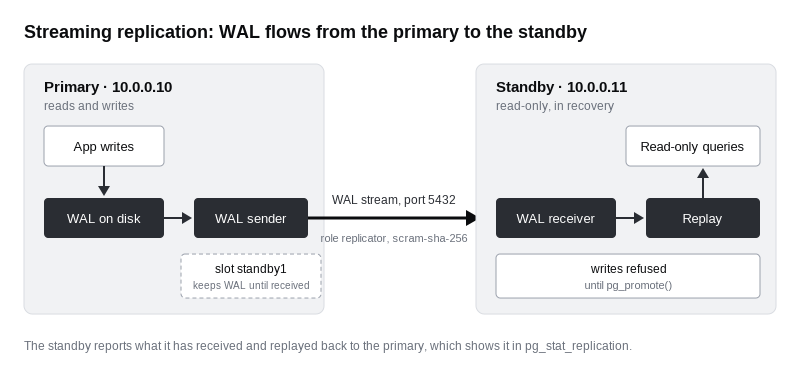
A single database server is one disk failure, one bad kernel update or one power cut away from an outage. Streaming replication keeps a second PostgreSQL server, the standby, a few milliseconds behind the first, the primary. The primary sends its write-ahead log (WAL), the record of every change it makes, over a network connection, and the standby replays it. The standby answers read-only queries while it does so, and you can promote it to take over when the primary dies.
In this tutorial you set up that pair from scratch. You create a replication role and a replication slot on the primary, clone it onto the standby with pg_basebackup, confirm changes arrive, measure how far behind the standby is, see it refuse writes, weigh synchronous against asynchronous commit, and finally promote the standby after stopping the primary.
You need two Ubuntu 26.04 servers with PostgreSQL 18 installed from the PostgreSQL apt repository, as in /tutorials/install-postgresql-18-on-ubuntu-26-04. Both must run the same major version. The examples call them primary at 10.0.0.10 and standby at 10.0.0.11; every command block says which server it runs on. PostgreSQL 19.0 came out on 19 November 2026. Everything here works the same on 19, as long as both servers run it.
Step 1 · Note the two addresses and check the versions
Set two shell variables with your servers' private addresses on both servers, replacing the example values with yours. The later commands use them, so set them again if you open a new shell.
# On both servers. Replace these with your own private addresses.
PRIMARY_IP=10.0.0.10
STANDBY_IP=10.0.0.11
Use private addresses, not public ones. Replication traffic carries every row you write, and a private network keeps it off the internet.
Check it worked
Run this on both servers:
# On both servers.
sudo -u postgres psql -Atc 'SHOW server_version;'
Both print a version that starts with 18., for example 18.7. If the major versions differ, stop here and upgrade one of them: a standby must run the same major version as its primary.
Step 2 · Create a replication role and slot on the primary
The standby logs in to the primary with its own role. That role needs the REPLICATION attribute and nothing else: it is not a superuser and owns no tables. Create it and type a strong password when asked. Keep the password to hand for a later step.
# On the primary.
sudo -u postgres createuser --replication --pwprompt replicator
Create a small database to watch replication work, with 100 rows in it:
# On the primary.
sudo -u postgres createdb replica_demo
sudo -u postgres psql -d replica_demo -c "CREATE TABLE orders (id bigint GENERATED ALWAYS AS IDENTITY PRIMARY KEY, item text NOT NULL, placed_at timestamptz NOT NULL DEFAULT now());"
sudo -u postgres psql -d replica_demo -c "INSERT INTO orders (item) SELECT 'item ' || g FROM generate_series(1, 100) AS g;"
Now create a physical replication slot called standby1. A slot makes the primary keep every piece of WAL until the standby has received it, so a standby that falls behind or restarts can always catch up. The true argument makes the slot start holding WAL straight away, before the standby has connected.
# On the primary.
sudo -u postgres psql -c "SELECT pg_create_physical_replication_slot('standby1', true);"
A slot has a cost. If the standby disappears for good, the primary keeps WAL for it forever, and the disk fills. Drop the slot of any standby you retire (the last step shows how), or cap what a slot may hold with the max_slot_wal_keep_size setting, at the price of the standby needing a fresh clone if it falls further behind than that.
Check it worked
# On the primary.
sudo -u postgres psql -c "SELECT slot_name, slot_type, active, wal_status FROM pg_replication_slots;"
One row: standby1, physical, active is f (nothing is connected yet) and wal_status is reserved.
Step 3 · Let the standby connect to the primary
PostgreSQL on Ubuntu listens only on localhost by default. Make the primary listen on its network interfaces, then allow the replicator role in from the standby's address only, with a password. The line goes in pg_hba.conf; asking the server for the file's path avoids guessing it.
# On the primary.
sudo -u postgres psql -c "ALTER SYSTEM SET listen_addresses = '*';"
HBA="$(sudo -u postgres psql -Atc 'SHOW hba_file;')"
echo "host  replication  replicator  ${STANDBY_IP}/32  scram-sha-256" | sudo tee -a "$HBA"
The second column says replication, not a database name. Replication connections only match rules with that keyword; a rule for all databases does not cover them.
Changing listen_addresses needs a restart, which also loads the new pg_hba.conf rule. Open connections drop, so choose a quiet moment on a live server.
# On the primary.
sudo systemctl restart postgresql
If the primary runs a firewall such as UFW, as in /tutorials/set-up-ufw-firewall-ubuntu-26-04, allow PostgreSQL's port from the standby only:
# On the primary, if you use UFW.
sudo ufw allow from "$STANDBY_IP" to any port 5432 proto tcpCheck it worked
On the primary, confirm the rule loaded:
# On the primary.
sudo -u postgres psql -c "SELECT type, database, user_name, address, auth_method FROM pg_hba_file_rules WHERE 'replicator' = ANY (user_name);"
The row shows host, {replication}, {replicator}, the standby's address and scram-sha-256. Then, on the standby, check that the primary answers on the network:
# On the standby.
pg_isready -h "$PRIMARY_IP" -p 5432
It prints 10.0.0.10:5432 - accepting connections with your primary's address. no response means the primary is not listening on that address or a firewall is in the way.
Step 4 · Clone the primary onto the standby with pg_basebackup
The standby must start from an exact copy of the primary's data directory, so its own empty cluster has to go. Stop PostgreSQL on the standby.
Run the next commands on the standby only. Moving the data directory on the primary would take your live database offline. Anything you stored in the standby's own cluster is set aside, not deleted, and you can remove it at the end.
# On the standby.
sudo systemctl stop postgresql# On the standby.
sudo -u postgres mv /var/lib/postgresql/18/main /var/lib/postgresql/18/main.before-replicaThe standby needs the replicator password every time it connects, not only now. Store it in the postgres user's password file rather than in a command line or a config file anyone can read. Create the file private first, then open it:
# On the standby.
sudo -u postgres install -m 600 /dev/null /var/lib/postgresql/.pgpass# On the standby.
sudo -u postgres nano /var/lib/postgresql/.pgpassAdd one line, with your primary's address and the password you chose in place of your-password:
10.0.0.10:5432:replication:replicator:your-passwordThe third field, replication, is how a password file entry matches replication connections. Save and close the file.
Now clone the primary. -S standby1 streams through the slot you made, -X stream copies the WAL written during the copy, --checkpoint=fast starts at once instead of waiting for a gentle checkpoint, and -R writes the settings that make the copy start as a standby.
# On the standby.
sudo -u postgres pg_basebackup -h "$PRIMARY_IP" -p 5432 -U replicator -D /var/lib/postgresql/18/main -S standby1 -X stream --checkpoint=fast -R -P
The progress line counts up to the size of the primary's databases and the command exits without error. A large database over a slow or metered link can take hours and saturate it; --max-rate=10M caps the transfer at 10 MB per second if other traffic shares the line.
-R did two things in the new data directory: it created an empty standby.signal file, which tells PostgreSQL to start in standby mode, and it appended primary_conninfo and primary_slot_name to postgresql.auto.conf. Look at both:
# On the standby.
sudo -u postgres ls /var/lib/postgresql/18/main/standby.signal
sudo -u postgres grep -E '^primary_(conninfo|slot_name)' /var/lib/postgresql/18/main/postgresql.auto.conf
primary_conninfo holds something like user=replicator host=10.0.0.10 port=5432 followed by SSL and other connection defaults. It holds no password, because the password came from .pgpass, and the standby will read that file again whenever it reconnects. primary_slot_name is 'standby1'.
Start the standby:
# On the standby.
sudo systemctl start postgresqlCheck it worked
# On the standby.
sudo -u postgres psql -Atc "SELECT pg_is_in_recovery();"
It prints t: the server is in recovery, which is what a standby always is. If PostgreSQL does not start, read the end of /var/log/postgresql/postgresql-18-main.log. password authentication failed points at .pgpass; no pg_hba.conf entry points at the rule on the primary.
Step 5 · Watch changes arrive and measure the lag
Add 50 rows on the primary:
# On the primary.
sudo -u postgres psql -d replica_demo -c "INSERT INTO orders (item) SELECT 'late item ' || g FROM generate_series(1, 50) AS g;"
The primary keeps one row per connected standby in pg_stat_replication. Ask it how the standby is doing:
# On the primary.
sudo -u postgres psql -x -c "SELECT application_name, client_addr, state, sync_state, sent_lsn, replay_lsn, pg_wal_lsn_diff(pg_current_wal_lsn(), replay_lsn) AS bytes_behind, replay_lag FROM pg_stat_replication;"
Read the output like this:
stateisstreamingonce the standby has caught up after connecting.catchupmeans it is still working through a backlog.sent_lsnandreplay_lsnare positions in the WAL. An LSN (log sequence number) such as0/3000148is a byte offset, sopg_wal_lsn_diffturns the gap into bytes. On a quiet systembytes_behindis0.replay_lagis the time between the primary writing a change and the standby confirming it has applied it. It is empty when nothing has happened for a while.sync_stateisasyncfor now. A later step changes that.
On the standby, the matching view comes from functions, because a standby has no pg_stat_replication of its own to report:
# On the standby.
sudo -u postgres psql -d replica_demo -Atc "SELECT count(*) FROM orders;"
sudo -u postgres psql -x -c "SELECT pg_last_wal_receive_lsn(), pg_last_wal_replay_lsn(), now() - pg_last_xact_replay_timestamp() AS since_last_replayed;"
pg_last_wal_receive_lsn is how far the standby has received WAL and pg_last_wal_replay_lsn how far it has applied it. since_last_replayed is the age of the last transaction it replayed. It keeps growing while the primary is idle, so alert on it only together with a check that the primary is actually writing.
Check it worked
The count on the standby is 150, the 100 rows from the clone plus the 50 you added afterwards, and the primary shows state as streaming.
Step 6 · See the standby refuse writes
A standby replays the primary's changes and accepts nothing else. Try to insert a row on it:
# On the standby.
sudo -u postgres psql -d replica_demo -c "INSERT INTO orders (item) VALUES ('from the standby');"
PostgreSQL rejects it with ERROR: cannot execute INSERT in a read-only transaction. The same goes for UPDATE, DELETE, CREATE TABLE and every other write, including a superuser's. Reads work as normal, which is the point of a hot standby: send reports and heavy read queries here and leave the primary for writes.
Applications can tell the two apart in the connection string. With libpq-based drivers, host=10.0.0.10,10.0.0.11 target_session_attrs=read-write connects to whichever server accepts writes, and target_session_attrs=prefer-standby sends a reporting tool to the standby while there is one. Remember that a standby is slightly behind: a user who saves a form on the primary and reads it back from the standby a millisecond later can miss their own change.
Check it worked
# On the standby.
sudo -u postgres psql -Atc "SHOW transaction_read_only;"
It prints on, and the insert above failed with the read-only error.
Step 7 · Choose between asynchronous and synchronous commit
So far replication is asynchronous. The primary tells your application a transaction has committed as soon as it is on the primary's own disk, and sends it to the standby a moment later. If the primary's disk dies in that moment, the standby never receives that transaction. The window is usually a few milliseconds, but it is not zero.
Synchronous replication closes it: the primary waits until a standby has the change before it reports the commit. Turn it on for any connected standby:
# On the primary.
sudo -u postgres psql -c "ALTER SYSTEM SET synchronous_standby_names = '*';"
sudo -u postgres psql -c "SELECT pg_reload_conf();"
Ask the primary how it now treats the standby:
# On the primary.
sudo -u postgres psql -Atc "SELECT sync_state FROM pg_stat_replication;"
It prints sync: the primary now waits for this standby before it confirms a commit. If it still prints async, run the query again after a second; the standby is picked up at its next status report.
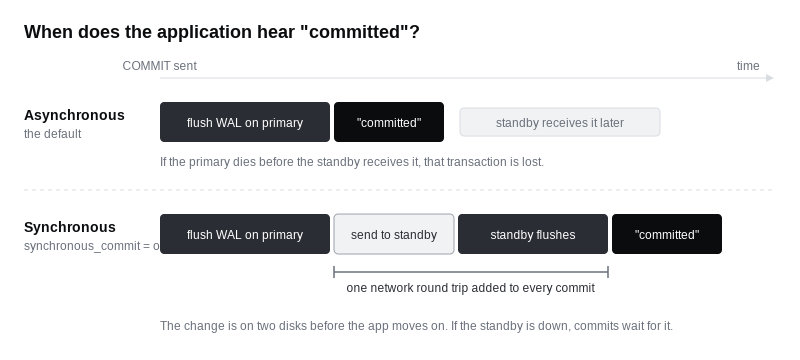
synchronous_commit decides how far the wait goes. The default, on, waits until the standby has flushed the WAL to its disk. remote_write waits only until the standby's operating system has it, which survives a PostgreSQL crash on the standby but not a power loss. remote_apply waits until the standby has replayed the change, so a read on the standby straight after sees it. local skips the standby wait. You can set it per transaction, for writes where speed matters more than a second copy:
# On the primary.
sudo -u postgres psql -d replica_demo -c "BEGIN; SET LOCAL synchronous_commit = local; INSERT INTO orders (item) VALUES ('page view, local commit only'); COMMIT;"
Weigh three costs before you keep synchronous replication on:
- Latency. Every commit waits a network round trip. Two servers in one data centre add well under a millisecond. A primary in Lagos with its standby in Europe adds around 100 milliseconds or more to every commit, and a standby in Johannesburg can cost as much or more, because traffic between the two is often routed through Europe. A busy application notices a tenth of a second on every write. Many teams run synchronous within a site and asynchronous to a distant site.
- Availability. With one standby listed, if that standby goes down, every commit on the primary waits until it returns. Your application hangs, it does not fail over. Running two standbys with
synchronous_standby_names = 'ANY 1 (*)'lets either one confirm. - What it does not protect. Both servers receive the same
DROP TABLEwithin milliseconds.
For the rest of this tutorial, return to asynchronous replication:
# On the primary.
sudo -u postgres psql -c "ALTER SYSTEM RESET synchronous_standby_names;"
sudo -u postgres psql -c "SELECT pg_reload_conf();"Check it worked
# On the primary.
sudo -u postgres psql -Atc "SELECT sync_state FROM pg_stat_replication;"
It prints async, where the same query printed sync while synchronous replication was on.
Step 8 · Promote the standby when the primary fails
When the primary is gone for good, you promote the standby: it stops replaying, starts a new timeline and accepts writes. Never promote while the old primary can still accept writes. Two servers that both accept writes is called split brain, and the two copies of your data drift apart with no automatic way to merge them. Stop the old primary first, or make sure it is unreachable.
Rehearse it now. Stop PostgreSQL on the primary:
# On the primary.
sudo systemctl stop postgresql
Then promote the standby. pg_promote() waits until promotion has finished and returns t.
# On the standby.
sudo -u postgres psql -c "SELECT pg_promote();"
The standby is now the primary. Point your applications at it, or at a multi-host connection string with target_session_attrs=read-write as above. Write to it:
# On the standby, now the primary.
sudo -u postgres psql -d replica_demo -c "INSERT INTO orders (item) VALUES ('first order after failover');"
The old primary cannot simply start again as a standby, because it may hold changes the new primary never received. Leave it stopped and rebuild it as a standby of the new primary with the steps above, run in the other direction. Keep it off the network your applications use until then. A rebuild moves the old data directory aside and clones a fresh one, so the old standby1 slot goes with the old directory and there is nothing to clean up.
When the data directory is large, pg_rewind can rewind the old primary to match the new one instead of copying everything. A rewind does not touch the pg_replslot directory, so the old standby1 slot survives it, and a slot no one uses makes a server keep WAL forever. After the rewind, start the old primary as a standby of the new one (with standby.signal and primary_conninfo set), still unreachable from your applications, and drop the slot there:
# On the old primary, only after pg_rewind, running as a standby and unreachable by applications.
sudo -u postgres psql -c "SELECT pg_drop_replication_slot('standby1');"
When you are happy with the new primary, remove the old cluster you set aside on it. This deletes it for good, so check the path first: it must end in main.before-replica.
# On the standby, now the primary.
sudo -u postgres rm -rf /var/lib/postgresql/18/main.before-replicaCheck it worked
# On the standby, now the primary.
sudo -u postgres psql -Atc "SELECT pg_is_in_recovery();"
sudo -u postgres psql -d replica_demo -Atc "SELECT count(*) FROM orders;"
pg_is_in_recovery() prints f, and the count is 152: 150 rows from before, the local-commit row from the synchronous step and the order written after failover. The standby.signal file is gone from the data directory.
Next steps
Replication is not a backup. A standby copies mistakes as faithfully as it copies good data: a wrong DELETE reaches it within milliseconds, and it cannot take you back to yesterday. Keep base backups and archived WAL alongside it, and test restoring them.
Promotion here was a command you typed. Tools such as Patroni watch the servers, promote a standby automatically, fence the old primary to prevent split brain and keep a shared record of which node leads, using a store such as etcd. Reach for one once you need failover without a person at the keyboard, and understand the manual steps above first, because those are what Patroni runs for you.
- Take logical backups you can restore to any version:
/tutorials/back-up-and-restore-postgresql-with-pg-dump. - Spread connections across the primary and standby with a pooler:
/tutorials/pool-postgresql-connections-with-pgbouncer. - Close the database port to everything but the servers that need it:
/tutorials/set-up-ufw-firewall-ubuntu-26-04.
Related tutorials
- Understand PostgreSQL transactions and isolation levelsYou will race two psql sessions against each other in PostgreSQL 18 to cause a lost update, a non-repeatable read, write skew and a deadlock, then fix each one with row locks, the right isolation level, a retry loop, savepoints and lock timeouts.
- Summarise data in SQL with GROUP BY, HAVING and aggregatesYou will turn twelve order rows into a PostgreSQL 18 revenue report by month and region, with subtotals, saved as a view and a CSV file that matches a hand check.
- Store and query JSON in PostgreSQL with JSONBYou will store payment webhook payloads in a PostgreSQL 18 jsonb column, query them with operators, SQL/JSON paths and JSON_TABLE, update keys in place, prove two indexes with EXPLAIN and guard the data with a CHECK constraint.
Need this done for you?
Padding does this work for growing companies, from the first diagnosis to a system that keeps working.
Get new tutorials