Databases · Advanced · 28 min
Understand PostgreSQL transactions and isolation levels
By Padding · Updated 18 Nov 2026
Ubuntu 26.04 · PostgreSQL 18.7
You will race two psql sessions against each other in PostgreSQL 18 to cause a lost update, a non-repeatable read, write skew and a deadlock, then fix each one with row locks, the right isolation level, a retry loop, savepoints and lock timeouts.
On this page
A transaction groups statements so they succeed or fail together. That part is easy to learn. The hard part is what happens when two transactions run at the same moment and touch the same rows. Most concurrency bugs never raise an error: the numbers are simply wrong afterwards, and only when two requests overlap.
You cannot see those bugs by typing into one psql window, because you cannot type fast enough to make two sessions overlap at the right instant. So in this tutorial you write a small script that starts two psql sessions one second apart, each reading SQL from a file. A pg_sleep inside the first session holds it open while the second one runs. Every race happens the same way each time you run it, which means you can watch each anomaly, change one thing and watch it disappear.
You will cause and then fix a lost update, a non-repeatable read, write skew, a serialization failure that your app must retry, a statement stuck behind a lock, and a deadlock. Along the way you use savepoints, lock_timeout and the pg_locks view.
The commands use PostgreSQL 18. PostgreSQL 19 came out in November 2026, and the behaviour shown here is the same on it.
Step 1 · Build a lab database and a race script
Make a folder for the lab files and a database called txlab:
mkdir -p ~/txlab-demo
cd ~/txlab-demo
sudo -u postgres createdb txlab
The lab has two small tables. items is a shop's stock list, with a rule that stock can never go below zero. doctors records who is on call at a clinic, and the clinic's rule is that at least one doctor must always be on call. Save the script that creates them as reset.sql. Every experiment starts by running it, so each one begins from the same rows.
cat > reset.sql <<'SQL'
DROP TABLE IF EXISTS items, doctors;
CREATE TABLE items (
  id       integer PRIMARY KEY,
  name     text NOT NULL,
  in_stock integer NOT NULL CHECK (in_stock >= 0)
);
INSERT INTO items VALUES
  (1, 'Rice, 5 kg bag', 10),
  (2, 'Cooking oil, 1 litre', 10);
CREATE TABLE doctors (
  name    text PRIMARY KEY,
  on_call boolean NOT NULL
);
INSERT INTO doctors VALUES ('Ada', true), ('Bayo', true);
SQL
sudo -u postgres psql -X -q -d txlab -v ON_ERROR_STOP=1 < reset.sql
Now write the race script, race.sh. It starts the first file in one psql session, waits a second, starts the second file in another session, waits for both to finish and prints what each one saw. The ISOLATION variable sets the isolation level for both sessions, and defaults to Read Committed, which is PostgreSQL's default. An argument that does not end in .sql is run as a command instead, which you need for the retry step.
cat > race.sh <<'SH'
#!/usr/bin/env bash
# Usage: [ISOLATION='repeatable read'] ./race.sh first.sql second.sql
# Runs the first file now and the second one second later, in two psql
# sessions on the txlab database, then prints what each session saw.
set -u
iso=${ISOLATION:-read committed}
run() {
  case "$1" in
    *.sql) sudo -u postgres psql -X -d txlab \
             -c "SET default_transaction_isolation = '$iso'" -f - < "$1" 2>&1 ;;
    *) "$1" 2>&1 ;;
  esac
}
sudo -v   # ask for your password now, not from a background job
run "$1" > session-a.log &
a=$!
sleep 1
run "$2" > session-b.log &
b=$!
wait "$a" "$b"
echo "--- session A: $1"; cat session-a.log
echo "--- session B: $2"; cat session-b.log
SH
chmod +x race.sh
The < "$1" redirect runs as you, so the SQL files can stay in your home folder even though psql runs as the postgres user. sudo -v refreshes your sudo login before the sessions start, so a password prompt never lands in a background job.
Check it worked
sudo -u postgres psql -X -d txlab -c "SELECT * FROM items ORDER BY id;" -c "SELECT * FROM doctors ORDER BY name;"You see two items with in_stock of 10 and two doctors with on_call set to t. ls in ~/txlab-demo shows reset.sql and race.sh.
Step 2 · Lose an update under Read Committed
The classic concurrency bug is read, then write. An app reads a value, works out a new value in its own code, and writes it back. If another request does the same in between, one of the two writes is lost.
Two staff members sell rice at the same time: one sells 3 bags, the other 2. Each session reads the stock into a psql variable with \gset, which stands in for your app reading a row into memory, then writes back the stock minus its sale. Session A pauses for two seconds between its read and its write, the way a slow request might.
cat > sell-3.sql <<'SQL'
BEGIN;
SELECT in_stock AS stock FROM items WHERE id = 1 \gset
\echo A read in_stock = :stock
SELECT pg_sleep(2) \gset
UPDATE items SET in_stock = :stock - 3 WHERE id = 1;
COMMIT;
SQL
cat > sell-2.sql <<'SQL'
BEGIN;
SELECT in_stock AS stock FROM items WHERE id = 1 \gset
\echo B read in_stock = :stock
UPDATE items SET in_stock = :stock - 2 WHERE id = 1;
COMMIT;
SQL
sudo -u postgres psql -X -q -d txlab < reset.sql
./race.sh sell-3.sql sell-2.sql
Putting \gset after pg_sleep just stops it printing an empty result. Both sessions report success:
--- session A: sell-3.sql
SET
BEGIN
A read in_stock = 10
UPDATE 1
COMMIT
--- session B: sell-2.sql
SET
BEGIN
B read in_stock = 10
UPDATE 1
COMMIT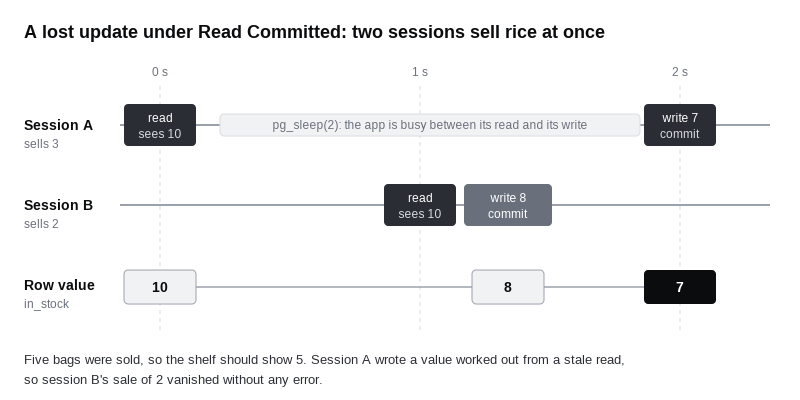
Read Committed gives each statement a fresh view of committed data, but it does nothing to stop the gap between your app's read and its write. Session A read 10, session B read 10, B wrote 8, then A wrote 10 minus 3. No error, no warning.
This shows up in real systems whenever requests overlap. On patchy mobile networks, a phone that times out often resends the same request while the first is still running, so overlapping writes are more common than you might expect from your traffic numbers.
Check it worked
sudo -u postgres psql -X -d txlab -Atc "SELECT in_stock FROM items WHERE id = 1;"The answer is 7. Five bags were sold from ten, so it should be 5.
Step 3 · Fix the lost update with an atomic UPDATE or FOR UPDATE
There are two fixes, and both work under Read Committed.
The first is to let the database do the arithmetic. SET in_stock = in_stock - 3 reads and writes in one statement. When a second session tries to update the same row, it waits for the first to commit, then applies its change to the new value. \timing on in session B prints how long its statement took.
cat > sell-3-atomic.sql <<'SQL'
BEGIN;
UPDATE items SET in_stock = in_stock - 3 WHERE id = 1 RETURNING in_stock;
SELECT pg_sleep(2) \gset
COMMIT;
SQL
cat > sell-2-atomic.sql <<'SQL'
\timing on
UPDATE items SET in_stock = in_stock - 2 WHERE id = 1 RETURNING in_stock;
SQL
sudo -u postgres psql -X -q -d txlab < reset.sql
./race.sh sell-3-atomic.sql sell-2-atomic.sql
Session A returns 7. Session B returns 5, and its Time: line shows about 1000 ms: it spent a second waiting for A's row lock.
The second fix is for when the new value really has to be worked out in your app, for example because it depends on a price list or a call to another service. Lock the row when you read it, with SELECT ... FOR UPDATE. Any other session that tries to lock or change the row waits until your transaction ends.
cat > sell-3-locked.sql <<'SQL'
BEGIN;
SELECT in_stock AS stock FROM items WHERE id = 1 FOR UPDATE \gset
\echo A read in_stock = :stock
SELECT pg_sleep(2) \gset
UPDATE items SET in_stock = :stock - 3 WHERE id = 1;
COMMIT;
SQL
cat > sell-2-locked.sql <<'SQL'
\timing on
BEGIN;
SELECT in_stock AS stock FROM items WHERE id = 1 FOR UPDATE \gset
\echo B read in_stock = :stock
UPDATE items SET in_stock = :stock - 2 WHERE id = 1;
COMMIT;
SQL
sudo -u postgres psql -X -q -d txlab < reset.sql
./race.sh sell-3-locked.sql sell-2-locked.sql
This time session B prints B read in_stock = 7, after a wait of about a second. Its read waited for A to commit, so it worked from the right number.
Keep locking transactions short. A row locked with FOR UPDATE blocks every other writer to that row until you commit, so never hold one open while you wait for a user or a slow network call.
Check it worked
sudo -u postgres psql -X -d txlab -Atc "SELECT in_stock FROM items WHERE id = 1;"The answer is 5, and session-b.log contains B read in_stock = 7.
Step 4 · See a non-repeatable read, then prevent it with Repeatable Read
Under Read Committed, each statement sees everything committed before that statement started. Two identical SELECTs in one transaction can therefore return different answers. That is a non-repeatable read, and it matters for anything that reads the same data twice and expects it to agree, such as a report that totals rows in one query and lists them in another.
Session A reads the oil stock twice, two seconds apart. Session B delivers 40 more bottles in between.
cat > report-twice.sql <<'SQL'
BEGIN;
SELECT in_stock AS first_read FROM items WHERE id = 2;
SELECT pg_sleep(2) \gset
SELECT in_stock AS second_read FROM items WHERE id = 2;
COMMIT;
SQL
cat > restock.sql <<'SQL'
UPDATE items SET in_stock = in_stock + 40 WHERE id = 2;
SQL
sudo -u postgres psql -X -q -d txlab < reset.sql
./race.sh report-twice.sql restock.sql
Session A shows first_read of 10 and second_read of 50, inside one transaction.
Run the same race at Repeatable Read. At this level, the transaction takes one snapshot at its first statement and every later statement reads from that snapshot.
sudo -u postgres psql -X -q -d txlab < reset.sql
ISOLATION='repeatable read' ./race.sh report-twice.sql restock.sql
Both reads now return 10. Session B's update still committed; session A simply does not see it until A's transaction ends.
Repeatable Read also stops the lost update from the previous step, but in a different way: it refuses to let a transaction overwrite a row that changed after its snapshot. Run the original read-then-write race at this level:
sudo -u postgres psql -X -q -d txlab < reset.sql
ISOLATION='repeatable read' ./race.sh sell-3.sql sell-2.sql
Session B commits as before. Session A's UPDATE fails with something like ERROR: could not serialize access due to concurrent update, and its COMMIT reports ROLLBACK. The stock is 8: B's sale was kept, and A's sale was refused rather than silently overwriting it. A has to run again, which is the retry you build two steps from now.
Check it worked
session-a.log from the Repeatable Read run of report-twice.sql showed 10 for both reads. For the last race:
grep "could not serialize" session-a.log
sudo -u postgres psql -X -d txlab -Atc "SELECT in_stock FROM items WHERE id = 1;"
The first command prints the error line from session A, and the second prints 8.
Step 5 · Catch write skew with Serializable
Write skew is harder to spot. Two transactions each read the same data, check a rule, and then write to different rows. Neither overwrites the other, so row locks and Repeatable Read do not help, and the rule ends up broken.
Ada and Bayo are both on call, and each wants to go off call. Each session checks that at least two doctors are on call, and only then signs its doctor off. The check uses psql's \if, standing in for an if in your app.
cat > ada-leaves.sql <<'SQL'
BEGIN;
SELECT (count(*) >= 2)::int AS can_leave FROM doctors WHERE on_call \gset
\echo Ada sees enough cover: :can_leave
SELECT pg_sleep(2) \gset
\if :can_leave
  UPDATE doctors SET on_call = false WHERE name = 'Ada';
\else
  \echo Ada stays on call
\endif
COMMIT;
\echo SQLSTATE of the last error: :LAST_ERROR_SQLSTATE
SQL
cat > bayo-leaves.sql <<'SQL'
BEGIN;
SELECT (count(*) >= 2)::int AS can_leave FROM doctors WHERE on_call \gset
\echo Bayo sees enough cover: :can_leave
\if :can_leave
  UPDATE doctors SET on_call = false WHERE name = 'Bayo';
\else
  \echo Bayo stays on call
\endif
COMMIT;
SQL
sudo -u postgres psql -X -q -d txlab < reset.sql
ISOLATION='repeatable read' ./race.sh ada-leaves.sql bayo-leaves.sql
sudo -u postgres psql -X -d txlab -c "SELECT * FROM doctors ORDER BY name;"
Both sessions see enough cover, both commit, and both doctors show on_call as f. Nobody is on call. Read Committed gives the same result.
Serializable is the only level that catches this. PostgreSQL tracks what each serializable transaction read as well as what it wrote. When a set of concurrent transactions could not have produced the same result in any one-at-a-time order, it cancels one of them.
sudo -u postgres psql -X -q -d txlab < reset.sql
ISOLATION=serializable ./race.sh ada-leaves.sql bayo-leaves.sql
Bayo's session, which finished first, commits. Ada's session ends with something like this:
psql:<stdin>:6: ERROR:  could not serialize access due to read/write dependencies among transactions
DETAIL:  Reason code: Canceled on identification as a pivot, during write.
HINT:  The transaction might succeed if retried.
ROLLBACK
SQLSTATE of the last error: 40001
The line number and the reason code may differ, and the error can arrive at COMMIT instead of the UPDATE. The SQLSTATE is the part to rely on: 40001 is serialization_failure, and it always means "run the whole transaction again".
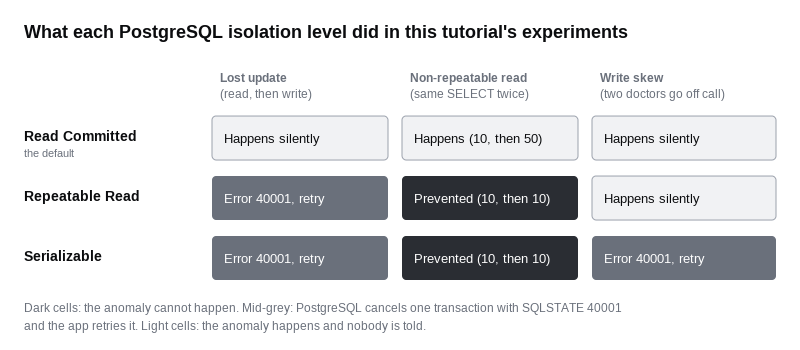
PostgreSQL accepts READ UNCOMMITTED as well, but treats it as Read Committed, so PostgreSQL never shows you another session's uncommitted data.
Check it worked
sudo -u postgres psql -X -d txlab -c "SELECT * FROM doctors ORDER BY name;"Ada is still on call (t) and Bayo is off (f). The rule held, at the cost of one failed transaction.
Step 6 · Retry serialization failures in your app
Repeatable Read and Serializable are only safe if your app retries a transaction that fails with SQLSTATE 40001. The retry must run the whole transaction again, including the reads, because the decision it made was based on data that has since changed. Retrying only the failed statement repeats the bug.
Write retry-ada.sh, a small version of what your app's database layer should do. It runs Ada's transaction at Serializable, and on 40001 it waits a short random moment and tries again, up to five times. ON_ERROR_STOP=1 makes psql exit with a non-zero status at the first error, and VERBOSITY=verbose puts the SQLSTATE in the error line, so the script can match the code rather than the message text, which can be translated.
cat > retry-ada.sh <<'SH'
#!/usr/bin/env bash
# Run ada-leaves.sql as a serializable transaction; retry on SQLSTATE 40001.
set -u
for attempt in 1 2 3 4 5; do
  out=$(sudo -u postgres psql -X -d txlab -v ON_ERROR_STOP=1 -v VERBOSITY=verbose \
    -c "SET default_transaction_isolation = 'serializable'" -f - < ada-leaves.sql 2>&1)
  status=$?
  echo "attempt $attempt:"
  echo "$out"
  if [ "$status" -eq 0 ]; then exit 0; fi
  case "$out" in
    *40001*) sleep "0.$((RANDOM % 5 + 1))" ;;
    *) exit "$status" ;;
  esac
done
echo "gave up after 5 attempts"
exit 1
SH
chmod +x retry-ada.sh
sudo -u postgres psql -X -q -d txlab < reset.sql
ISOLATION=serializable ./race.sh ./retry-ada.sh bayo-leaves.sql
Session A's log shows attempt 1 failing with ERROR: 40001: could not serialize access .... Attempt 2 runs after Bayo has committed, sees only one doctor on call and prints Ada stays on call.
In your own code the shape is the same in any language: wrap the transaction in a function, catch the database error, check its SQLSTATE (40001, and 40P01 for the deadlocks in the last step), and call the function again with a limit on attempts. Most drivers expose the code as a field on the exception, for example e.sqlstate in psycopg 3. Keep anything with side effects outside PostgreSQL, such as sending an SMS or charging a card, out of the retried function or make it safe to repeat.
Check it worked
grep -c '^attempt' session-a.log
sudo -u postgres psql -X -d txlab -c "SELECT * FROM doctors ORDER BY name;"
The count is 2, and Ada is still on call while Bayo is off. The retry reached the right answer without any change to the SQL.
Step 7 · Recover from an error inside a transaction with savepoints
Any error inside a transaction block puts the whole transaction in an aborted state. Every later statement is refused until you end it, and COMMIT then rolls back. Try it: sell one rice bag, then try to sell 99 bottles of oil, which breaks the CHECK (in_stock >= 0) rule, then sell one bottle.
sudo -u postgres psql -X -q -d txlab < reset.sql
sudo -u postgres psql -X -d txlab <<'SQL'
BEGIN;
UPDATE items SET in_stock = in_stock - 1 WHERE id = 1;
UPDATE items SET in_stock = in_stock - 99 WHERE id = 2;
UPDATE items SET in_stock = in_stock - 1 WHERE id = 2;
COMMIT;
SELECT id, in_stock FROM items ORDER BY id;
SQL
The second update fails with a message like new row for relation "items" violates check constraint "items_in_stock_check". The third is refused with current transaction is aborted, commands ignored until end of transaction block (SQLSTATE 25P02), and COMMIT prints ROLLBACK. Both items are still at 10, so even the rice sale was undone.
A savepoint marks a point inside the transaction you can roll back to without losing the work before it:
sudo -u postgres psql -X -d txlab <<'SQL'
BEGIN;
UPDATE items SET in_stock = in_stock - 1 WHERE id = 1;
SAVEPOINT before_oil;
UPDATE items SET in_stock = in_stock - 99 WHERE id = 2;
ROLLBACK TO SAVEPOINT before_oil;
UPDATE items SET in_stock = in_stock - 1 WHERE id = 2;
COMMIT;
SELECT id, in_stock FROM items ORDER BY id;
SQL
The check constraint still fails, but ROLLBACK TO SAVEPOINT clears the error and undoes only what happened after the savepoint. The rest of the transaction carries on and commits.
Savepoints are how ORMs implement nested transactions, and they suit batch jobs where one bad row should be skipped and logged rather than sinking the batch. They are not free: each one has a cost, so do not wrap every statement in a large loop. When you work interactively, \set ON_ERROR_ROLLBACK interactive in psql sets a savepoint before each statement for you, so a typo does not abort your session's transaction.
Check it worked
The final SELECT shows both items at 9: one rice bag and one oil bottle sold, and the bad sale discarded.
Step 8 · Stop waiting forever with lock_timeout and read pg_locks
A statement that needs a locked row waits as long as the lock is held. A transaction left open by a crashed worker or a forgotten psql window can make every request that touches that row hang. lock_timeout sets how long a statement may wait for a lock before it gives up with an error.
Session A locks the rice row and holds it for five seconds. Session B allows itself one second.
cat > hold-lock.sql <<'SQL'
BEGIN;
UPDATE items SET in_stock = in_stock - 1 WHERE id = 1;
SELECT pg_sleep(5) \gset
COMMIT;
SQL
cat > impatient.sql <<'SQL'
SET lock_timeout = '1s';
\timing on
UPDATE items SET in_stock = in_stock - 1 WHERE id = 1;
SQL
sudo -u postgres psql -X -q -d txlab < reset.sql
./race.sh hold-lock.sql impatient.sql
Session B fails after about 1000 ms with ERROR: canceling statement due to lock timeout (SQLSTATE 55P03) instead of waiting four more seconds. Your app can then return a clear "busy, try again" message. Set it per transaction with SET LOCAL lock_timeout = '2s', or for an app's database role with ALTER ROLE ... SET lock_timeout. It is especially worth setting before schema changes such as ALTER TABLE, which queue behind running queries and block everything that arrives after them.
When something is stuck, find out who is blocking whom. Start a holder and a waiter in the background, then look while they are stuck:
sudo -v
sudo -u postgres psql -X -d txlab < hold-lock.sql > holder.log 2>&1 &
holder=$!
sleep 1
sudo -u postgres psql -X -d txlab -c "UPDATE items SET in_stock = in_stock - 1 WHERE id = 1;" > waiter.log 2>&1 &
waiter=$!
sleep 1
sudo -u postgres psql -X -d txlab -c "SELECT pid, pg_blocking_pids(pid) AS blocked_by, state, wait_event_type, left(query, 45) AS query FROM pg_stat_activity WHERE datname = 'txlab' AND pid <> pg_backend_pid();"
sudo -u postgres psql -X -d txlab -c "SELECT pid, locktype, relation::regclass AS relation, transactionid, mode, granted FROM pg_locks WHERE pid IN (SELECT pid FROM pg_stat_activity WHERE datname = 'txlab' AND pid <> pg_backend_pid()) ORDER BY pid, granted;"
The first query lists two sessions. The holder is active, running SELECT pg_sleep(5), with an empty blocked_by. The waiter has wait_event_type of Lock, and blocked_by holds the holder's process ID, something like {2817}.
The second query shows the locks themselves. Read the rows with granted set to f first: those are what someone is waiting for. Here the waiter wants a ShareLock on the holder's transactionid. That is how PostgreSQL waits for a row lock: it waits for the transaction that changed the row to finish. You also see RowExclusiveLock rows on items and on its primary key index, which every UPDATE takes and which do not conflict with each other.
In an emergency you can end the blocking session with SELECT pg_terminate_backend(<pid>);, replacing <pid> with the holder's process ID. That rolls back its transaction, so first check what it was doing. Here, wait for both to finish:
wait "$holder" "$waiter"
cat waiter.logCheck it worked
waiter.log shows UPDATE 1: the waiter finished as soon as the holder committed. Rice stock is now 7, after the two lock-holding sales and the waiter's sale.
Step 9 · Cause a deadlock and prevent it with a lock order
A deadlock is two transactions each waiting for a lock the other holds. Neither can move, so PostgreSQL has to break the cycle. After a session has waited for deadlock_timeout (1 second by default) it checks for a cycle, and if it finds one it cancels one of the transactions.
Session A sells rice and then oil. Session B sells oil and then rice, so they lock the same two rows in opposite orders.
cat > rice-then-oil.sql <<'SQL'
BEGIN;
UPDATE items SET in_stock = in_stock - 1 WHERE id = 1;
SELECT pg_sleep(2) \gset
UPDATE items SET in_stock = in_stock - 1 WHERE id = 2;
COMMIT;
SQL
cat > oil-then-rice.sql <<'SQL'
BEGIN;
UPDATE items SET in_stock = in_stock - 1 WHERE id = 2;
SELECT pg_sleep(1.5) \gset
UPDATE items SET in_stock = in_stock - 1 WHERE id = 1;
COMMIT;
SQL
sudo -u postgres psql -X -q -d txlab < reset.sql
./race.sh rice-then-oil.sql oil-then-rice.sql
One session, normally session A because it started waiting first, ends with something like:
psql:<stdin>:4: ERROR:  deadlock detected
DETAIL:  Process 3120 waits for ShareLock on transaction 812; blocked by process 3127.
Process 3127 waits for ShareLock on transaction 811; blocked by process 3120.
Its transaction rolls back, and the other session commits. A deadlock error has SQLSTATE 40P01, and like 40001 the right response is to retry the whole transaction.
Retrying fixes the symptom. The cure is to make every transaction take its locks in the same order. When a transaction will change several rows, lock them all at the start, sorted by key:
cat > rice-then-oil-ordered.sql <<'SQL'
BEGIN;
SELECT id FROM items WHERE id IN (1, 2) ORDER BY id FOR UPDATE;
UPDATE items SET in_stock = in_stock - 1 WHERE id = 1;
SELECT pg_sleep(2) \gset
UPDATE items SET in_stock = in_stock - 1 WHERE id = 2;
COMMIT;
SQL
cat > oil-then-rice-ordered.sql <<'SQL'
BEGIN;
SELECT id FROM items WHERE id IN (1, 2) ORDER BY id FOR UPDATE;
UPDATE items SET in_stock = in_stock - 1 WHERE id = 2;
SELECT pg_sleep(1.5) \gset
UPDATE items SET in_stock = in_stock - 1 WHERE id = 1;
COMMIT;
SQL
sudo -u postgres psql -X -q -d txlab < reset.sql
./race.sh rice-then-oil-ordered.sql oil-then-rice-ordered.sql
Session B now waits at its first SELECT ... FOR UPDATE until A commits, then does its work. No error, and both sales count.
Check it worked
grep -c "deadlock" session-a.log session-b.log || true
sudo -u postgres psql -X -d txlab -Atc "SELECT string_agg(in_stock::text, ',' ORDER BY id) FROM items;"
Both logs report 0 deadlocks, and the stock reads 8,8: two rice bags and two oil bottles sold.
When you have finished, remove the lab database and its files:
sudo -u postgres dropdb txlab
rm -rf ~/txlab-demo
Next steps
- Use transactions from application code, with an ORM, in a small library app: /tutorials/lend-and-return-books-with-database-transactions.
- Locks held by slow queries last longer, so make those queries fast: /tutorials/speed-up-slow-postgres-queries-with-explain.
- The PostgreSQL manual's chapter "Concurrency Control" at postgresql.org/docs/18 is the reference for every isolation level and lock mode used here.
Related tutorials
- Summarise data in SQL with GROUP BY, HAVING and aggregatesYou will turn twelve order rows into a PostgreSQL 18 revenue report by month and region, with subtotals, saved as a view and a CSV file that matches a hand check.
- Store and query JSON in PostgreSQL with JSONBYou will store payment webhook payloads in a PostgreSQL 18 jsonb column, query them with operators, SQL/JSON paths and JSON_TABLE, update keys in place, prove two indexes with EXPLAIN and guard the data with a CHECK constraint.
- Set up PostgreSQL streaming replication with a read-only standbyYou will clone a PostgreSQL 18 primary onto a second server with pg_basebackup, watch it stream changes and refuse writes, measure its lag, try synchronous commit, and promote it when the primary goes down.
Need this done for you?
Padding does this work for growing companies, from the first diagnosis to a system that keeps working.
Get new tutorials