Programming languages · Intermediate · 22 min
Understand Rust ownership by fixing borrow checker errors
By Padding · Updated 18 Nov 2026
Debian 13 (rust:1.100 image) · Rust 1.100.0 · Cargo 1.100.0
You will compile six short Rust 1.100 programs that each fail with a classic ownership or borrowing error, fix every one by reading the compiler's message, and finish with a word-frequency counter that borrows its words instead of copying them.
On this page
Every value in Rust has one owner, the variable responsible for freeing it. You can hand ownership to someone else (a move), or lend the value out (a borrow) without giving it up. The borrow checker is the part of the compiler that enforces this, and it runs before your program does, so whole classes of bugs (use after free, two pieces of code changing the same list at once, pointers into memory that has gone) become compile errors.
Reading about the rules only gets you so far. In this tutorial you write programs that break them on purpose, read what the compiler says, and fix them. Each error has a code such as E0382, and the message names the value involved, the line where ownership changed and, often, the fix. Read the whole message each time, not only the first line. By the end you will have met moves and Copy, clone and what it costs, shared & and mutable &mut borrows, &str versus String, and your first lifetime annotation. You finish with a word counter whose map borrows each word from the text instead of copying it.
All the programs live in one Cargo project, one file per program in src/bin/. cargo run --bin <name> builds only the program you name, so a broken one does not stop the others building.
Step 1 · Create the practice project
Create a project in a throwaway folder and add the src/bin folder for the programs:
cargo new ~/ownership-demo
cd ~/ownership-demo
mkdir -p src/bin
ls src
Cargo treats every .rs file in src/bin/ as a separate program named after the file. The generated src/main.rs stays as it is; you will not use it.
Check it worked
cargo new prints something like Creating binary (application) package, and ls src lists bin and main.rs.
Step 2 · Use a value after it has moved
Create src/bin/moves.rs. It makes a String, assigns it to b, then tries to assign it to c too:
cat > src/bin/moves.rs <<'RS'
fn main() {
    let a = String::from("kettle");
    let b = a;
    let c = a;
    println!("{b} {c}");
}
RS
Run it:
cargo run --bin movesThe compiler stops with `error[E0382]: use of moved value: `a `. Below the headline it marks three places: where `a was declared ("move occurs because a has type String, which does not implement the Copy trait"), the line let b = a; ("value moved here") and the line let c = a; ("value used here after move"). It also suggests calling .clone().
A String is two things: a small fixed-size part on the stack (a pointer, a length and a capacity) and the text itself on the heap. let b = a; copies the stack part only. If both a and b stayed usable, both would try to free the same heap bytes when they went out of scope. Rust prevents that by making a unusable after the move.
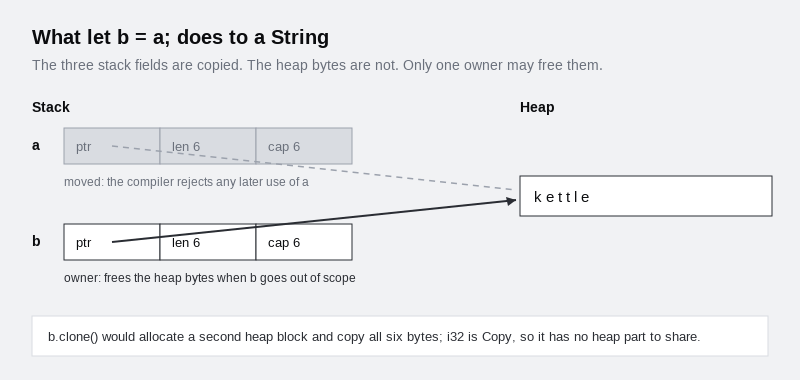
There are two fixes, and which one is right depends on what you need. If you need two independent strings, clone: clone allocates a new heap block and copies every byte, so it costs memory and time in proportion to the size of the value. On a short word that is nothing; inside a loop over a 50 MB file it is 50 MB per call. If you only need to read the value, borrow it instead (the next step). Replace the file with the clone fix, and add two integers to see the contrast:
cat > src/bin/moves.rs <<'RS'
fn main() {
    let a = String::from("kettle");
    let b = a;
    let c = b.clone();
    println!("{b} {c}");

    let x = 5;
    let y = x;
    println!("{x} {y}");
}
RS
cargo run -q --bin moves
let y = x; does not move x. Integers, floats, bool, char and tuples of them implement Copy: they live entirely on the stack, so copying them is cheap and leaves both variables usable.
Check it worked
The program prints kettle kettle and then 5 5. If you change let c = b.clone(); back to let c = a; the E0382 error returns.
Step 3 · Lend a String to a function with &str
Passing a value to a function moves it too. Create src/bin/borrow_moved.rs:
cat > src/bin/borrow_moved.rs <<'RS'
fn shout(text: String) -> String {
    text.to_uppercase()
}

fn main() {
    let name = String::from("Amara");
    let loud = shout(name);
    println!("{name} -> {loud}");
}
RScargo run --bin borrow_movedThis time the headline is `error[E0382]: borrow of moved value: `name `. It is a "borrow" because `println! only reads name, but name has already gone into shout. The note under the error points at the parameter text: String and says that shout takes ownership of its argument. That is the real problem: shout only reads the text, so it should not own it.
Change the parameter to &str, a borrowed string slice. A &str is a pointer and a length into string data someone else owns. Pass &name to lend the String; Rust turns &String into &str for you. The same function now also accepts string literals, which are &str already. Slices can point at part of a string, too:
cat > src/bin/borrow_moved.rs <<'RS'
fn shout(text: &str) -> String {
    text.to_uppercase()
}

fn main() {
    let name = String::from("Amara");
    let loud = shout(&name);
    let start = &name[..3];
    println!("{name} -> {loud} (starts with {start})");
    println!("{}", shout("literal"));
}
RS
cargo run -q --bin borrow_moved
A rule of thumb: take &str when a function only reads text, and String when it must keep the text (store it in a struct, send it to another thread).
The range in &name[..3] counts bytes, not letters. That is fine for Amara, but many names and words are not plain ASCII. In Ọlá or Ìbàdàn the first letter takes more than one byte in UTF-8, and a slice that ends in the middle of a letter panics at run time. For text in Yoruba, Amharic, Arabic or any script beyond basic Latin, walk letters with .chars() rather than slicing by byte position.
Check it worked
The program prints Amara -> AMARA (starts with Ama) and then LITERAL. name is still usable after the call because shout only borrowed it.
Step 4 · Take two mutable borrows at once
A &mut borrow lets the borrower change the value. Rust allows only one at a time. Create src/bin/two_mut.rs:
cat > src/bin/two_mut.rs <<'RS'
fn main() {
    let mut scores = vec![3, 5, 8];
    let first = &mut scores;
    let second = &mut scores;
    first.push(13);
    second.push(21);
    println!("{scores:?}");
}
RScargo run --bin two_mutThe error is `error[E0499]: cannot borrow `scores as mutable more than once at a time`. The compiler labels the first mutable borrow, the second one, and the later line `first.push(13); where the first borrow is still in use. That third label is the key: the problem is not that two &mut lines exist, it is that their uses overlap. Two handles that can both change the same vector are how one part of a program ends up with a list another part has just resized.
A borrow lasts until its last use, not until the end of the block. So the fix is to finish with first before taking second:
cat > src/bin/two_mut.rs <<'RS'
fn main() {
    let mut scores = vec![3, 5, 8];
    let first = &mut scores;
    first.push(13);
    let second = &mut scores;
    second.push(21);
    println!("{scores:?}");
}
RS
cargo run -q --bin two_mut
If you want more detail on any error, rustc --explain E0499 prints a longer explanation with examples.
Check it worked
The program prints [3, 5, 8, 13, 21].
Step 5 · Change a Vec while reading from it
Shared borrows (&) and a mutable borrow cannot overlap either. Create src/bin/shared_then_mut.rs, which holds a reference to the first name and then adds a name:
cat > src/bin/shared_then_mut.rs <<'RS'
fn main() {
    let mut names = vec![String::from("Ada"), String::from("Bola")];
    let first = &names[0];
    names.push(String::from("Chidi"));
    println!("first is {first}, {} names", names.len());
}
RScargo run --bin shared_then_mutThe error is `error[E0502]: cannot borrow `names as mutable because it is also borrowed as immutable`. The rule may look strict for a two-item list, but it protects you from a real bug. A `Vec keeps its items in one heap block. When push finds the block full, it allocates a bigger one, moves the items across and frees the old block. first would then point into freed memory. In C this compiles and fails later, sometimes; in Rust it does not compile.
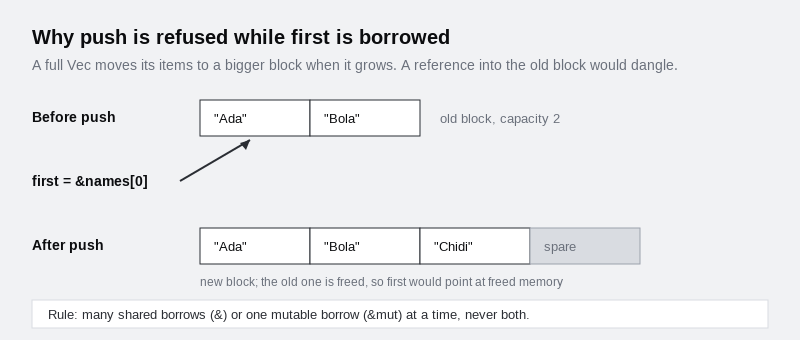
Fix it by finishing with first before the push:
cat > src/bin/shared_then_mut.rs <<'RS'
fn main() {
    let mut names = vec![String::from("Ada"), String::from("Bola")];
    let first = &names[0];
    println!("first is {first}");
    names.push(String::from("Chidi"));
    println!("{} names", names.len());
}
RS
cargo run -q --bin shared_then_mut
If you really need the first name after the push, take an owned copy with names[0].clone() before pushing. That costs one small allocation and is often the honest answer.
Check it worked
The program prints first is Ada and then 3 names.
Step 6 · Keep a reference past the end of its owner
A reference must never outlive the value it points at. Create src/bin/lives.rs, where city is dropped at the end of the inner block while label still points at it:
cat > src/bin/lives.rs <<'RS'
fn main() {
    let label;
    {
        let city = String::from("Nairobi");
        label = &city;
    }
    println!("{label}");
}
RScargo run --bin livesThe error is ` error[E0597]: `city does not live long enough `. The labels read like a timeline: `city is borrowed here, city is dropped here (the closing brace) while still borrowed, and the borrow is later used here (the println!). Whenever you see this error, look for the closing brace the compiler points at: that is where the owner disappears.
Move the owner out to the scope that needs it:
cat > src/bin/lives.rs <<'RS'
fn main() {
    let city = String::from("Nairobi");
    let label = &city;
    println!("{label}");
}
RS
cargo run -q --bin livesCheck it worked
The program prints Nairobi.
Step 7 · Return references from functions with a first lifetime
Functions hit the same rule. Create src/bin/lifetimes.rs, with a function that builds a string and returns a reference to it:
cat > src/bin/lifetimes.rs <<'RS'
fn greeting(name: &str) -> &str {
    let text = format!("Hello, {name}");
    &text
}

fn main() {
    println!("{}", greeting("Kofi"));
}
RScargo run --bin lifetimesThe error is E0515, with a headline something like `cannot return reference to local variable `text `. `text is owned by greeting and freed when the function returns, so a reference to it would dangle. No annotation can fix that. The function created the value, so it must hand over ownership: return String.
Now the opposite case, where returning a reference is correct but the compiler needs more information. Replace the file with the fixed greeting and add longest, which returns whichever of two borrowed strings is longer:
cat > src/bin/lifetimes.rs <<'RS'
fn greeting(name: &str) -> String {
    format!("Hello, {name}")
}

fn longest(a: &str, b: &str) -> &str {
    if a.len() >= b.len() { a } else { b }
}

fn main() {
    println!("{}", greeting("Kofi"));
    let a = String::from("Lagos");
    let b = String::from("Kinshasa");
    println!("longer: {}", longest(&a, &b));
}
RScargo run --bin lifetimesThis gives error[E0106]: missing lifetime specifier. With one reference parameter, as in shout or the first greeting, Rust assumes the result borrows from it. With two, it cannot tell whether the result borrows from a or from b, and callers need to know how long the result stays valid. The help text suggests the fix: name a lifetime 'a and attach it to both inputs and the output.
cat > src/bin/lifetimes.rs <<'RS'
fn greeting(name: &str) -> String {
    format!("Hello, {name}")
}

fn longest<'a>(a: &'a str, b: &'a str) -> &'a str {
    if a.len() >= b.len() { a } else { b }
}

fn main() {
    println!("{}", greeting("Kofi"));
    let a = String::from("Lagos");
    let b = String::from("Kinshasa");
    println!("longer: {}", longest(&a, &b));
}
RS
cargo run -q --bin lifetimes
'a does not change how long anything lives. It is a promise the compiler checks at each call: the returned reference is valid only while both arguments are. If a caller drops b and then uses the result, that caller gets the E0597 error from the previous step.
Check it worked
The program prints Hello, Kofi and then longer: Kinshasa.
Step 8 · Count words without copying them
Now put it together. The counter reads a file into one String, lowercases it once, and fills a HashMap<&str, usize> whose keys are slices of that one string. No word is copied: each key is a pointer and a length into the text. Create a sample file first. It mixes English and Swahili so you can see that split_whitespace and is_alphanumeric work on any script:
cat > sample.txt <<'TXT'
The kettle boils. The tea steeps.
Pour the tea, then wash the kettle.
Chai ya tangawizi: chai, maji, tangawizi.
TXT
Create src/bin/wordfreq.rs:
cat > src/bin/wordfreq.rs <<'RS'
use std::collections::HashMap;
use std::env;
use std::fs;

// Keys borrow from `text`, so the map cannot outlive it.
fn count_words(text: &str) -> HashMap<&str, usize> {
    let mut counts = HashMap::new();
    for word in text.split_whitespace() {
        let word = word.trim_matches(|c: char| !c.is_alphanumeric());
        if !word.is_empty() {
            *counts.entry(word).or_insert(0) += 1;
        }
    }
    counts
}

// Most frequent first; ties in alphabetical order.
fn top<'a>(counts: &HashMap<&'a str, usize>, n: usize) -> Vec<(&'a str, usize)> {
    let mut pairs: Vec<(&'a str, usize)> = counts.iter().map(|(w, c)| (*w, *c)).collect();
    pairs.sort_by(|x, y| y.1.cmp(&x.1).then(x.0.cmp(y.0)));
    pairs.truncate(n);
    pairs
}

fn main() {
    let path = env::args().nth(1).unwrap_or_else(|| String::from("sample.txt"));
    let text = match fs::read_to_string(&path) {
        Ok(raw) => raw.to_lowercase(),
        Err(e) => {
            eprintln!("cannot read {path}: {e}");
            std::process::exit(1);
        }
    };
    let counts = count_words(&text);
    println!("{} distinct words", counts.len());
    for (word, n) in top(&counts, 3) {
        println!("{n:>3} {word}");
    }
}
RS
cargo run -q --bin wordfreq -- sample.txt
Three ownership decisions are worth noticing. count_words takes &str, so it only borrows the text. Its return type HashMap<&str, usize> needs no lifetime annotation, because there is one reference input and Rust ties the keys to it. top has two references in play (the map and the words inside it), so it names 'a to say that the returned words borrow from the text, not from the map. Lowercasing the whole file once costs one allocation; lowercasing each word as you went would mean one new String per word.
To see the borrow from the other side, create src/bin/keep_alive.rs, which drops the text while the map still uses it:
cat > src/bin/keep_alive.rs <<'RS'
use std::collections::HashMap;

fn main() {
    let text = String::from("a b a");
    let mut counts: HashMap<&str, usize> = HashMap::new();
    for word in text.split_whitespace() {
        *counts.entry(word).or_insert(0) += 1;
    }
    drop(text);
    println!("{counts:?}");
}
RScargo run --bin keep_aliveThe compiler refuses with E0505, something like `cannot move out of `text because it is borrowed`, and points at the loop where the map borrowed it. A map of owned `String keys would compile here, at the price of a copy of every word.
Check it worked
The word counter prints:
12 distinct words
  4 the
  2 chai
  2 kettle
tea and tangawizi also appear twice; they miss the top three because ties are sorted alphabetically. Point it at a bigger file of your own (cargo run -q --bin wordfreq -- notes.txt) and it works the same way. keep_alive fails with E0505 until you delete the drop(text); line.
When you are done, remove the practice project with rm -rf ~/ownership-demo.
rm -rf ~/ownership-demoNext steps
- If any of this felt new, Hello World in Rust covers installing Rust and how Cargo projects are laid out.
- Understand variable references and mutability compares how other languages share and change values, which helps explain why Rust checks this at compile time.
- Handle errors in Rust with Result, ? and thiserror replaces the
matchandexitin the word counter with proper error handling.
Related tutorials
- Write safer PHP with strict types, enums and readonly classesYou will take a loosely typed PHP 8.5 order script that gets totals quietly wrong and turn it into a typed domain model with strict types, a backed enum, readonly value objects and match, then prove it with a clean PHPStan 2.3 run.
- Write reusable TypeScript with genericsYou will replace three copy-pasted lookup functions with one generic function, then build a type-safe pluck, a Result type, a hand-written mapped type and a tested fetchJson helper in TypeScript 7.
- Write regular expressions you can read and testYou will build a small, tested Python module that pulls dates, money amounts and Nigerian and Kenyan phone numbers out of messy SMS text, and know how to port its patterns to JavaScript and when to stop using a regex.
Need this done for you?
Padding does this work for growing companies, from the first diagnosis to a system that keeps working.
Get new tutorials