Security and hardening · Beginner · 20 min
Write an incident response plan for a small team
By Padding · Updated 18 Nov 2026
Any shared document editor and a printer · NIST SP 800-61 Rev. 3 (April 2025) · November 2026
You will have a four-page incident response plan for a team of under 20 people, with severity levels, named roles, an out-of-band contact list, first-hour checklists for three common incidents, regulator deadlines and evidence rules, tested once in a 30-minute tabletop exercise.
On this page
Most small teams meet their first serious security incident without a plan. A developer notices an API key in a public repository on a Friday evening, posts about it in the team chat, and then three people rotate different things, nobody tells the customers, and on Monday nobody can say when the key was found. That last detail matters: in many countries the deadline for telling the data protection regulator starts from the moment you became aware.
An incident response plan is not a policy binder. For a team of under 20 people it is four pages that answer the questions people ask in the first hour: how bad is this, who is in charge, who do we call, what do we do right now, and who must we tell. In this tutorial you write those four pages and then test them with a 30-minute tabletop exercise, a meeting where the team talks through a made-up incident using only the plan.
The structure follows the thinking in NIST SP 800-61 Rev. 3, published in April 2025. Rev. 3 drops the old standalone incident lifecycle and places incident response inside the six functions of the NIST Cybersecurity Framework 2.0: Govern, Identify, Protect, Detect, Respond and Recover. For a small team the useful lesson is that the plan is part of how you run the business all year, not a document you open only in a crisis. You do not need to read the whole publication to follow this tutorial.
The running example is Tamarind Ledger, a made-up seven-person company in Lagos that sells bookkeeping software to small shops in Nigeria and to a few customers in Ireland and Germany. That mix means two sets of breach rules apply, which is common for African teams with customers abroad. Replace every Tamarind detail with your own.
Step 1 · Set up the four-page skeleton
Create a new document called "Incident response plan" in whatever editor your team already uses. Give it four page headings, one per question, and a short header block. Keep everything else out: no history of the company, no definitions copied from a standard.
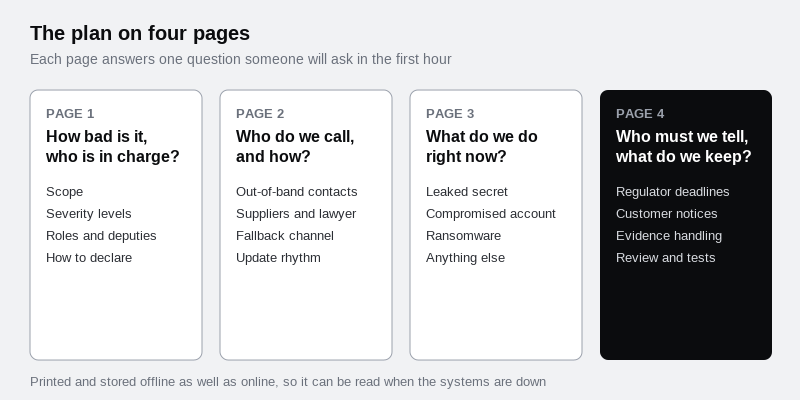
Copy this template into the document and fill it in as you go through the next steps:
INCIDENT RESPONSE PLAN · <Company> · version <n> · last reviewed <date>
Owner: <name> · Next review: <date, at most 6 months away>
Copies: <link to online copy> · printed copy in <place> · PDF on <phones of lead and deputy>

PAGE 1 · HOW BAD IS IT, WHO IS IN CHARGE
Scope: systems and data this plan covers
How to declare an incident: <one sentence: who may declare, where>
Severity levels: SEV-1 / SEV-2 / SEV-3 with examples and update times
Roles: incident lead, deputy, communications, scribe (name + deputy each)

PAGE 2 · WHO DO WE CALL, AND HOW
Out-of-band channel: <tool and group name> · fallback: phone call tree
Contact table: name, role, personal phone, personal email, time zone
Outside contacts: hosting, domain registrar, payment provider, bank,
  lawyer, insurer, regulator portal

PAGE 3 · WHAT DO WE DO RIGHT NOW
First-hour checklist: leaked secret
First-hour checklist: compromised account
First-hour checklist: ransomware
Anything else: the five generic first steps

PAGE 4 · WHO MUST WE TELL, WHAT DO WE KEEP
Regulators and deadlines, by country
Customer notice: who approves, template location
Evidence rules: what to keep, where, who touched it
After the incident: review meeting within 5 working days
Change log: date, change, reason
Fill in the scope line now. List the systems from your prerequisites and the kinds of personal data each one holds. Tamarind Ledger's reads: "Production app on our cloud host, the customer database (names, phone numbers, shop sales records), Google Workspace email, the code hosting organisation, the payment provider account and staff laptops."
Check it worked
Your document has a header with an owner and a next-review date, four page headings, and a scope line that names every system on your list. If any system on your list is missing from the scope, add it now.
Step 2 · Define three severity levels with real examples
Severity decides how fast people move and who must be woken up. Large organisations use four or five levels; a small team only needs three, because the difference between them must be obvious to someone who has been woken at 2am.
Write each level as a short sentence plus two or three examples from your own systems. Examples matter more than definitions: people match what they see to the nearest example.
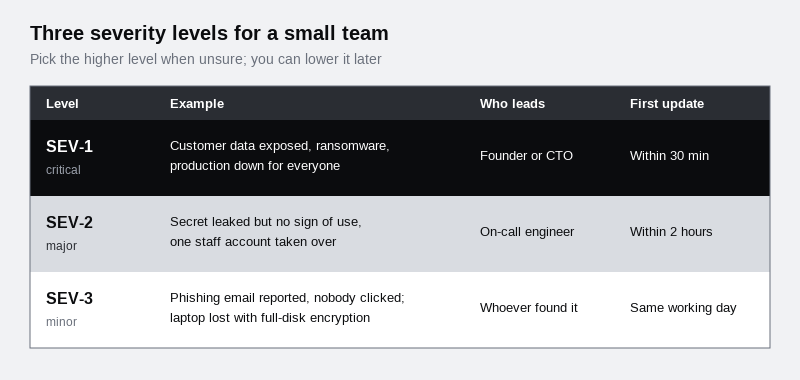
Add three rules under the table:
- When unsure, pick the higher level. Lowering a level after an hour costs nothing; raising it after a day can cost you a regulator deadline.
- Anyone may declare an incident. Write where they declare it, for example "post SEV and one line in the incident group, then phone the lead". A junior developer should never wait for permission to raise an alarm.
- Personal data at risk is at least SEV-2. Any incident where customer or staff personal data may have been seen, copied, changed or lost starts the regulator clock in Step 6, so it can never be SEV-3.
Check it worked
Read each of your examples aloud to a colleague and ask them which level it is without showing them the table. If they disagree with your table on any example, rewrite that example or the level's sentence until the answer is obvious.
Step 3 · Name who leads and who talks
In a small team the same three people end up doing everything at once, which is how nobody ends up writing down the timeline. Give four roles to named people, each with a deputy. One person can hold two roles in a team of five, but never lead and scribe together.
- Incident lead. Makes decisions, sets the severity, decides when the incident is over. Does not do the hands-on fixing for a SEV-1; they keep the overall picture.
- Communications. The only person who speaks to customers, the press and social media. Drafts regulator notices with the lead. Everyone else says "we are looking into it, [name] will update you".
- Scribe. Keeps a timeline with times and time zones: what was seen, who did what, what was decided and why. This timeline becomes your evidence and your regulator notice.
- Fixers. Everyone else with access, working on the tasks the lead gives them.
Write a hand-off rule: the lead role passes to the deputy if the lead cannot be reached within 15 minutes, or after 8 hours on a long incident, with a two-minute spoken hand-over that the scribe records.
Tamarind Ledger: lead Adaeze (CTO), deputy Tunde; communications Ngozi (founder), deputy Femi; scribe Chiamaka, deputy whoever is not fixing.
Check it worked
Every role on page 1 has a person and a deputy, and no person is both lead and scribe. Count the names: if one person appears in more than two places, give one of their roles to someone else.
Step 4 · Build an out-of-band contact list
During an incident your normal tools may be the thing that is broken or watched. If an attacker controls a staff email account, emailing "we think Tunde's account is compromised" tells the attacker. So page 2 is about reaching people without the systems in your scope.
Choose one out-of-band channel that does not use your company sign-in, for example a group in a messaging app on personal phones, and a fallback that needs no internet: a phone call tree where each person calls the next.
Then build a contact table. For each person in Step 3: name, role, personal mobile number, personal email, time zone, and a second number if they have one. Below it, list outside contacts with the support route that works fastest, not the marketing page: your cloud host, domain registrar, code hosting, email provider, payment provider, bank, a lawyer who handles data protection, your insurer if you have cyber cover, and each regulator's breach-reporting page.
A note for teams with people on prepaid data or in areas with patchy coverage: write down which people need an SMS or a voice call rather than a data message, and agree that the company pays for data top-ups during an incident. Make sure the PDF of the plan is saved on the phones of the lead and deputy, so they can read it offline.
Write the update rhythm under the table: for a SEV-1, a short internal update every 30 minutes, even if it is "no change"; for a SEV-2, every 2 hours.
Check it worked
Turn off Wi-Fi on your laptop, close your work email and chat, and try to reach the deputy lead using only page 2 and your phone. If you cannot, the missing piece (a number, a group invite, an offline copy) is what to add.
Step 5 · Write first-hour checklists for three common incidents
Page 3 holds short checklists, each fitting in about a third of a page. They cover the first hour only: contain the damage, keep evidence, start the timeline. The detailed technical fix lives in separate runbooks such as rotating a leaked secret.
Write each item as an action with an owner. Tamarind Ledger's three:
Leaked secret (API key, database password or token found somewhere public):
- Scribe: note when and where it was found, and save a copy or screenshot of where it appeared.
- Lead: set severity. SEV-2 by default, SEV-1 if logs show it was used.
- Fixer: create a replacement secret and switch the app to it, then revoke the old one.
- Fixer: check the provider's logs for use of the old secret since it was first exposed, not only since it was found.
- Fixer: remove it from the public place, and treat it as leaked even after removal, since copies may exist.
Compromised account (a staff email, code hosting or cloud account used by someone else):
- Lead: tell the owner of the account by phone, not by the affected account.
- Fixer: before changing anything, export the sign-in and activity log, and screenshot the devices, app passwords, forwarding rules and recovery details. If the attacker is still active, contain first and have the scribe record what was removed.
- Fixer: reset the password and sign out all sessions; remove unknown devices, app passwords, forwarding rules and recovery details.
- Fixer: turn on or re-register two-factor sign-in with a method the attacker cannot reach.
- Lead: list what the account could reach, and check those systems for new users, keys or changed settings.
Ransomware (files encrypted, ransom note, systems refusing to open):
- Anyone: disconnect affected machines from the network (unplug the cable, turn off Wi-Fi). Do not switch them off unless you cannot disconnect them; memory can hold evidence.
- Lead: declare SEV-1 and move all talk to the out-of-band channel.
- Fixer: check that backups are intact and stored where the affected machines could not reach them. Do not connect backup drives to an affected machine.
- Communications: call the lawyer and insurer before anyone talks to the attacker or pays anything.
- Scribe: photograph the ransom note and the screens; record what was disconnected and when.
Add a fourth short block, "Anything else", with five generic steps, each with an owner:
- Anyone: declare an incident to the lead.
- Lead: set a severity.
- Scribe: start the timeline.
- Fixer: contain the damage without destroying evidence.
- Lead: decide by the end of the hour whether personal data is involved.
Check it worked
Each checklist has five items or fewer, every item starts with a role, and none needs a system that the incident itself may have taken down. Hand page 3 to someone who did not write it and ask them to point to the one item they would do first for each incident; they should all point to item 1.
Step 6 · Decide when to tell regulators and customers
Page 4 starts with the deadlines that apply to you. They depend on where your customers and staff are, not only where your company is registered. Check the current law for every country you serve; the two below are the ones Tamarind Ledger needs, as written in the sources cited for this tutorial on 26 November 2026. This is not legal advice, which is why the lawyer is on page 2.
EU and EEA customers: GDPR. Article 33 asks the controller to notify the national supervisory authority without undue delay and, where feasible, within 72 hours of becoming aware of a personal data breach, unless the breach is unlikely to result in a risk to people. If you notify later, you give the reasons for the delay. You may send information in phases if you do not have it all yet. Article 34 adds that you tell the affected people without undue delay when the risk to them is high. Every breach must be documented, even ones you do not report.
Nigerian customers: the Nigeria Data Protection Act 2023. Section 40 asks the data controller to notify the Nigeria Data Protection Commission (NDPC) within 72 hours of becoming aware of a breach that is likely to result in a risk to people's rights and freedoms, and to tell the affected people immediately when the risk is high. The NDPC's General Application and Implementation Directive (GAID), issued on 20 March 2025 and in effect from 19 September 2025, sets out how the Act is applied. Read the GAID's breach section yourself and copy the current reporting route into your plan.
Write these lines on page 4:
- Who decides. The lead and communications decide together whether a breach is reportable, with the lawyer if there is any doubt. Write down the reasoning either way; a decision not to report is also a record you keep.
- When the clock starts. The moment someone in the team becomes aware, which is the time the scribe writes first in the timeline.
- What a first notice contains. What happened, what data and roughly how many people, likely consequences, what you have done, and a contact name. Keep a draft template in the same folder as the plan.
- If you process data for other companies. If you are the processor rather than the controller, your duty under both laws is to tell your customer, the controller, without delay, so they can meet their own deadline. Add those customers' security contacts to page 2.
Check it worked
Page 4 lists every country where you have customers or staff, with the regulator's name, the deadline and a link to its reporting page, each dated the day you checked it. For any country you serve that has no line yet, the gap is visible as an empty row, not missing.
Step 7 · Write down how to handle evidence
Evidence lets you find out what happened, prove what you did, and support an insurance claim or a police report. It is easily destroyed by well-meant fixing: re-imaging a server, deleting a suspicious user, or clearing logs to save space.
Write a short evidence block on page 4:
- Before you change it, capture it. Export logs, take screenshots with the clock visible, and copy suspicious files before deleting, rebuilding or wiping anything. Where the lead decides containment must come first, the scribe records what was lost.
- Keep logs longer during an incident. Note where each system's logs live and how long they are kept by default, so a fixer can extend retention on day one.
- Store evidence in one place, separate from the affected systems, with access limited to the lead and scribe.
- Record the chain of custody. For each item: what it is, where it came from, who collected it, when, and a checksum if it is a file. A simple table in the evidence folder is enough.
- Use UTC in the timeline, with local time in brackets, so entries from Lagos, Dublin and a cloud provider's logs line up.
For servers, link the detailed procedure rather than writing it here: collecting evidence from a Linux server covers what to copy and in what order.
Finish page 4 with the after-incident rule: a blameless review meeting within five working days of any SEV-1 or SEV-2, which produces a short list of changes, each with an owner and a date, added to the plan's change log.
Check it worked
The evidence block names a storage location that is outside your scope list from Step 1, and the chain-of-custody table exists as an empty file in that location, ready to fill in. The change log at the end of page 4 has its first entry: today's date and "plan created".
Step 8 · Test the plan with a 30-minute tabletop exercise
A plan nobody has tested will fail at the first missing phone number. A tabletop exercise finds those gaps cheaply: the team sits together, a facilitator reads a made-up incident in stages, and the team answers using only the printed plan.
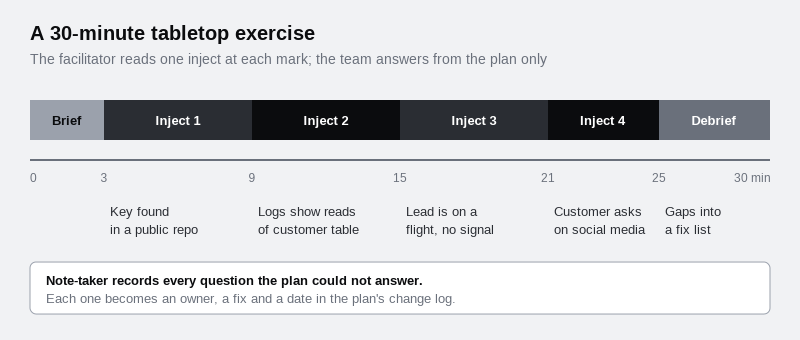
Pick a facilitator who did not write the plan, and a note-taker. Invite the people named in Step 3. Print the plan. Then run it:
- Minutes 0 to 3, brief. "This is practice, nothing is really happening. Use only the printed plan. Say what you would do and who you would contact."
- Minute 3, inject 1. "It is Friday at 18:40. A developer sees our production database password in a public repository, committed eleven days ago." Ask: what severity, who leads, what is the first action? Tests page 1 and page 3.
- Minute 9, inject 2. "The database logs show reads of the customers table from an unknown address four days ago." Ask: does the severity change, does the regulator clock start, and at what time? Tests page 4.
- Minute 15, inject 3. "The incident lead is on a flight and cannot be reached for six hours." Ask: who takes over, and how do they find out? Tests the hand-off rule and page 2.
- Minute 21, inject 4. "A customer posts on social media asking whether their sales records have leaked." Ask: who answers, and what do they say? Tests the communications role.
- Minutes 25 to 30, debrief. Read back the note-taker's list of questions the plan could not answer. Give each one an owner and a date.
Run a new scenario at least twice a year, and after any change of staff in a named role. Swap the scenario each time: a compromised account or ransomware next.
Check it worked
You have a list of gaps from the exercise, each with an owner and a date, and each one is in the change log at the end of page 4. Update the "last reviewed" and "next review" dates in the header. If the exercise found no gaps at all, run it again with a harder inject; a first exercise nearly always finds at least one missing contact or unclear role.
Next steps
Your plan is only as good as the runbooks it points to. Practise the hands-on parts next:
- Find the cause of an outage in server logs helps you build the timeline your scribe needs.
Related tutorials
- Threat model a feature with a data flow diagram and STRIDEYou will have a one-page threat model of a mobile money payment feature, with a data flow diagram, trust boundaries, a STRIDE threat list rated for likelihood and impact, tickets with owners for the top risks, and a rule for when to look again.
- Audit Node.js dependencies with npm audit and fix them safelyYou will read an npm audit report for a project with three vulnerable dependencies, fix each one the right way (a compatible update, a deliberate major upgrade and an override), gate CI on what ships, keep a dated exceptions file and check registry signatures.
- How to Set Up a UFW Firewall on Ubuntu 26.04You will turn on UFW with a deny-by-default policy, allow SSH before you enable it so you stay connected, open only the web ports your server needs, and learn to list, remove and limit rules.
Need this done for you?
Padding does this work for growing companies, from the first diagnosis to a system that keeps working.
Get new tutorials