Security and hardening · Intermediate · 18 min
Threat model a feature with a data flow diagram and STRIDE
By Padding · Updated 18 Nov 2026
Whiteboard, paper or any diagramming tool, optionally OWASP Threat Dragon 2.6 · November 2026
You will have a one-page threat model of a mobile money payment feature, with a data flow diagram, trust boundaries, a STRIDE threat list rated for likelihood and impact, tickets with owners for the top risks, and a rule for when to look again.
On this page
A threat model answers four plain questions, as the Threat Modeling Manifesto puts them: what are we working on, what can go wrong, what are we going to do about it, and did we do a good enough job. You do not need a security team or special software to answer them. You need the people who are building the feature, a drawing of how data moves through it, and an hour with a clear agenda.
This tutorial gives you that hour, using one running example: a mobile money checkout. A customer taps "Pay" in your app, your server asks a provider such as M-Pesa or MTN MoMo to charge their phone, the customer approves with their PIN, and the provider tells your server how it went. Money moves, phone numbers are stored, and outside parties call into your system, so it is a good feature to practise on. If you built it with Accept mobile money in an app through your own server, you can model your own code. If not, follow the example and then repeat the steps on a feature of your own.
The method is the one most teams start with. You draw a data flow diagram, mark where trust changes, and walk each part through STRIDE, a list of six kinds of threat that Microsoft introduced:
- Spoofing: pretending to be someone or something else. It breaks authentication.
- Tampering: changing data you should not be able to change. It breaks integrity.
- Repudiation: doing something and being able to deny it later, because nothing recorded it. It breaks accountability.
- Information disclosure: reading data you should not see. It breaks confidentiality.
- Denial of service: stopping the system working for others. It breaks availability.
- Elevation of privilege: getting more access than you were given. It breaks authorisation.
By the end you will have one page: a diagram, a rated threat list, tickets for the top risks and a note saying when the model must be looked at again.
Step 1 · Book the hour and set the scope
Pick one feature, not the whole product. "Mobile money checkout, from the customer tapping Pay to the order showing as paid" is a good scope. "The payment system" is too big for an hour, and "the callback endpoint" is too small to show how the parts interact.
Invite the people who know the feature: the developer building the server side, whoever owns the app, and someone who understands the business side (refunds, support, what a lost payment costs). Two to five people is right. One person runs the session and one writes things down; they can be the same person in a small team.
Use this agenda and keep to the times:
- 0 to 10 minutes: agree the scope and what "done" looks like for today
- 10 to 25 minutes: draw the data flow diagram and its trust boundaries
- 25 to 45 minutes: walk the diagram through STRIDE and list threats
- 45 to 55 minutes: rate each threat for likelihood and impact
- 55 to 60 minutes: choose the top risks, give each an owner, set the revisit rule
Start a shared document with a title, the date, the names of the people in the room and a one-sentence scope. Everything else from the hour goes into this document.
Check it worked
Your document has a title, today's date, the attendees and a scope sentence that names where the feature starts and where it ends. If anyone in the room describes the scope differently from the sentence, fix the sentence now, before the diagram.
Step 2 · Draw the data flow diagram
A data flow diagram (DFD) shows how data moves, not how the code is organised. It uses four shapes:
- External entity (a box): a person or system you do not control, such as the customer's app or the provider.
- Process (a circle): code you run that changes or routes data, such as your payment API.
- Data store (two parallel lines): where data rests, such as a database, a queue or a log file.
- Data flow (an arrow): data moving from one element to another. Label every arrow with a number and what it carries.
Draw the main path first, then add the less obvious ones: the callback from the provider, the status polling from the app, and the support staff who look up orders and issue refunds. Teams often forget staff and admin paths, and those paths often hold the most power.
Treat the mobile app as an external entity, even though your team wrote it. Once it is on a customer's phone, anyone can inspect it, change it or replace it with a script that sends the same requests. On a cheap Android phone on a slow prepaid connection, the app may also send the same request twice, which matters later.
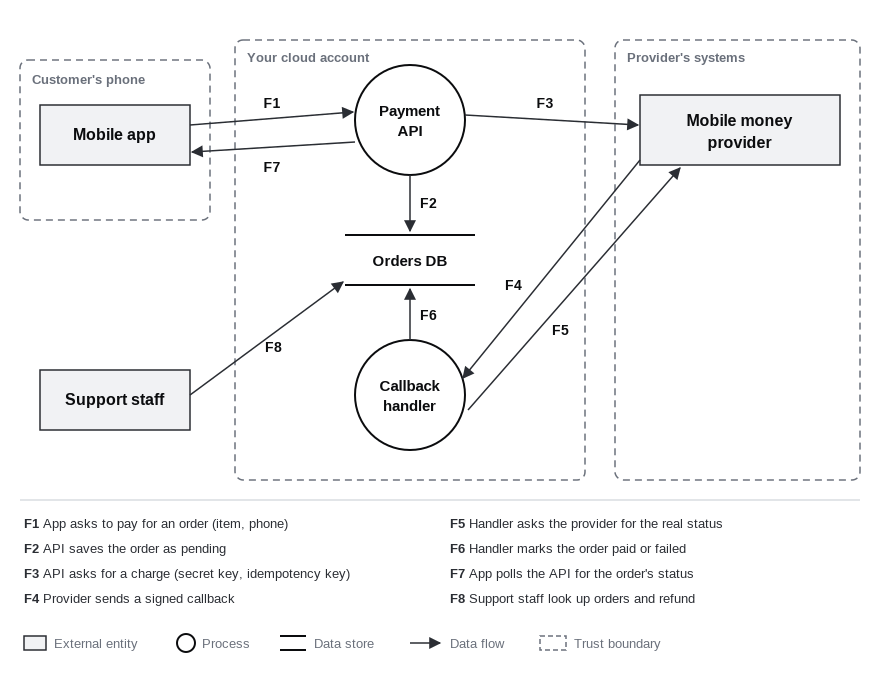
For each flow, write one line in your document saying what it carries. For the example:
- F1: item ID and phone number from the app, with the customer's session token
- F3: the charge request, sent with your provider secret key and an idempotency key
- F4: the provider's callback, with its signature header and the provider's reference
- F8: support staff reading orders and issuing refunds
Check it worked
Every arrow on your diagram has a number, and your document has one line per number saying what data it carries. Ask the developer: "Is there any way data gets into or out of this feature that is not on the drawing?" If they name one (a nightly export, an error-reporting service, a webhook to a chat channel), add it.
Step 3 · Mark the trust boundaries
A trust boundary is a line where the level of trust changes: data that crosses it comes from, or goes to, something with different owners, permissions or exposure. Draw boundaries as dashed lines or dashed boxes around groups of elements.
In the example there are three: the customer's phone, your cloud account and the provider's systems. Support staff sit outside your cloud account too, because they reach it from office laptops and phones.
Now list every flow that crosses a boundary. In the example that is F1, F3, F4, F5, F7 and F8. Only F2 and F6 stay inside your cloud account. The crossing flows are where you will find most threats, because each is a point where you receive something you did not create, or send something to a place you do not control.
Look at F8 while you are here. It goes straight from support staff into the database, with no process in between. That means nothing checks what staff are allowed to do. A diagram that shows this plainly is already paying for itself; you will rate it in a later step.
Check it worked
Your diagram has dashed boundaries, and your document has a list of the flows that cross them. Count them: if no flow crosses a boundary, the boundaries are drawn too wide; if every flow crosses one, check you have not boxed each element separately.
Step 4 · Walk each element through STRIDE
Not every STRIDE letter applies to every kind of element. A data flow cannot be "elevated", and an external entity is not something you can tamper with from your side. The usual shortcut, called STRIDE per element, narrows the questions:
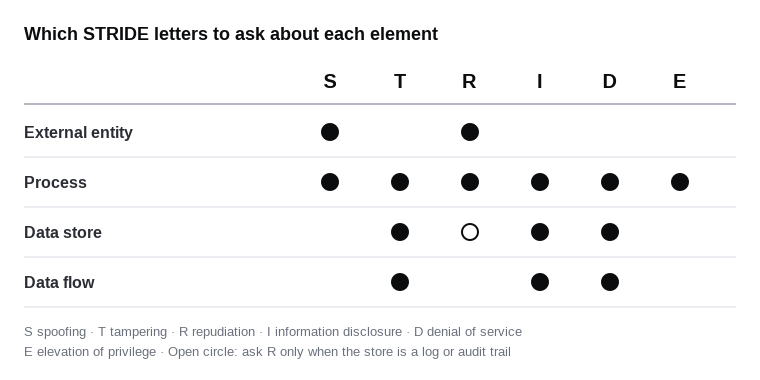
Go element by element. For each one, ask the questions its row allows, phrased for this feature. "Can someone pretend to be the provider when calling the callback handler?" is spoofing for F4. "Can someone change the amount on F1?" is tampering. Write every answer as a threat in the form "who could do what, and what happens":
- T1 (spoofing, F4): someone posts a fake "payment succeeded" callback to the callback handler, and an unpaid order is marked paid.
- T2 (tampering, F1): someone edits the request from the app to send a lower amount, and is charged less than the price.
- T3 (repudiation, support staff and F8): a staff member issues a refund and later denies it, and nothing shows who did it.
- T4 (information disclosure, orders database and logs): customer phone numbers and names end up in plain-text logs or an unencrypted backup that more people can read.
- T5 (denial of service, payment API via F1): a script sends many charge requests for someone else's number, flooding their phone with PIN prompts and getting your provider account throttled.
- T6 (elevation of privilege, F8): because support staff reach the database directly, anyone with that access can set an order to paid.
- T7 (tampering, F4): a genuine, correctly signed callback from an old order is sent again and matched to a new order.
- T8 (spoofing, mobile app): an attacker who has taken the customer's number through a SIM swap receives the login code and uses their account.
- T9 (information disclosure, payment API and F3): the provider secret key is shipped inside the app or printed in logs, and anyone who finds it can call the provider as you.
- T10 (denial of service, F7): thousands of apps poll for status every second on flaky networks and overload the API and database.
Not every threat comes from an attacker. A double charge caused by a phone retrying on a weak signal is a tampering-shaped problem with an innocent cause, and it hurts the customer just as much. Write those down too.
If you use OWASP Threat Dragon, you can draw the same diagram there and record threats against each element; its rule engine can suggest STRIDE threats for the shapes you draw. Treat suggestions, and any list an AI assistant produces, as a starting point: a person in the room checks each one against your actual diagram, deletes those that do not apply and adds the ones only your team would know about.
Check it worked
Every element on your diagram has at least one threat or a written "considered, none found" against it. Each threat names an element or flow number and says what happens if it occurs. Read T-numbers aloud: if anyone cannot point to where it happens on the diagram, rewrite it until they can.
Step 5 · Rate each threat for likelihood and impact
You will not fix everything at once, so rank the list. Use two three-point scales and agree what each number means before you start, so ratings do not turn into debates:
- Likelihood 1: needs inside access or unusual skill.
- Likelihood 2: a motivated outsider could do it with public tools, or it happens by accident now and then.
- Likelihood 3: anyone with the app and a free proxy tool could do it, or it will happen by accident every week.
- Impact 1: annoying, no money or personal data lost.
- Impact 2: one customer loses money or data, or the feature is down for hours.
- Impact 3: money lost at scale, many customers' data exposed, or a regulator gets involved.
Multiply the two for a score from 1 to 9 and place each threat on a grid. Rate as a group: each person says a number for likelihood, then for impact, and the discussion is about the gaps, not the averages.
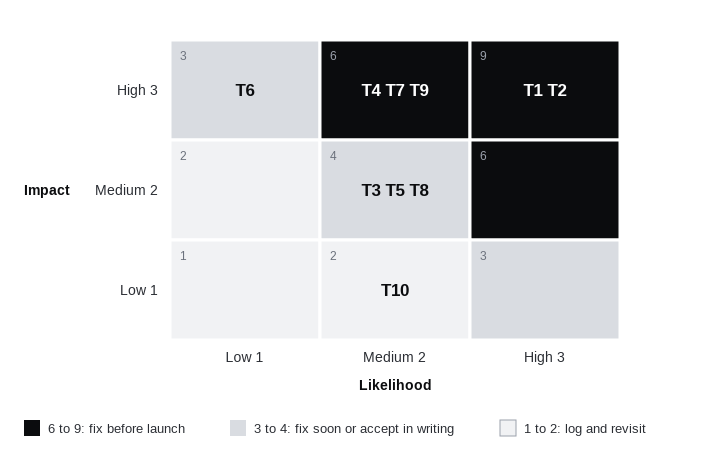
In the example, T1 and T2 score 9: forging a callback or editing an amount is easy and loses real money. T4, T7 and T9 score 6. T6 scores only 3 because few people have database access today, but its impact is high, so note why the likelihood is low; if more staff are hired, that rating changes.
The numbers are a way to agree an order, not a measurement. If the room agrees a 4 should go before a 6, write down why and move it.
Check it worked
Every threat in your document has a likelihood, an impact and a score, and the list is sorted by score. Anyone who reads the document can see which threats you will handle first and the one-line reason for any you moved out of score order.
Step 6 · Turn the top risks into tickets with owners
A threat list that stays in a document changes nothing. Every threat scoring 6 or more becomes a ticket in the tool your team already uses, and every ticket gets one named owner, not a team. Use the same shape for each:
Title:    [Threat model] T1 Forged payment callback marks orders paid
Element:  F4 provider callback -> callback handler
Threat:   Anyone can POST a "success" callback; the handler trusts it.
Score:    Likelihood 3 x Impact 3 = 9
Fix:      Verify the provider signature on the raw body; then ask the
          provider for the charge status (F5) and only mark the order
          paid if the provider says so and the amount and reference match.
Done when: A callback with a bad signature is rejected, and a correctly
          signed callback for an unpaid charge does not mark the order paid.
Owner:    (one person's name)
Due:      Before launch
For the example, the fixes for the other top risks are short:
- T2: the server looks up the price from the item ID; it never accepts an amount from the app.
- T4: mask phone numbers in logs (show the last three digits only) and restrict who can read backups.
- T7: store the provider's reference on each order, ignore callbacks whose reference does not match, and ignore further callbacks once an order is settled.
- T9: keep the provider key only on the server, in a secrets store, and rotate it if it has ever been in an app build or a log.
Threats scoring 3 or 4 get a ticket too, or a written decision to accept the risk for now, signed by the person who owns the feature. T6 in the example is worth fixing early anyway: put an admin process with role checks and an audit log between staff and the database, which also closes T3.
Check it worked
Every threat scoring 6 or more has a ticket link next to it in your document, each ticket has one named owner and a "done when" line someone could test, and every threat scoring 3 or 4 has either a ticket or a dated acceptance note with a name on it.
Step 7 · Record the result and set when to look again
Finish the document with three short sections:
- Decisions: which risks you accepted, by whom, and why.
- Assumptions: things you relied on that could change, for example "only two people have database access" or "the provider signs every callback".
- Revisit when: the events that reopen the model.
For the example, the revisit list is:
- a new payment provider or a new country is added
- a new flow appears on the diagram (a refund API, a merchant dashboard, USSD payments without the app)
- any assumption above stops being true
- an incident or a near miss involving payments
- six months pass without any of the above
The Manifesto's point here is that a threat model follows the design as it changes. When a trigger fires, the team does not start again: open this document, update the diagram, walk only the new or changed elements through STRIDE, and re-rate. That usually takes twenty minutes, not an hour.
Save the diagram next to the document (as an image, or as a Threat Dragon model file if you used it), and link the document from the feature's design notes or repository README so the next person finds it.
Check it worked
Your document ends with Decisions, Assumptions and Revisit when sections, each with at least one entry, and the document is linked from where the feature's design lives. Ask someone who was not in the room to read it: they can say what the feature does, what the top two risks are, who owns each fix and what would make the team look again.
Next steps
Practise spotting the same kinds of flaw in running code with Set up a deliberately vulnerable app to practise fixes. Build the fix for T1 with Verify webhook signatures in Node, and see the whole payment server the example models in Accept mobile money in an app through your own server. When a risk you accepted turns into a real event, Write an incident response plan for a small team gives you the next document to have ready.
Related tutorials
- Write an incident response plan for a small teamYou will have a four-page incident response plan for a team of under 20 people, with severity levels, named roles, an out-of-band contact list, first-hour checklists for three common incidents, regulator deadlines and evidence rules, tested once in a 30-minute tabletop exercise.
- Audit Node.js dependencies with npm audit and fix them safelyYou will read an npm audit report for a project with three vulnerable dependencies, fix each one the right way (a compatible update, a deliberate major upgrade and an override), gate CI on what ships, keep a dated exceptions file and check registry signatures.
- How to Set Up a UFW Firewall on Ubuntu 26.04You will turn on UFW with a deny-by-default policy, allow SSH before you enable it so you stay connected, open only the web ports your server needs, and learn to list, remove and limit rules.
Need this done for you?
Padding does this work for growing companies, from the first diagnosis to a system that keeps working.
Get new tutorials