Containers and Kubernetes · Advanced · 25 min
Control who can do what in Kubernetes with RBAC
By Padding · Updated 18 Nov 2026
Ubuntu 26.04 · Kubernetes 1.37 on kind 0.33 · kubectl 1.37.3
You will give developers read-only access to one namespace, give a CI ServiceAccount a short-lived token that can only patch Deployments there, audit both with kubectl auth can-i, and see how the bind, escalate and impersonate verbs hand out more than they appear to.
On this page
Out of the box, a kind cluster has one user, you, and you can do anything. That is fine on a laptop. The moment a second person or a CI pipeline needs access, "anything" is the wrong answer: a developer who only needs to read logs should not be able to delete a Deployment, and a pipeline that rolls out a new image should not be able to read Secrets.
Kubernetes answers "who can do what, where" with role-based access control (RBAC). It has three parts:
- Subjects are who is asking: a user, a group or a ServiceAccount. Kubernetes stores no user accounts. A user name and groups come from whatever authenticated the request, such as the CN and O fields of a client certificate or the claims in an OIDC token. ServiceAccounts are real objects, made for workloads and automation.
- Roles list what is allowed: rules made of API groups, resources and verbs (
get,list,watch,create,patch,deleteand a few special ones). A Role lives in one namespace. A ClusterRole is not tied to a namespace. - Bindings join the two. A RoleBinding grants a role inside one namespace. A ClusterRoleBinding grants it across the whole cluster.
Rules only add permissions. There is no "deny" rule, so anything no binding grants is refused. That makes namespaces the natural unit of access: you grant per namespace and widen only where you must.
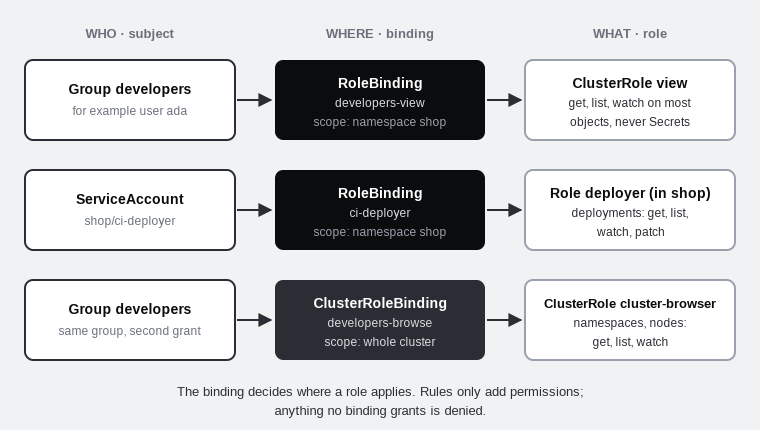
You build exactly the access in that diagram, in a namespace called shop, and check every grant before and after with kubectl auth can-i. The kind node image is several hundred megabytes, and the two nginx images and jq add a few tens more, so run this on a connection you trust (or pull kindest/node:v1.37.0 with docker pull first). The RBAC commands themselves talk only to the cluster on your own machine.
Step 1 · Create a practice cluster and namespace
Create a one-node cluster with kind. If kind or kubectl is not installed yet, follow Run your first Kubernetes cluster locally with kind first:
kind create cluster --name rbac-demo --image kindest/node:v1.37.0 --wait 120skind names the context kind-rbac-demo and makes it current. You also need jq later to filter JSON from the API:
sudo apt update
sudo apt install -y jq
On macOS, use brew install jq instead.
Make a folder for the files in this tutorial, move into it, and run everything else from there in the same terminal. Then create the namespace and a Deployment for the pipeline to update later:
mkdir -p ~/rbac-demo
cd ~/rbac-demo
kubectl config current-context
kubectl create namespace shop
kubectl -n shop create deployment web --image=nginx:1.30.7-alpine
kubectl create deployment names the container after the image, so the one container in web is called nginx.
Check it worked
kubectl auth whoami
kubectl auth can-i '*' '*'
whoami shows the user name kubernetes-admin and its groups. One of them is an admin group bound to the cluster-admin ClusterRole; on kind that is kubeadm:cluster-admins. can-i '*' '*' asks "may I do every verb on every resource?" and answers yes. That is the access you are about to stop handing out.
Step 2 · Read the built-in roles before writing your own
Every cluster ships four ClusterRoles meant for people:
view: read most objects in a namespace. It leaves out Secrets, because reading a ServiceAccount's Secret would mean borrowing that account's access.edit:viewplus create, change and delete most objects, including Secrets. It leaves out Roles and RoleBindings.admin:editplus Roles and RoleBindings inside the namespace, so an admin can hand out access there.cluster-admin: everything, everywhere.
kubectl get clusterroles view edit admin cluster-adminview, edit and admin are aggregated: they hold no rules of their own in the source. A controller copies in the rules of every ClusterRole carrying a matching label. Look at the selector on view and the roles that feed it:
kubectl get clusterrole view -o jsonpath='{.aggregationRule.clusterRoleSelectors[0].matchLabels}'; echo
kubectl get clusterroles -l rbac.authorization.k8s.io/aggregate-to-view=true
The selector is rbac.authorization.k8s.io/aggregate-to-view: "true", and the list includes system:aggregate-to-view. Tools that install their own resources, such as cert-manager or a database operator, add labelled ClusterRoles so their objects show up in view too. That is useful, and it also means the built-in roles grow as you install things.
Check it worked
kubectl get clusterrole view -o jsonpath='{range .rules[*]}{.verbs}{"\n"}{end}' | sort -uYou see one line, ["get","list","watch"]: every rule in view is read-only.
Step 3 · Give developers read-only access to one namespace
Bind the built-in view role to a group called developers, in shop only. Binding a ClusterRole with a RoleBinding is the normal way to reuse a role: the ClusterRole says what, and the RoleBinding limits it to its own namespace.
cat > developers-view.yaml <<'EOF'
apiVersion: rbac.authorization.k8s.io/v1
kind: RoleBinding
metadata:
  name: developers-view
  namespace: shop
subjects:
  - kind: Group
    name: developers
    apiGroup: rbac.authorization.k8s.io
roleRef:
  kind: ClusterRole
  name: view
  apiGroup: rbac.authorization.k8s.io
EOF
kubectl apply -f developers-view.yaml
Binding a group rather than named people means you change who is a developer in one place, your identity provider or the O= field when you issue certificates, and never touch the cluster. roleRef cannot be changed after the binding is created; to point a binding at a different role, delete it and create it again.
To test the binding you do not need Ada's credentials. As an admin you can impersonate any user and group with --as and --as-group, and kubectl auth can-i answers for them. Asking one question at a time gets slow, so write a small script that prints a grid of answers for one namespace:
cat > can.sh <<'EOF'
#!/usr/bin/env bash
# Print a yes/no grid of what a subject may do in one namespace.
# Usage: ./can.sh <namespace> [--as=... --as-group=...]
ns="$1"
shift
verbs="get list create patch delete"
printf '%-14s' "RESOURCE"
for v in $verbs; do printf '%-8s' "$v"; done
echo
for r in pods deployments.apps secrets rolebindings.rbac.authorization.k8s.io; do
  printf '%-14s' "${r%%.*}"
  for v in $verbs; do
    if kubectl auth can-i "$v" "$r" -n "$ns" "$@" --quiet; then
      printf '%-8s' yes
    else
      printf '%-8s' no
    fi
  done
  echo
done
EOF
chmod +x can.sh
--quiet makes can-i print nothing and answer with its exit code only, 0 for yes and 1 for no, which the if turns into a word.
Check it worked
./can.sh shop --as=ada --as-group=developersRESOURCE get list create patch delete
pods yes yes no no no
deployments yes yes no no no
secrets no no no no no
rolebindings no no no no noAda can read pods and Deployments in shop and change nothing. Run the same grid against default with ./can.sh default --as=ada --as-group=developers and every answer is no, because the binding lives in shop.
Step 4 · Make a deploy-only ServiceAccount for CI
A pipeline that ships new images needs to change the image on a Deployment and watch it roll out. That is get, list, watch and patch on deployments in the apps API group, and nothing else. No built-in role is that small, so write a Role, a ServiceAccount and the binding between them in one file:
cat > ci-deployer.yaml <<'EOF'
apiVersion: v1
kind: ServiceAccount
metadata:
  name: ci-deployer
  namespace: shop
automountServiceAccountToken: false
---
apiVersion: rbac.authorization.k8s.io/v1
kind: Role
metadata:
  name: deployer
  namespace: shop
rules:
  - apiGroups: ["apps"]
    resources: ["deployments"]
    verbs: ["get", "list", "watch", "patch"]
---
apiVersion: rbac.authorization.k8s.io/v1
kind: RoleBinding
metadata:
  name: ci-deployer
  namespace: shop
subjects:
  - kind: ServiceAccount
    name: ci-deployer
    namespace: shop
roleRef:
  kind: Role
  name: deployer
  apiGroup: rbac.authorization.k8s.io
EOF
kubectl apply -f ci-deployer.yaml
Three details matter here:
apiGroups: ["apps"]is required. Deployments are not in the core group (""), and a rule with the wrong group silently matches nothing.automountServiceAccountToken: falsestops Kubernetes from putting this account's token into any pod that names it. The account is for a pipeline outside the cluster, so no pod should carry its credentials.- You could add
resourceNames: ["web"]to limitgetandpatchto one Deployment. A rule withresourceNamesonly matches requests that name one object, so a plainlistorwatchwould then be refused. Keeplistandwatchin a second rule withoutresourceNames.
A ServiceAccount's user name is system:serviceaccount:<namespace>:<name>, which is what you impersonate to test it.
Check it worked
./can.sh shop --as=system:serviceaccount:shop:ci-deployerRESOURCE get list create patch delete
pods no no no no no
deployments yes yes no yes no
secrets no no no no no
rolebindings no no no no noThe pipeline can read and patch Deployments and nothing else: no deleting, no pods and no Secrets.
Step 5 · Give CI a short-lived token and use it
Impersonation proves the rules. Now prove them with the account's own credentials. kubectl create token asks the API server for a signed token for a ServiceAccount, with an expiry you choose. The shortest the API accepts is 10 minutes; give this one 15. The commands run inside ( umask 077; ... ) so both files are private from the moment they exist:
(
  umask 077
  kubectl create token ci-deployer -n shop --duration=15m -o json > token-request.json
  jq -r '.status.token' token-request.json > ci.token
)
jq -r '.status.expirationTimestamp' token-request.json
rm token-request.json
The last jq prints the expiry time, 15 minutes from now, in UTC. No Secret object holds this token, and nothing renews it. After that time it stops working on its own.
Build a kubeconfig for the pipeline. It reads the API server address and CA certificate from your current context, and points at the token file with tokenFile, so the token is never typed on a command line or stored in the kubeconfig:
SERVER="$(kubectl config view --minify -o jsonpath='{.clusters[0].cluster.server}')"
kubectl config view --minify --raw -o jsonpath='{.clusters[0].cluster.certificate-authority-data}' | base64 -d > ca.crt
(
  umask 077
  cat > ci.kubeconfig <<EOF
apiVersion: v1
kind: Config
clusters:
  - name: rbac-demo
    cluster:
      server: ${SERVER}
      certificate-authority: ${HOME}/rbac-demo/ca.crt
users:
  - name: ci-deployer
    user:
      tokenFile: ${HOME}/rbac-demo/ci.token
contexts:
  - name: ci
    context:
      cluster: rbac-demo
      user: ci-deployer
      namespace: shop
current-context: ci
EOF
)
In a real pipeline, keep the token in the CI system's secret store and write it to a file at the start of the job. Mint a fresh token for each run where you can, so a leaked one is useless within minutes. Many CI providers can also present their own OIDC token, and the API server can be set up to trust it, which removes the stored token altogether; see the authentication page of the Kubernetes docs.
Roll out a new image as the pipeline would:
kubectl --kubeconfig ci.kubeconfig set image deployment/web nginx=nginx:1.30.8-alpineOn your kind cluster you can watch the rollout with the same credentials, since it only reads the Deployment:
kubectl --kubeconfig ci.kubeconfig rollout status deployment/webNow try two things the role does not allow:
kubectl --kubeconfig ci.kubeconfig delete deployment web
kubectl --kubeconfig ci.kubeconfig get secrets
Both fail with something like Error from server (Forbidden): ... User "system:serviceaccount:shop:ci-deployer" cannot delete resource "deployments" in API group "apps" in the namespace "shop". The error names the user, the verb, the resource and the namespace, which is exactly what you need to decide whether a rule is missing or the request is wrong.
Check it worked
kubectl --kubeconfig ci.kubeconfig auth whoami
kubectl -n shop get deployment web -o jsonpath='{.spec.template.spec.containers[0].image}'; echo
whoami shows the user name system:serviceaccount:shop:ci-deployer and groups including system:serviceaccounts:shop. The second command, run as you, prints nginx:1.30.8-alpine: the pipeline's patch landed.
Step 6 · Grant something cluster-wide, and only that
Some objects belong to no namespace: nodes, namespaces themselves, PersistentVolumes. To let developers list namespaces and see which nodes exist, you need a ClusterRole and a ClusterRoleBinding. Keep the role as narrow as the need:
cat > cluster-browser.yaml <<'EOF'
apiVersion: rbac.authorization.k8s.io/v1
kind: ClusterRole
metadata:
  name: cluster-browser
rules:
  - apiGroups: [""]
    resources: ["namespaces", "nodes"]
    verbs: ["get", "list", "watch"]
---
apiVersion: rbac.authorization.k8s.io/v1
kind: ClusterRoleBinding
metadata:
  name: developers-browse
subjects:
  - kind: Group
    name: developers
    apiGroup: rbac.authorization.k8s.io
roleRef:
  kind: ClusterRole
  name: cluster-browser
  apiGroup: rbac.authorization.k8s.io
EOF
kubectl apply -f cluster-browser.yaml
A ClusterRoleBinding grants its role in every namespace at once, including kube-system and any namespace created later. Bind view this way and developers can read everything in every namespace, which is rarely what you meant. Reach for a ClusterRoleBinding only when the role covers cluster-scoped objects, or when you really want "all namespaces".
Check it worked
kubectl auth can-i list namespaces --as=ada --as-group=developers
kubectl auth can-i list nodes --as=ada --as-group=developers
./can.sh default --as=ada --as-group=developers
Both can-i lines print yes. The grid for default is still all no: the new binding grants only what cluster-browser lists, and pods are not in it.
Step 7 · Audit what a subject can do and who has access
can.sh asks about a handful of resources. --list asks the API server for everything a subject may do in a namespace:
kubectl auth can-i --list -n shop --as=system:serviceaccount:shop:ci-deployerThe table has a row for deployments.apps with the verbs [get list watch patch], plus rows every authenticated user gets, such as selfsubjectreviews.authentication.k8s.io [create] (what makes auth whoami work) and read access to discovery URLs like /api/*. Anything not in the table is refused.
The other direction, "who has access to this namespace?", is answered by the bindings. -o wide adds the subjects to each row:
kubectl get rolebindings -n shop -o wide
kubectl get clusterrolebinding developers-browse -o wide
Read the ROLE, USERS, GROUPS and SERVICEACCOUNTS columns: developers-view gives ClusterRole/view to the group developers, and ci-deployer gives Role/deployer to shop/ci-deployer. Remember that ClusterRoleBindings also reach into shop, so a full answer means reading both lists. Keeping RBAC manifests in Git, as you have in ~/rbac-demo, turns this into a code review instead of an investigation.
Check it worked
kubectl get rolebindings -n shop -o custom-columns=NAME:.metadata.name,ROLE:.roleRef.name --no-headersYou see two lines, ci-deployer with role deployer and developers-view with role view.
Step 8 · Watch for bind, escalate and impersonate
RBAC has a guard against handing out power you do not hold. To create a RoleBinding, you must already have every permission in the role you are binding, in that namespace. Three verbs get around that guard, and they are easy to grant without noticing:
bindon roles or clusterroles lets a subject bind that role even though it does not hold the role's permissions.escalateon roles or clusterroles lets a subject create or edit a role with permissions it does not hold.impersonateon users, groups or serviceaccounts lets a subject send requests as someone else, with all of their access. It is how your own--asworks.
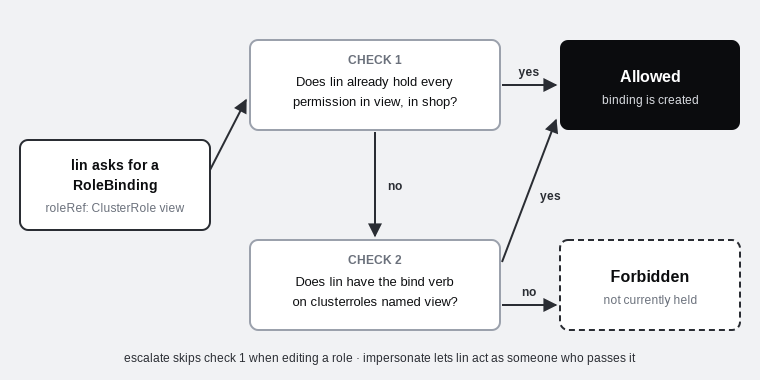
See the guard work. Lin is a team lead who should hand out read-only access in shop. Give lin a ClusterRole that manages RoleBindings, bound in shop only:
cat > access-manager.yaml <<'EOF'
apiVersion: rbac.authorization.k8s.io/v1
kind: ClusterRole
metadata:
  name: access-manager
rules:
  - apiGroups: ["rbac.authorization.k8s.io"]
    resources: ["rolebindings"]
    verbs: ["get", "list", "create", "delete"]
EOF
cat > lin-access-manager.yaml <<'EOF'
apiVersion: rbac.authorization.k8s.io/v1
kind: RoleBinding
metadata:
  name: lin-access-manager
  namespace: shop
subjects:
  - kind: User
    name: lin
    apiGroup: rbac.authorization.k8s.io
roleRef:
  kind: ClusterRole
  name: access-manager
  apiGroup: rbac.authorization.k8s.io
EOF
kubectl apply -f access-manager.yaml -f lin-access-manager.yaml
Now, as lin, give a new developer, Sam, the view role:
kubectl create rolebinding sam-view -n shop --clusterrole=view --user=sam --as=linIt fails with something like user "lin" (groups=["system:authenticated"]) is attempting to grant RBAC permissions not currently held, followed by the list of permissions lin is missing. Lin can create RoleBindings but cannot read pods, so lin cannot give away the right to read them.
Allow lin to bind view, and only view, by adding a bind rule with resourceNames. This replaces the whole file:
cat > access-manager.yaml <<'EOF'
apiVersion: rbac.authorization.k8s.io/v1
kind: ClusterRole
metadata:
  name: access-manager
rules:
  - apiGroups: ["rbac.authorization.k8s.io"]
    resources: ["rolebindings"]
    verbs: ["get", "list", "create", "delete"]
  - apiGroups: ["rbac.authorization.k8s.io"]
    resources: ["clusterroles"]
    verbs: ["bind"]
    resourceNames: ["view"]
EOF
kubectl apply -f access-manager.yaml
kubectl create rolebinding sam-view -n shop --clusterrole=view --user=sam --as=lin
This time the binding is created. The same request for admin is still refused, because the bind rule names view only:
kubectl create rolebinding sam-admin -n shop --clusterrole=admin --user=sam --as=linLeave out resourceNames and lin could bind cluster-admin in shop, or in any namespace if the role were granted cluster-wide. Treat any of the three verbs without resourceNames, and any * in verbs or resources, as a grant of admin. Note too that the built-in edit role can impersonate every ServiceAccount in its namespace and create tokens for them, so anyone with edit has at least the access of the strongest ServiceAccount there. Keep powerful ServiceAccounts out of namespaces where people have edit.
Search the cluster for roles that carry these verbs or a wildcard. The query skips the system: roles that Kubernetes components use:
kubectl get clusterroles,roles -A -o json | jq -r '
  .items[]
  | select(.metadata.name | startswith("system:") | not)
  | select([.rules[]?.verbs[]] | any(. == "*" or . == "bind" or . == "escalate" or . == "impersonate"))
  | "\(.kind)/\(.metadata.namespace // "-")/\(.metadata.name)"'
You see something like ClusterRole/-/access-manager, ClusterRole/-/admin, ClusterRole/-/cluster-admin and ClusterRole/-/edit, and on kind possibly a role or two that kind's own components use. Every line deserves a reason. Run this query whenever you install a Helm chart or operator, since they often bring their own roles.
Check it worked
kubectl get rolebinding sam-view -n shop -o wide
kubectl auth can-i get pods -n shop --as=sam
The binding shows ClusterRole/view with sam in the USERS column, and the can-i line prints yes. Sam got exactly view in shop, and lin never held more than the right to hand it out.
Step 9 · Revoke the CI token and clean up
The CI token expires by itself, but if one leaks you need it dead now. A token from kubectl create token is bound to its ServiceAccount, so deleting the ServiceAccount invalidates every token issued for it. Delete it and try the pipeline's credentials again:
kubectl -n shop delete serviceaccount ci-deployerkubectl --kubeconfig ci.kubeconfig auth whoamiWithin a few seconds the request fails with error: You must be logged in to the server (Unauthorized). The RoleBinding still names ci-deployer, though: bindings match by name, so a new ServiceAccount created with the same name gets the same access straight away. If the account is gone for good, delete its binding too.
Delete the practice cluster, which removes the namespace, every role and binding, and the kind-rbac-demo context from your kubeconfig:
kind delete cluster --name rbac-demoThe node image stays in Docker for next time; remove it with docker image rm kindest/node:v1.37.0 if you want the disk space.
Then remove the practice folder. It holds only the files from this tutorial, including the expired token:
cd ~
rm -rf ~/rbac-demoCheck it worked
test ! -e ~/rbac-demo && echo "practice folder removed"You see practice folder removed, and kind get clusters no longer lists rbac-demo.
Next steps
- Limit what pods in a namespace can reach on the network, and what they may run as, in Lock down the Snip namespace with network policies and Pod Security.
- Keep a read-only context for everyday work and a separate one for changes with Switch between Kubernetes clusters and namespaces with kubeconfig contexts.
- Apply the same least-privilege thinking to the servers under your cluster with Write least-privilege sudo rules with visudo.
Related tutorials
- Validate Kubernetes manifests before they reach a clusterYou will have one script that checks plain, Kustomize, Helm, generated and custom-resource manifests against the Kubernetes 1.37 schemas and a set of lint rules, with no cluster, and a GitHub Actions job that runs it on every pull request.
- Use secrets in Docker builds without leaking them into the imageYou will find a token and a private key leaking through a Docker build with Trivy 0.76, then fix the build with secret and SSH mounts, carry the fix into Compose and GitHub Actions, and prove with a rescan that the build context is clean.
- Store data in Kubernetes with persistent volumes and claimsYou will claim storage on a Kubernetes 1.37 kind cluster, prove the data outlives its pod, see which access modes and reclaim policies keep or lose data, and know how expansion and snapshots work on a cloud CSI driver.
Need this done for you?
Padding does this work for growing companies, from the first diagnosis to a system that keeps working.
Get new tutorials