UX and research · Intermediate · 16 min
Run a heuristic evaluation of an existing app
By Padding · Updated 18 Nov 2026
The app on a phone, a screen-capture tool and a shared spreadsheet · November 2026
You will have one merged list of usability problems in an existing booking flow, found by two evaluators working apart, with each problem tied to a heuristic, a screen and a severity rating.
On this page
A heuristic evaluation is a review in which people who know usability walk through an interface and check it against a short list of principles, called heuristics. Nobody outside the team is involved. It costs an afternoon, and it catches the problems that do not need a user to reveal them: a button that does nothing visible, an error message that blames the reader, a back link that throws away what someone typed.
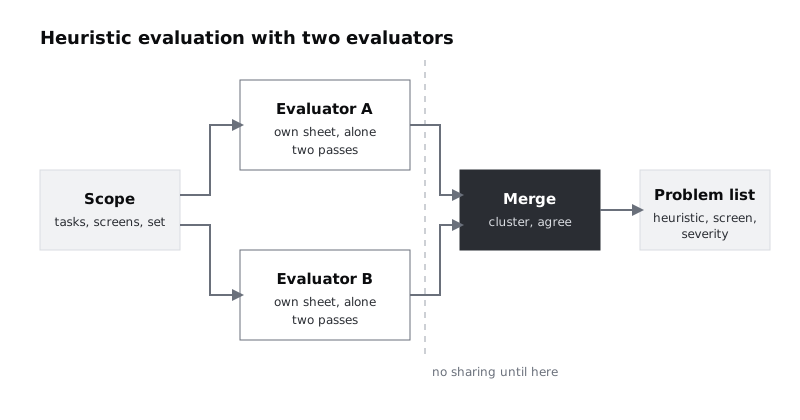
It has two weak points. One reviewer on their own misses a lot, and reviewers who work together talk each other into the same blind spots. So this tutorial uses two evaluators who work apart and only compare notes at the end. The merge is where most of the value is, and it is the part most teams skip or do loosely.
The running example is Larkfield Clinic, a fictional community clinic whose appointment booking app is already live. Its screens are Home, Choose a service, Pick a time, Your details, Confirm and Booked. The clinic has had complaints about failed bookings, and before paying for a round of user testing it wants to find and fix the obvious problems. You and a colleague, Tobi, will review the flow against Jakob Nielsen's ten usability heuristics.
Step 1 · Fix the scope before anyone opens the app
Write down four things in a short note at the top of a new spreadsheet, on a tab called Scope. Both evaluators read this note and nothing else before they start.
- The tasks. Name two or three things a real person comes to the flow to do. For Larkfield: book a nurse appointment for yourself this week; book a GP appointment for your child; change your mind on the Confirm screen and pick a different time.
- The screens in scope. List them by name, numbered in flow order: 1 Home, 2 Choose a service, 3 Pick a time, 4 Your details, 5 Confirm, 6 Booked. Anything not listed (account settings, the clinic's news page) is out. The numbers matter later, when you sort the merged findings.
- The device and build. "iPhone, app version 2.3, test account larkfield-review-01" or "Android, Chrome, staging site". If the two evaluators use different builds, they will find different problems and you will not know why.
- The heuristic set. Paste in the ten heuristics with a number each, so findings can refer to them by number:
- H1 Visibility of system status
- H2 Match between the system and the real world
- H3 User control and freedom
- H4 Consistency and standards
- H5 Error prevention
- H6 Recognition rather than recall
- H7 Flexibility and efficiency of use
- H8 Aesthetic and minimalist design
- H9 Help users recognise, diagnose and recover from errors
- H10 Help and documentation
Add a time box: each evaluator spends no more than two hours. A review with no end point drifts into redesign.
Check it worked
Your Scope tab has a task list, a list of named screens, one device and build, the ten numbered heuristics and a time limit. Ask Tobi to read it and tell you, without looking at the app, which screens they will review. If their answer matches your list, the scope is clear enough.
Step 2 · Give each evaluator their own blank sheet
In the spreadsheet that holds the Scope tab, add a second tab called Findings. This file is now your template. It has these columns:
- ID: A-01, A-02 ... or B-01, B-02 ...
- Screen: one of the numbered names from the Scope tab, such as "3 Pick a time"
- Where: the element, such as "Date of birth field" or "Back link, top left"
- What happens: what you saw, written as an observation
- Why it is a problem: who it affects and how
- Heuristic: one number, H1 to H10
- Capture: file name of the screenshot or screen recording
Now make two separate copies of the whole file: one called "Larkfield review, evaluator A" for you and one called "Larkfield review, evaluator B" for Tobi. Each copy has the Scope tab and one blank Findings tab. Share B with Tobi; do not share A with anyone.
Use separate files, not separate tabs in one shared file. Spreadsheet tools do not let you hide one tab from a person who can open the file: protecting a tab only stops editing, and a hidden tab can be unhidden by anyone with access. The point is that neither of you can see the other's findings while you work. If one person reads "Booked slots look free" in the other's sheet, they stop looking for it themselves and the two reviews are no longer independent.
Check it worked
Open the share settings of Tobi's file: only Tobi and you have access. Open the share settings of your own file: Tobi is not listed. Both files have the same Scope tab and the same seven Findings column headings in the same order, which makes the merge a copy and paste instead of a reshuffle.
Step 3 · Walk the flow twice, on your own
Do two passes, in this order.
First pass: be the patient. Do each task from the Scope tab at normal speed, as someone who has never seen the app. Do not write findings yet. Note only where you hesitated, backtracked or guessed. This pass gives you the feel of the flow and stops you treating every screen as an isolated picture.
Second pass: screen by screen. Go back to Home and stop on each screen. For each one, run down the ten heuristics and ask a pointed question for each. Some examples for Larkfield:
- On Pick a time, H1: can I tell which slots are free before I tap one? H5: does the app let me pick something that will fail?
- On Your details, H9: if I type my date of birth the wrong way, does the message tell me the format it wants? H6: do I have to remember anything from an earlier screen?
- On Confirm, H3: can I change the time without losing what I typed on Your details?
- On Booked, H1: does it say when the reminder will arrive and how?
Try the unhappy paths on purpose: leave a field empty, go back with the device's back gesture, lose signal on Confirm, pick a slot and wait ten minutes before confirming. Many of the worst problems only show up off the happy path.
Take a screenshot or short recording of every problem as you find it, and name the file after the finding ID (A-04.png).
Check it worked
Every screen listed in Scope appears at least once in your Screen column, or you have written a row saying "No problems found" for it. Every row has a capture file name, and that file exists in your capture folder. If a screen has no row at all, you skipped it.
Step 4 · Write each finding so someone else can act on it
A finding is useful only if a developer who was not in the room can find the problem and see why it matters. Three habits keep findings usable.
One problem per row. "Pick a time is confusing" is not a finding. Split it into what is actually wrong: booked slots look the same as free ones; there is no way to move to next week; the screen does not say which clinic the times are for.
Observation, not solution. Write what happens, not what to build. Compare:
- Weak: "Add a date picker to Your details."
- Strong: "Your details, Date of birth field. Typing 03/07/1990 shows 'Invalid input' after tapping Continue. The field expects 1990-07-03 but nothing says so. A patient may give up or think the app is broken. H9."
Solutions come later, once the whole list is ranked. A solution written too early anchors the team on the first idea.
One heuristic per finding. If a problem fits two, pick the one that best explains why it hurts the user and mention the other in the Why column. You will compare heuristic choices in the merge, so a clear first choice helps.
Here are some of your findings from the Larkfield review, as they would read in your Findings tab:
- A-02, Choose a service (H2): services are listed by internal code ("NUR-D", "GP-R") with no plain description.
- A-04, Pick a time (H5): booked slots look the same as free ones; tapping one shows "Slot unavailable" only after a pause.
- A-05, Pick a time (H7): no way to see next week without going back to Home.
- A-07, Confirm (H3): tapping "Change time" returns to Pick a time and clears everything entered on Your details.
- A-09, Booked (H1): says "Reminder set" but not when or by what (text, email or notification).
Check it worked
Give one of your findings to someone who has not seen the app, with its screenshot. Ask them to point to the problem on the screenshot and say in their own words why it matters. If they can, the finding is written well. Then scan your sheet: no row should contain the words "add", "change to" or "should be" in the What happens column.
Step 5 · Merge the two sheets into one list
Stop when both evaluators have hit the time limit. Now, and not before, make a third copy of the template called "Larkfield review, merged". Rename its Findings tab to Merged, then copy every row from your Findings tab and from Tobi's into it. Add three columns: No. (the screen's number from the Scope list), Found by (the evaluators) and Source (the original A- and B- IDs folded into that row).
Work screen by screen, together, in one sitting.
- Sort the combined rows by the No. column, smallest first. Sorting on the Screen names alone would put them in alphabetical order (Booked, Choose a service, Confirm ...), not flow order. If you kept the numbers in the screen names, as in "3 Pick a time", sorting on Screen works too; with six screens the single digits sort correctly.
- For each screen, read every row aloud. When two rows describe the same problem, even in different words, keep one row, give it a new ID (P-01, P-02 ...) and put both evaluators in Found by.
- When two rows describe the same element but different problems, keep both. "Change time clears my details" and "Change time is hard to spot" are two problems on one link.
- Keep every problem found by only one person. A problem one evaluator missed is not less real; it is the reason you had two.
- When you chose different heuristics for the same problem, agree on one and note the other in Why. Do not spend more than a minute on this. The heuristic explains the problem; it is not the point of it.
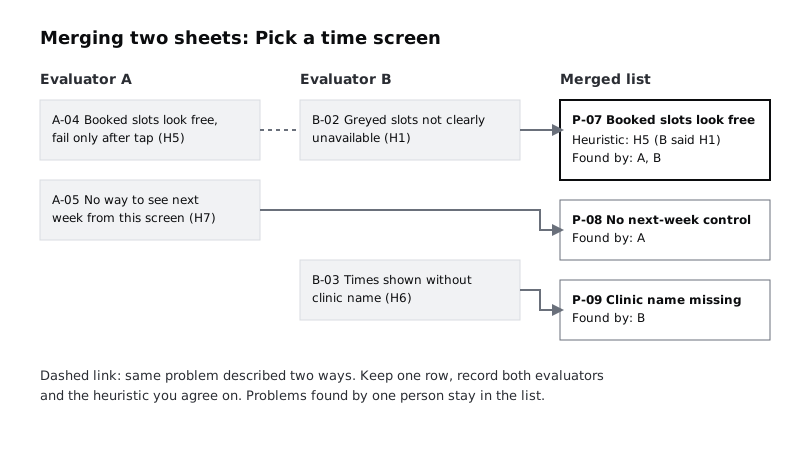
In the Larkfield review, Tobi logged the booked-slot problem as B-02 under H1 ("greyed slots are not clearly unavailable"). You logged it as A-04 under H5. It is one problem, so it becomes P-07, found by A and B, filed under H5 because the real harm is that the app lets the patient choose something that will fail. Tobi also found something you missed entirely: Pick a time does not show the clinic name, so a patient who chose the wrong branch has no way to notice. That stays in the list as P-09, found by B alone.
Count the result. Note how many problems both of you found and how many only one of you found. If almost everything was found by only one person, your second evaluator mattered a great deal, and a third would probably have found more.
Check it worked
Your Merged tab has no two rows that describe the same problem on the same element. Every row has a P- ID, a screen, a heuristic and at least one name in Found by. Every A- and B- ID from the two evaluator files is accounted for, either as its own merged row or folded into one: search the Source column for each original ID.
Step 6 · Rate each problem's severity, apart then together
Each evaluator now rates every merged problem on their own, using one scale. A common choice is Nielsen's 0 to 4 scale:
- 0: not a usability problem
- 1: cosmetic; fix if there is time
- 2: minor; low priority
- 3: major; important to fix
- 4: catastrophe; fix before release
Rate apart first for the same reason you reviewed apart: the first person to say a number sets the anchor. Add two columns to Merged, Severity A and Severity B. Each of you writes your numbers on paper or in your own file first, then you both fill in the columns and reveal them together.
Where you are one point apart, take the higher number unless one of you can point to something the other missed. Where you are two or more points apart, talk it through: usually one of you is imagining a different patient (a regular who knows the app, or someone booking for the first time on a slow phone). Agree which patient matters more for Larkfield, then rate for them.
For a fuller, repeatable way to judge frequency, impact and recovery, use the rating method in /tutorials/rate-usability-problems-by-severity rather than inventing your own.
Check it worked
Every merged row has three numbers: Severity A, Severity B and an agreed Severity. Sort by agreed Severity, highest first. For Larkfield, P-07 (booked slots look free) and the merged row for A-07 (Change time clears your details) should sit near the top; if a cosmetic issue such as an uneven icon outranks them, look again at how that rating was reached.
Step 7 · Mark what an expert review cannot settle
A heuristic evaluation tells you where an interface breaks known principles. It cannot tell you what real patients understand, need or do. Go down the merged list and add one last column, Needs users, with Yes or No.
Mark Yes where the finding depends on something only users can show you:
- Language and meaning. You think "NUR-D" is unclear. You do not know which plain words Larkfield's patients use for a dressing change.
- Whether a feature matters. You think the missing next-week control is a problem. You do not know how far ahead patients book.
- Domain and context. A receptionist or nurse may know that booking for a child needs extra details you never thought to check.
- Assistive technology. Unless an evaluator uses a screen reader daily, findings about screen reader use are guesses. Test with people who use one.
- Disagreements you could not resolve. If you and Tobi rated a problem 1 and 4 and still disagree after talking, that is a question for users, not for a vote.
Also note what an expert review tends to miss altogether: problems that only appear over time (the reminder arrives at 3am), problems caused by the clinic's process rather than the screen (slots released at midnight), and anything outside the tasks you scoped.
Check it worked
Every row in Merged has Yes or No in Needs users. Filter for Yes. That filtered list, with its screens, is the first draft of the tasks for your next usability test. If the filter shows nothing, you are probably more confident than the evidence allows; look again at the wording and feature findings.
Step 8 · Hand over the list
Clean the Merged tab into the version the team will use. Hide the evaluator working columns (Severity A, Severity B, Source) and keep: ID, Screen, Where, What happens, Why, Heuristic, Severity, Found by, Needs users and Capture. Add a short note at the top with the date, the build reviewed, the two evaluators' names, the number of problems found, and one line: "Expert review only. Rows marked Needs users are untested assumptions."
Share the sheet with the person who decides what gets fixed, and walk them through the top five rows with the screenshots open. Do not send it as an attachment and leave it there.
Check it worked
The person who owns the backlog can answer three questions from the sheet without asking you: what the worst problem is, which screen has the most problems, and which findings still need checking with patients. If they cannot, the top note or the sort order needs fixing.
Next steps
- Turn the severity ratings into a ranked fix list with a scale two people apply the same way: /tutorials/rate-usability-problems-by-severity
- Take the rows marked Needs users into a test plan: /tutorials/plan-a-usability-test
- Watch five patients book an appointment and see which of your findings they hit: /tutorials/run-a-five-person-usability-test
- Present the merged list so the team acts on it: /tutorials/report-research-findings-so-the-team-acts
Part of these paths
Related tutorials
- Rate and prioritise usability problems by severityYou will have a severity table for the problems from a usability test, rated on a three-factor scale that two people apply the same way, and a ranked fix list the team can plan a release from.
- Plan a usability test with tasks and success criteriaYou will have a written usability test plan for a booking flow, with scenario tasks that do not give away the answer, a success rule for each task and a session script another person could run without you.
Need this done for you?
Padding does this work for growing companies, from the first diagnosis to a system that keeps working.
Get new tutorials