Programming fundamentals · Intermediate · 18 min
Search a list with linear and binary search
By Padding · Updated 18 Nov 2026
Python 3.15.2 · python:3.15-slim (Debian)
You will write linear search and binary search in Python, watch binary search halve a sorted phone book in a printed trace, fix the classic off-by-one loop, and test both functions and the standard library's bisect against the same inputs.
On this page
Finding one item in a list is one of the most common jobs a program does: a contact in a phone book, a product code in a price list, a username in a list of accounts. Python's in and list.index do it for you, but they check items one at a time. On a sorted list there is a much faster way, and knowing how it works, and how it goes wrong, is a basic tool for any backend developer.
In this tutorial you write both methods yourself. Linear search checks every item from the start. Binary search uses the fact that the list is sorted: it looks at the middle item and throws away the half that cannot hold the target, again and again. You print each round so you can see the range shrink, break the code on purpose to meet the bug almost everyone writes once, count steps on a million items, and finish with bisect, the standard library module that does the same job.
All the code runs with python3.15 from the install tutorial. Nothing needs installing.
Step 1 · Write linear search
Make a folder for this tutorial and create search.py. It holds a sorted phone book of 16 names and the first search function:
mkdir -p ~/search-demo
cd ~/search-demo
cat > search.py <<'PY'
NAMES = [
    "Abebe", "Amara", "Bongani", "Chen", "Fatima", "Hana", "Ifeoma", "Javier",
    "Kofi", "Lerato", "Mei", "Nnamdi", "Priya", "Sipho", "Wanjiru", "Zainab",
]


def linear_search(items, target):
    """Return (index, steps). index is -1 when target is not in items."""
    steps = 0
    for index, item in enumerate(items):
        steps += 1
        if item == target:
            return index, steps
    return -1, steps
PY
Line by line:
NAMESis a plain list in alphabetical order. Linear search does not need the order; binary search will.enumerate(items)hands out each item together with its position, so the function can report where it found the name.stepscounts how many items the function looked at. Real search code would not count, but the number is the whole point of this tutorial.return index, stepsstops the loop the moment the name matches. If the loop runs out, the name is not there, and the function returns-1, a position no list can have.
Try it on a name near the start, one in the middle, the last one and one that is missing:
cat > try_linear.py <<'PY'
from search import NAMES, linear_search

print(linear_search(NAMES, "Abebe"))
print(linear_search(NAMES, "Kofi"))
print(linear_search(NAMES, "Zainab"))
print(linear_search(NAMES, "Musa"))
PY
python3.15 try_linear.pyCheck it worked
The output is four pairs:
(0, 1)
(8, 9)
(15, 16)
(-1, 16)
The first name costs one step and the last costs 16. A missing name also costs 16, because the function has to check every item before it can say no. Linear search does as many steps as there are items in the worst case.
Step 2 · Write binary search with a trace
Binary search keeps two positions, low and high, that mark the part of the list where the target could still be. Each round it checks the item in the middle, mid, and moves one of the two ends past it. Add the function to search.py:
cat >> search.py <<'PY'


def binary_search(items, target, trace=False):
    """Search a sorted list. Return (index, steps); index is -1 when missing."""
    low = 0
    high = len(items) - 1
    steps = 0
    while low <= high:
        mid = (low + high) // 2
        steps += 1
        if trace:
            print(f"  low={low:2} high={high:2} mid={mid:2} -> {items[mid]}")
        if items[mid] == target:
            return mid, steps
        if items[mid] < target:
            low = mid + 1
        else:
            high = mid - 1
    return -1, steps
PY
What each part does:
low = 0andhigh = len(items) - 1start the range as the whole list.highis the last valid index, not the length.while low <= highkeeps going while at least one item is left in the range. Whenlowpasseshigh, the range is empty and the name is not there.(low + high) // 2is the middle position.//divides and rounds down, somidis always a whole number.items[mid] < targetcompares strings alphabetically. If the middle name comes before the target, everything up to and includingmidis too early, solowjumps tomid + 1. Otherwisehighdrops tomid - 1.trace=Trueprints the range each round.{low:2}pads the number to two characters so the columns line up.
Search for a name in the second half, the first name and a missing name:
cat > try_binary.py <<'PY'
from search import NAMES, binary_search

for name in ["Sipho", "Abebe", "Musa"]:
    print(f"Looking for {name}:")
    print(" ", binary_search(NAMES, name, trace=True))
PY
python3.15 try_binary.py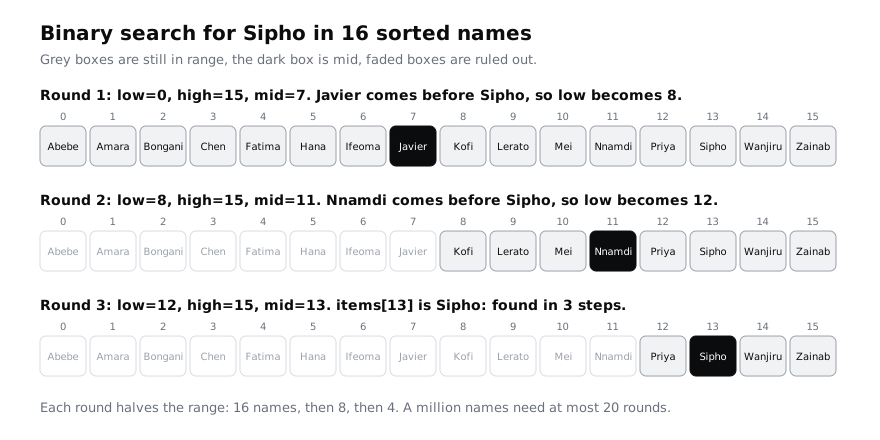
Check it worked
The trace for Sipho is three rounds:
Looking for Sipho:
  low= 0 high=15 mid= 7 -> Javier
  low= 8 high=15 mid=11 -> Nnamdi
  low=12 high=15 mid=13 -> Sipho
  (13, 3)
Linear search needed 14 steps for Sipho; binary search needs 3. Abebe takes 4 rounds, with high falling 15, 6, 2, 0. Musa takes 4 rounds and ends with (-1, 4): after Mei at index 10 the range is empty, so the function stops without checking the other names.
Step 3 · Break binary search with an off-by-one loop
The most common binary search bug is writing low = mid instead of low = mid + 1. It looks harmless, because mid "is where we got to". Write the broken version in its own file. It has a guard that stops after 8 rounds, so it cannot run forever on your machine:
cat > broken.py <<'PY'
from search import NAMES


def broken_binary_search(items, target):
    low = 0
    high = len(items) - 1
    rounds = 0
    while low <= high:
        mid = (low + high) // 2
        rounds += 1
        print(f"  low={low:2} high={high:2} mid={mid:2} -> {items[mid]}")
        if rounds == 8:
            print("  stopped after 8 rounds: the range is not shrinking")
            return -1
        if items[mid] == target:
            return mid
        if items[mid] < target:
            low = mid
        else:
            high = mid - 1
    return -1


print(broken_binary_search(NAMES, "Zainab"))
PY
python3.15 broken.pyCheck it worked
The trace gets stuck:
  low=13 high=15 mid=14 -> Wanjiru
  low=14 high=15 mid=14 -> Wanjiru
  low=14 high=15 mid=14 -> Wanjiru
and ends with stopped after 8 rounds: the range is not shrinking and -1. Once low and high are next to each other, (14 + 15) // 2 is 14 again, so low = mid sets low to the value it already has. Nothing changes, and without the guard the loop would never end. The high = mid - 1 branch is correct and never runs here, because Zainab is after every middle name.
Step 4 · Apply the fix and run it again
mid has already been checked, so leave it out of the new range: low = mid + 1, just as high = mid - 1 already does. Then the range gets at least one item smaller every round and the loop must end. Open broken.py in your editor and change low = mid to low = mid + 1, or make the same change from the terminal (sed -i.bak works on both Linux and macOS and keeps a backup in broken.py.bak):
sed -i.bak 's/low = mid$/low = mid + 1/' broken.py
python3.15 broken.pyCheck it worked
The trace now takes five rounds and finds Zainab at index 15:
  low= 0 high=15 mid= 7 -> Javier
  low= 8 high=15 mid=11 -> Nnamdi
  low=12 high=15 mid=13 -> Sipho
  low=14 high=15 mid=14 -> Wanjiru
  low=15 high=15 mid=15 -> Zainab
15
low moves past Wanjiru to 15 instead of staying on 14, and the guard message no longer appears. This is the same rule search.py follows. The opposite slip, while low < high, ends one round early: when only one name is left, it is never checked, so a search for Abebe returns -1. The tests in the next step catch both mistakes.
Step 5 · Test both functions against the same inputs
A search function is easy to get almost right. The edge cases are where it breaks: an empty list, a single item, the first and last items, and names that would sort before, between or after the others. Write a test that runs both functions on all of these and compares each answer with list.index, which you trust:
cat > test_search.py <<'PY'
from search import NAMES, binary_search, linear_search

lists = {
    "empty": [],
    "one name": ["Kofi"],
    "two names": ["Kofi", "Mei"],
    "phone book": NAMES,
}
missing = ["Aaron", "Musa", "Zola"]

checks = 0
for label, items in lists.items():
    for target in items + missing:
        expected = items.index(target) if target in items else -1
        assert linear_search(items, target)[0] == expected, (label, target)
        assert binary_search(items, target)[0] == expected, (label, target)
        checks += 1

print(f"all {checks} checks passed")
PY
python3.15 test_search.py
items + missingtests every name in the list plus three that are not in it: Aaron sorts before Abebe, Musa falls between Mei and Nnamdi, and Zola sorts after Zainab.items.index(target)raises an error for a missing item, so the test only calls it whentarget in itemsis true.assert ... , (label, target)stops with anAssertionErrorthat names the list and the name if any answer is wrong.
Check it worked
The script prints all 31 checks passed. That is 3 checks for the empty list, 4 for one name, 5 for two names and 19 for the phone book. To see the test do its job, change low = mid + 1 to low = mid in search.py and run it again: the test never finishes. It hangs on the one-name list, before it reaches the others: the search for Musa in ["Kofi"] sees that Kofi comes before Musa, sets low = mid, which is 0 again, and stays stuck with low=0 high=0. The loop gets stuck like this whenever the target is larger than the item at low and low equals high or sits right next to it. Press Ctrl+C to stop it. A test that hangs is a failing test too. Change the line back to low = mid + 1 before moving on.
Step 6 · See why binary search needs sorted data
Binary search trusts the order. When it sees that the middle name comes after the target, it throws away the whole right half without looking. On an unsorted list that trust is misplaced:
cat > unsorted.py <<'PY'
from search import binary_search, linear_search

contacts = ["Mei", "Abebe", "Zainab", "Kofi", "Hana", "Sipho", "Chen"]

print("linear:", linear_search(contacts, "Hana"))
print("binary:", binary_search(contacts, "Hana", trace=True))
print("binary on sorted copy:", binary_search(sorted(contacts), "Hana"))
PY
python3.15 unsorted.pyCheck it worked
Linear search finds Hana with (4, 5). Binary search checks Kofi, decides Hana must be to the left, then wanders off and prints binary: (-1, 3): it says Hana is not there, with no error. On sorted(contacts) it finds her at index 2 in 3 steps.
That silent wrong answer is the real danger. Only use binary search on data you know is sorted, by the same comparison the search uses. Python compares strings by Unicode code point, so every capital letter comes before every lower-case one ("Zainab" < "adaeze" is True), and a name with an accented first letter such as "Ọlá" sorts after "Zainab". If your contact list mixes cases or languages, normalise the names first, for example with name.casefold(), and sort and search the normalised list.
Step 7 · Count steps for a thousand and a million items
The difference between the two methods grows with the size of the list. Build sorted lists of 1,000 and 1,000,000 even numbers and search for the last one, which is the worst case for linear search:
cat > count_steps.py <<'PY'
from search import binary_search, linear_search

for size in [1_000, 1_000_000]:
    numbers = list(range(0, size * 2, 2))
    last = numbers[-1]
    print(f"{size:>9,} items")
    print(f"  linear, last item: {linear_search(numbers, last)[1]:>9,} steps")
    print(f"  binary, last item: {binary_search(numbers, last)[1]:>9,} steps")
    print(f"  binary, missing:   {binary_search(numbers, last + 1)[1]:>9,} steps")
PY
python3.15 count_steps.py
range(0, size * 2, 2) gives 0, 2, 4 and so on, already sorted. 1_000_000 is the same as 1000000; Python ignores the underscores, which only make the number easier to read. {...:>9,} prints the number right-aligned with comma separators.
Check it worked
The output is:
    1,000 items
  linear, last item:     1,000 steps
  binary, last item:        10 steps
  binary, missing:          10 steps
1,000,000 items
  linear, last item: 1,000,000 steps
  binary, last item:        20 steps
  binary, missing:          20 steps
A thousand times more data costs linear search a thousand times more steps, and binary search 10 more. Each round halves the range, and 1,000,000 can be halved about 20 times before one item is left. That is what "logarithmic time" means, and estimating how code slows down with Big O gives it a name and a notation. The catch is the cost of sorting: if you search a list only once, sorting it first takes longer than one linear search. Sort once, then search many times.
Step 8 · Use bisect from the standard library
You rarely need to write binary search yourself. Python's bisect module does it, tested and fast. bisect_left(items, target) returns the position where target is, or where it would go to keep the list sorted. Add a small wrapper that turns that position into the same answer your functions give:
cat >> search.py <<'PY'


from bisect import bisect_left


def bisect_search(items, target):
    """Return the index of target in a sorted list, or -1."""
    i = bisect_left(items, target)
    if i < len(items) and items[i] == target:
        return i
    return -1
PY
cat > use_bisect.py <<'PY'
from bisect import bisect_left, insort

from search import NAMES, binary_search, bisect_search

for name in ["Abebe", "Mei", "Zainab", "Musa"]:
    print(name, bisect_search(NAMES, name), binary_search(NAMES, name)[0])

print("Musa would go at index", bisect_left(NAMES, "Musa"))

book = NAMES.copy()
insort(book, "Musa")
print(book[9:13])
PY
python3.15 use_bisect.pybisect_leftalways returns a position, even for a missing name, so the wrapper checks that the position is inside the list (i < len(items)) and that the name there really matches.insort(book, "Musa")inserts the name at the right place, so the list stays sorted and still works with binary search. It works on a copy here soNAMESis unchanged.
Now add bisect_search to the test, so all three functions are held to the same answers:
cat > test_search.py <<'PY'
from search import NAMES, binary_search, bisect_search, linear_search

lists = {
    "empty": [],
    "one name": ["Kofi"],
    "two names": ["Kofi", "Mei"],
    "phone book": NAMES,
}
missing = ["Aaron", "Musa", "Zola"]

checks = 0
for label, items in lists.items():
    for target in items + missing:
        expected = items.index(target) if target in items else -1
        assert linear_search(items, target)[0] == expected, (label, target)
        assert binary_search(items, target)[0] == expected, (label, target)
        assert bisect_search(items, target) == expected, (label, target)
        checks += 1

print(f"all {checks} checks passed")
PY
python3.15 test_search.pyCheck it worked
use_bisect.py prints Abebe 0 0, Mei 10 10, Zainab 15 15 and Musa -1 -1: both functions agree. Then Musa would go at index 11 and ['Lerato', 'Mei', 'Musa', 'Nnamdi'], with Musa slotted between Mei and Nnamdi. The test prints all 31 checks passed again, now covering all three functions.
When you are done, delete the demo folder:
cd ~
rm -rf ~/search-demo
Next steps
- Sort the data that binary search depends on: write insertion sort, then use sorted with a key.
- Put a name to the 1,000 against 10 steps you measured: estimate how code slows down with Big O.
- Go back over
in,indexand slicing on everyday lists: index, slice, sort and search lists in Python.
Part of these paths
Related tutorials
- Estimate how code slows down as data grows: Big-O by experimentYou will time four Python functions on 1,000, 10,000 and 100,000 items, sort them into O(1), O(n) and O(n²) from your own numbers, and rewrite a slow duplicate finder so it scales.
- Sort a list: write insertion sort, then use sorted with a keyYou will write insertion sort from the way you sort cards by hand, watch it work pass by pass, time it against Python's sorted(), sort student records by score and name with key and reverse, and finish with a test that checks your sort against sorted() on 500 random lists.
- Index, slice, sort and search lists in PythonYou will use a list of market prices to practise indexing, slicing, adding and removing items, searching, sorting and a first list comprehension, and end with a script that answers five questions about the prices.
Need this done for you?
Padding does this work for growing companies, from the first diagnosis to a system that keeps working.
Get new tutorials