Programming fundamentals · Intermediate · 18 min
Sort a list: write insertion sort, then use sorted with a key
By Padding · Updated 18 Nov 2026
Python 3.15.2 · python:3.15-slim (Debian)
You will write insertion sort from the way you sort cards by hand, watch it work pass by pass, time it against Python's sorted(), sort student records by score and name with key and reverse, and finish with a test that checks your sort against sorted() on 500 random lists.
On this page
Python already sorts lists for you, and in real code you should use what it gives you. So why write a sort yourself? Because writing one, once, teaches you what "sorted" actually means for a program: which items get compared, how many times, and what happens to items that compare equal. Those three questions come back every time you sort records, rank search results or tidy a report.
In this tutorial you start with a hand of numbered cards, turn the way you sort them into insertion sort, and print the list after every pass. You time it against the built-in sorted() and see why the built-in wins. Then comes the part you will use every week: sorting records with key=, reverse=True and a lambda, and why it matters that Python's sort is stable. You finish by testing your own sort against sorted() on 500 random lists.
The examples use python3. On Windows outside WSL, type py instead. Everything runs offline once Python is installed, including on an Android phone with Termux (pkg install python), so none of it uses mobile data.
Step 1 · Sort a hand of cards by hand
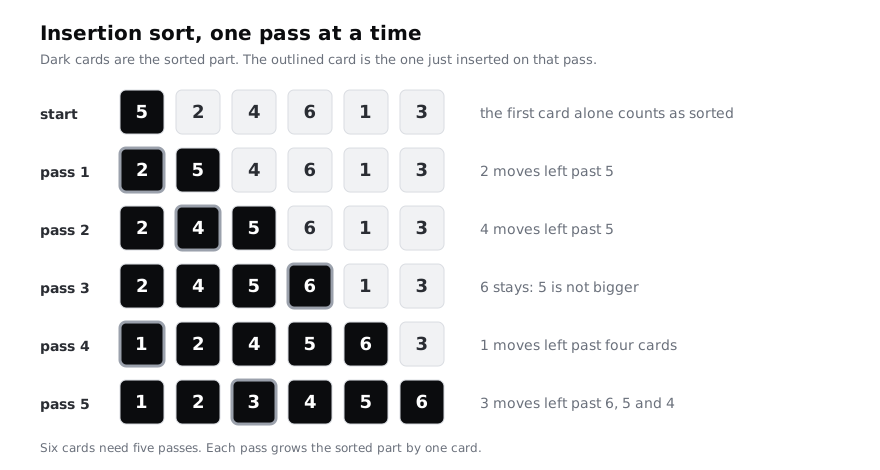
Take six cards numbered 5, 2, 4, 6, 1 and 3, or write the numbers on scraps of paper, and lay them in a row in that order. Sort them from smallest to largest, but follow one rule: work from left to right, and only ever pick up the next unsorted card.
- The first card, 5, is a sorted row of one. Leave it.
- Pick up the next card, 2. Slide it left past every card bigger than it, then put it down. It goes before 5.
- Pick up 4. It slides past 5 and stops at 2, because 2 is not bigger.
- Pick up 6. Nothing to its left is bigger, so it stays.
- Pick up 1. It slides past all four sorted cards to the front.
- Pick up 3. It slides past 6, 5 and 4 and stops at 2.
That is insertion sort. The left part of the row is always sorted, and each pass inserts one more card into it at the right place. Six cards need five passes, because the first card needs none.
Make a folder for the code in the rest of this tutorial:
mkdir -p ~/sorting-demo
cd ~/sorting-demoCheck it worked
Write down the row after each pass. Your list should read, in order: 2 5 4 6 1 3, 2 4 5 6 1 3, 2 4 5 6 1 3 (no change, because 6 stayed put), 1 2 4 5 6 3 and 1 2 3 4 5 6. If yours differs, you probably picked up a card from the middle of the row instead of the next one along.
Step 2 · Write insertion sort and print each pass
Turn the card rules into code. Create insertion.py:
cd ~/sorting-demo
cat > insertion.py <<'PY'
def insertion_sort(items, show=False):
    result = list(items)
    for i in range(1, len(result)):
        card = result[i]
        j = i - 1
        while j >= 0 and result[j] > card:
            result[j + 1] = result[j]
            j -= 1
        result[j + 1] = card
        if show:
            print(f"pass {i}: {result}")
    return result


if __name__ == "__main__":
    hand = [5, 2, 4, 6, 1, 3]
    print(f"start:  {hand}")
    insertion_sort(hand, show=True)
    print(f"hand is still {hand}")
PY
python3 insertion.py
Line by line, matched to the cards:
result = list(items)copies the list, so the caller's list is left alone.sorted()behaves the same way, and you test for it later.for i in range(1, len(result))visits every position from the second card to the last. Positioniis the card you pick up; everything before it is already sorted.card = result[i]holds the picked-up card, because the next lines overwrite its slot.j = i - 1points at the sorted card just to its left.while j >= 0 and result[j] > cardkeeps going while there is a card to the left and that card is bigger.j >= 0is checked first, so the loop stops at the front of the list instead of readingresult[-1], which in Python is the last item.result[j + 1] = result[j]shifts the bigger card one place right, opening a gap.j -= 1moves on to the next card left.result[j + 1] = carddrops the picked-up card into the gap.if __name__ == "__main__":runs the demo only when you run this file directly. Later scripts importinsertion_sortfrom it without running the demo.
Check it worked
The output matches the card rows you wrote down:
start:  [5, 2, 4, 6, 1, 3]
pass 1: [2, 5, 4, 6, 1, 3]
pass 2: [2, 4, 5, 6, 1, 3]
pass 3: [2, 4, 5, 6, 1, 3]
pass 4: [1, 2, 4, 5, 6, 3]
pass 5: [1, 2, 3, 4, 5, 6]
hand is still [5, 2, 4, 6, 1, 3]
The last line shows the original list was not changed.
Step 3 · Time it against sorted()
Insertion sort is fine for six cards. To see how it copes with more, time it on random lists of 1,000, 2,000 and 4,000 numbers and compare it with sorted():
cd ~/sorting-demo
cat > timing.py <<'PY'
import random
import time

from insertion import insertion_sort

random.seed(1)

for size in (1000, 2000, 4000):
    numbers = [random.randint(0, 1_000_000) for _ in range(size)]

    start = time.perf_counter()
    mine = insertion_sort(numbers)
    mine_seconds = time.perf_counter() - start

    start = time.perf_counter()
    builtin = sorted(numbers)
    builtin_seconds = time.perf_counter() - start

    assert mine == builtin
    print(f"{size:>5} items  insertion {mine_seconds:7.3f}s  sorted {builtin_seconds:7.4f}s")
PY
python3 timing.py
random.seed(1) makes the "random" numbers the same on every run, so you can compare runs. time.perf_counter() is a clock meant for measuring short durations; subtracting two readings gives seconds. assert mine == builtin stops the script with an error if the two results ever differ.
Look at how the insertion column grows. Doubling the list roughly quadruples the time. On a random list, each new card slides past about half of the sorted part, so the total work grows with the square of the length. A list ten times longer takes about a hundred times as long. The tutorial on estimating how code slows down with big O gives that pattern a name, O(n²).
sorted() is written in C and uses a much better algorithm. CPython's list sort finds stretches of the list that are already in order, sorts short pieces with a form of insertion sort, and merges the pieces together. That is why your hand-written version is worth understanding but not worth using in real code.
Check it worked
You see three lines, something like this (your times depend on your computer):
 1000 items  insertion   0.024s  sorted  0.0001s
 2000 items  insertion   0.099s  sorted  0.0002s
 4000 items  insertion   0.398s  sorted  0.0006s
Each insertion time is about four times the one above it, and sorted() is hundreds of times faster. No AssertionError appears, so both gave the same answer.
Step 4 · Sort records with key and reverse
Real lists hold records, not bare numbers. Here are six students as dictionaries. Python cannot compare two dictionaries with <, so you tell sorted() what to compare with key=: a function that takes one item and returns the value to sort by.
cd ~/sorting-demo
cat > students.py <<'PY'
students = [
    {"name": "Lindiwe", "score": 74},
    {"name": "Bola", "score": 91},
    {"name": "Kwame", "score": 74},
    {"name": "Chen", "score": 88},
    {"name": "Amaka", "score": 91},
    {"name": "Ines", "score": 60},
]


def score_of(student):
    return student["score"]


if __name__ == "__main__":
    print("Lowest score first:")
    for s in sorted(students, key=score_of):
        print(" ", s["score"], s["name"])

    print("Highest score first:")
    for s in sorted(students, key=lambda s: s["score"], reverse=True):
        print(" ", s["score"], s["name"])
PY
python3 students.pykey=score_ofpasses the function itself, without brackets.sorted()calls it once per student and sorts by the numbers it returns. The records come out whole; only the comparison uses the score.lambda s: s["score"]is the same function written inline, with no name. A lambda is a single expression whose value is returned. Use one when the key is short and used once; use a named function when the key needs several lines or a test of its own.reverse=Trueputs the largest first. It is clearer than negating values and also works for strings.
sorted() returns a new list. A list also has a .sort() method that sorts it in place and returns None, so students = students.sort() leaves you with None instead of a list. That is one of the most common sorting mistakes. Use students.sort(key=...) on its own line, or ranked = sorted(students, key=...).
Check it worked
The first block runs 60, 74, 74, 88, 91, 91 and the second runs 91 down to 60. Look at the ties: in both blocks Lindiwe comes before Kwame and Bola before Amaka, the same order as in the original list. The next step explains why.
Step 5 · Break ties and rely on stability
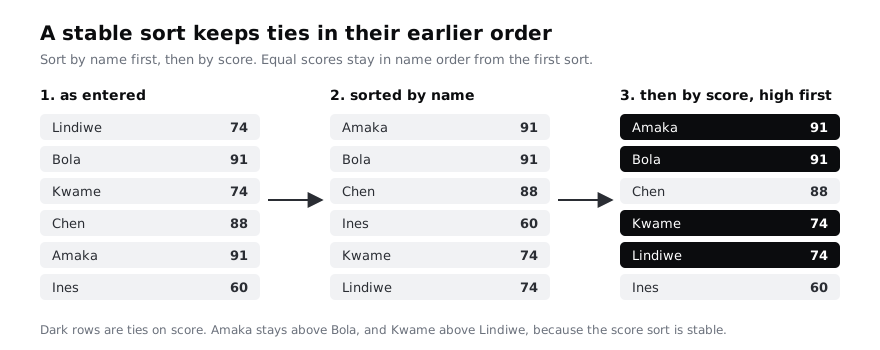
A ranking needs a rule for ties. Say you want the highest score first and, for equal scores, names in alphabetical order. There are two ways to do it, and they give the same answer:
cd ~/sorting-demo
cat > ranking.py <<'PY'
from students import students

one_key = sorted(students, key=lambda s: (-s["score"], s["name"]))

by_name = sorted(students, key=lambda s: s["name"])
two_passes = sorted(by_name, key=lambda s: s["score"], reverse=True)

for s in one_key:
    print(s["score"], s["name"])

print("same order:", one_key == two_passes)
PY
python3 ranking.py
The first way returns a tuple as the key. Tuples compare item by item: the first items decide unless they are equal, then the second items decide. -s["score"] makes higher scores sort first while the names still sort A to Z. The minus sign only works for numbers, which is the limit of this trick.
The second way sorts twice, least important rule first. It works because Python's sort is stable: when two items have equal keys, they stay in the order they were in before the sort. Sorting by score keeps the alphabetical order from the name sort for everyone with the same score. Stability holds with reverse=True too. Use the two-pass form when one rule must go one way and another the other way with values you cannot negate, such as names Z to A within each score.
Names bring one more surprise. Strings compare by Unicode code point, so every capital letter sorts before every lowercase one, and accented letters such as é sort after z. sorted(["Zara", "émile", "bola"]) gives ['Zara', 'bola', 'émile']. Passing key=str.casefold ignores case and gives ['bola', 'Zara', 'émile']. If your lists mix languages, for example Yoruba or French names with tone marks and accents, test the order with real names before you trust it.
Check it worked
The output is:
91 Amaka
91 Bola
88 Chen
74 Kwame
74 Lindiwe
60 Ines
same order: True
Compare it with the previous step: Amaka now comes before Bola, and Kwame before Lindiwe. same order: True shows that the tuple key and the two stable passes agree.
Step 6 · Test your sort against sorted()
Your sort only takes bare values. Give it a key parameter like sorted() has, then check it against sorted() on hundreds of random lists. Replace insertion.py with this version; the only changes are the key parameter, the two lines that default it, and key(...) in the comparison:
cd ~/sorting-demo
cat > insertion.py <<'PY'
def insertion_sort(items, key=None, show=False):
    result = list(items)
    if key is None:
        key = lambda value: value
    for i in range(1, len(result)):
        card = result[i]
        j = i - 1
        while j >= 0 and key(result[j]) > key(card):
            result[j + 1] = result[j]
            j -= 1
        result[j + 1] = card
        if show:
            print(f"pass {i}: {result}")
    return result


if __name__ == "__main__":
    hand = [5, 2, 4, 6, 1, 3]
    print(f"start:  {hand}")
    insertion_sort(hand, show=True)
    print(f"hand is still {hand}")
PY
cat > test_sort.py <<'PY'
import random

from insertion import insertion_sort

random.seed(2026)

for trial in range(500):
    length = random.randint(0, 30)
    numbers = [random.randint(-50, 50) for _ in range(length)]
    original = list(numbers)

    assert insertion_sort(numbers) == sorted(numbers), numbers
    assert insertion_sort(numbers, key=abs) == sorted(numbers, key=abs), numbers
    assert numbers == original, "insertion_sort changed its input"

print("500 random lists: insertion_sort matches sorted()")
PY
python3 test_sort.py
The test is built to catch the mistakes people actually make:
- Lengths from 0 to 30 include the empty list and a list of one, where off-by-one errors show up.
- Numbers from -50 to 50 in lists of up to 30 items give plenty of duplicates.
key=abssorts by distance from zero, so -7 and 7 tie.sorted()keeps tied items in their original order, so this line passes only if your sort is stable too.- The last check confirms the input list was not changed.
- The message after the comma in each
assertis shown when it fails, so you see the exact list that broke your sort.
Try breaking it on purpose. In insertion.py, change key(result[j]) > key(card) to >= and run python3 test_sort.py again. Equal cards now jump past each other, the order of ties changes, and the key=abs check fails with an AssertionError that prints the list. Change it back to > before you go on.
Check it worked
The script prints 500 random lists: insertion_sort matches sorted() and nothing else. python3 insertion.py still prints the same five passes as before, because the default key returns each value unchanged.
When you are finished, delete the demo folder:
cd ~
rm -rf ~/sorting-demo
Next steps
Insertion sort is the right tool in only one place: short or nearly sorted lists, where few cards have to move. The natural next algorithm is merge sort. It splits the list in half, sorts each half, and merges the two sorted halves by repeatedly taking the smaller front item. Sorting each half is the same problem on a smaller list, so merge sort is usually written with recursion, and its work grows with n × log n instead of n². Write it after understanding recursion with small examples, then reuse test_sort.py to check it.
- A sorted list can be searched far faster than an unsorted one: search a list with linear and binary search.
- Put a name to the growth you measured: estimate how code slows down with big O.
- Key functions are ordinary functions: write functions that return values.
Part of these paths
Related tutorials
- Search a list with linear and binary searchYou will write linear search and binary search in Python, watch binary search halve a sorted phone book in a printed trace, fix the classic off-by-one loop, and test both functions and the standard library's bisect against the same inputs.
- Estimate how code slows down as data grows: Big-O by experimentYou will time four Python functions on 1,000, 10,000 and 100,000 items, sort them into O(1), O(n) and O(n²) from your own numbers, and rewrite a slow duplicate finder so it scales.
- Understand recursion with small examples and the call stackYou will write four recursive functions in Python, from a countdown to a folder-tree walker, break one on purpose to see RecursionError, rewrite another as a loop, and be able to trace any recursive call on paper.
Need this done for you?
Padding does this work for growing companies, from the first diagnosis to a system that keeps working.
Get new tutorials