Programming fundamentals · Intermediate · 17 min
Understand recursion with small examples and the call stack
By Padding · Updated 18 Nov 2026
Python 3.15.2 · python:3.15-slim (Debian)
You will write four recursive functions in Python, from a countdown to a folder-tree walker, break one on purpose to see RecursionError, rewrite another as a loop, and be able to trace any recursive call on paper.
On this page
A recursive function is a function that calls itself. That sounds like a trick, but it is a plain way to solve a problem that contains a smaller copy of itself: the size of a folder is the size of its files plus the size of each folder inside it, and the sum of a list is its first number plus the sum of the rest.
Every working recursive function has two parts. The base case is an input small enough to answer directly, with no further call. The step does a little work and calls the function again on an input that is closer to the base case. If either part is missing or wrong, the function never stops.
In this tutorial you write a countdown, a factorial and a list sum, naming the base case and the step in each. You print the calls as they happen to see the call stack, the list of function calls Python is in the middle of. Then you walk a real folder tree, where recursion is the clearest tool for the job, break a function to meet RecursionError, and rewrite factorial as a loop to compare. The examples use python3; on Windows outside WSL, type py instead.
Step 1 · Write a countdown that calls itself
Make a throwaway folder and write the smallest useful recursive function:
mkdir -p ~/recursion-demo
cd ~/recursion-demo
cat > countdown.py <<'PY'
def countdown(n):
    if n == 0:
        print("Lift off")
        return
    print(n)
    countdown(n - 1)


countdown(3)
PY
python3 countdown.py
Read it line by line:
if n == 0:is the base case. When the count reaches zero, the function printsLift offandreturnends this call without calling again.print(n)is the work this call does.countdown(n - 1)is the step. Each call passes a number one smaller, so the input moves toward0every time.
countdown(3) prints 3 and calls countdown(2), which prints 2 and calls countdown(1), and so on until countdown(0) reaches the base case.
Check it worked
The output is four lines: 3, 2, 1 and Lift off. Change the last line to countdown(5) and run it again: you see 5 down to 1, then Lift off.
Step 2 · Return a value with factorial
A countdown only prints. Most recursive functions return a value that the caller uses. The factorial of a whole number is the product of every number from 1 up to it: 4 factorial is 4 × 3 × 2 × 1, which is 24. It contains a smaller copy of itself, because 4 factorial is 4 × (3 factorial).
cd ~/recursion-demo
cat > factorial.py <<'PY'
def factorial(n):
    if n <= 1:
        return 1
    return n * factorial(n - 1)


print(factorial(4))
print(factorial(10))
PY
python3 factorial.py
if n <= 1: return 1is the base case: the factorial of 1 is 1. Using<=also returns 1 for 0, which is the correct answer for 0 factorial.return n * factorial(n - 1)is the step. Python cannot finish the multiplication untilfactorial(n - 1)hands back its answer, so this call waits.
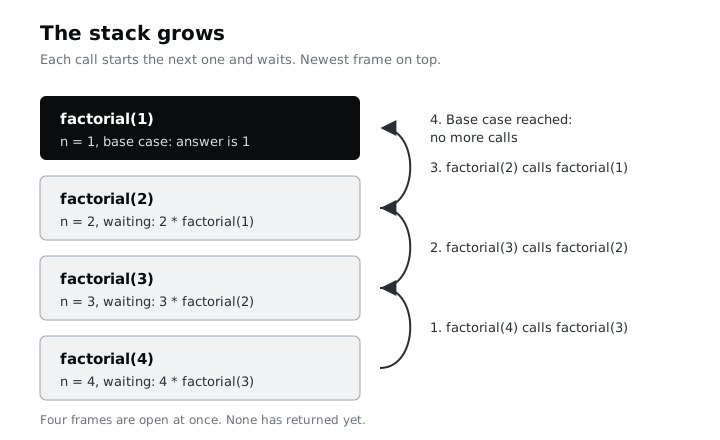
That waiting is the important part. When factorial(4) runs, it pauses while factorial(3) runs, which pauses while factorial(2) runs, and so on. Python keeps each paused call, with its own value of n, in a frame on the call stack.
Check it worked
The output is 24 and then 3628800. Work out factorial(3) in your head (3 × 2 × 1) and check it against the code by adding print(factorial(3)): it prints 6.
Step 3 · Watch the call stack grow and unwind
Add a depth parameter that only exists to indent the output, so you can see each call start and finish:
cd ~/recursion-demo
cat > trace_factorial.py <<'PY'
def factorial(n, depth=0):
    indent = "    " * depth
    print(f"{indent}factorial({n}) starts")
    if n <= 1:
        result = 1
    else:
        result = n * factorial(n - 1, depth + 1)
    print(f"{indent}factorial({n}) returns {result}")
    return result


factorial(4)
PY
python3 trace_factorial.py
Each deeper call is indented four more spaces. The output is:
factorial(4) starts
    factorial(3) starts
        factorial(2) starts
            factorial(1) starts
            factorial(1) returns 1
        factorial(2) returns 2
    factorial(3) returns 6
factorial(4) returns 24
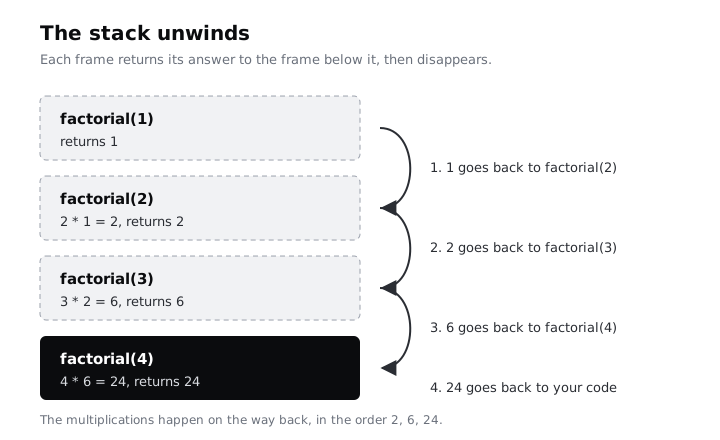
The top half is the stack growing: four calls start, and none has finished. factorial(1) is the first to finish, because it reaches the base case. Then the stack unwinds: each waiting call receives the answer from the call below it, multiplies, and returns.
Check it worked
Your output matches the eight lines above, and the last line is factorial(4) returns 24. Notice that every "starts" line has a matching "returns" line at the same indent: one frame, opened and closed.
Step 4 · Add up a list recursively and trace it on paper
The same pattern works on lists. The sum of an empty list is 0, and the sum of any other list is its first item plus the sum of the rest. Before you run the code below, take a sheet of paper and write what you expect it to print for [4, 7, 1], one call per line, indenting each deeper call.
cd ~/recursion-demo
cat > sum_list.py <<'PY'
def sum_list(items, depth=0):
    indent = "  " * depth
    print(f"{indent}sum_list({items})")
    if not items:
        print(f"{indent}-> 0")
        return 0
    result = items[0] + sum_list(items[1:], depth + 1)
    print(f"{indent}-> {result}")
    return result


total = sum_list([4, 7, 1])
print("total:", total)
PY
python3 sum_list.py
if not items:is the base case. An empty list counts as false in Python, so this is true only when there is nothing left to add.items[0] + sum_list(items[1:], ...)is the step.items[1:]is a new list without the first item, so every call gets a list one item shorter, which moves toward the empty list.
To trace any recursive call on paper, follow the same three moves you used here. Write the call. If it is the base case, write its answer. If not, write the smaller call it makes underneath, indented, and come back to finish this line only when that call has an answer.
Check it worked
Compare your paper with the output:
sum_list([4, 7, 1])
  sum_list([7, 1])
    sum_list([1])
      sum_list([])
      -> 0
    -> 1
  -> 8
-> 12
total: 12
If your paper has the same four calls going in and the same answers 0, 1, 8 and 12 coming back out, you can trace recursion. A common slip is to add as you go down (4, then 11, then 12). The additions happen on the way back up, after each smaller call returns.
items[1:] copies the list on every call, so this version gets slow on long lists. It is here to teach the pattern; in real code use the built-in sum(). The tutorial on estimating how code slows down with Big-O shows how to measure costs like that copy.
Step 5 · Walk a folder tree
Lists and countdowns can be written with a loop just as easily. A folder tree is where recursion earns its place: you do not know how deep the folders go, and every folder is the same kind of thing as the folder that holds it. Create a small tree of stand-in photo files to walk:
cd ~/recursion-demo
mkdir -p photos/2025/lagos photos/2026
printf 'abcde' > photos/readme.txt
printf '0123456789' > photos/2025/beach.jpg
printf '0123456789' > photos/2025/lagos/market.jpg
printf '01234567890123456789' > photos/2026/family.jpg
The files hold 5, 10, 10 and 20 bytes, so the whole tree holds 45 bytes. Now write two recursive functions, one that prints the tree and one that adds up the size:
cd ~/recursion-demo
cat > tree.py <<'PY'
import sys
from pathlib import Path


def show(folder, depth=0):
    for entry in sorted(folder.iterdir()):
        if entry.is_dir() and not entry.is_symlink():
            print("    " * depth + entry.name + "/")
            show(entry, depth + 1)
        else:
            print("    " * depth + entry.name)


def total_size(folder):
    total = 0
    for entry in folder.iterdir():
        if entry.is_dir() and not entry.is_symlink():
            total += total_size(entry)
        else:
            total += entry.stat().st_size
    return total


root = Path(sys.argv[1])
print(root.name + "/")
show(root, 1)
print(total_size(root), "bytes")
PY
python3 tree.py photosfolder.iterdir()lists what is directly inside one folder, in no fixed order, soshowsorts it to print the same way every time.if entry.is_dir() and not entry.is_symlink():decides whether to go deeper. Skipping symbolic links stops a link that points back up the tree from sending the function round in a circle.show(entry, depth + 1)andtotal += total_size(entry)are the steps: the same job, on a folder one level down.- There is no
ifthat looks like a base case. The base case is a folder with no folders inside it: the loop runs over its files and finishes without making another call. Every step goes one level deeper, and a real tree has a bottom, so the calls always stop. sys.argv[1]is the folder name you type after the script, so you can point it at any folder.
Check it worked
The output is:
photos/
    2025/
        beach.jpg
        lagos/
            market.jpg
    2026/
        family.jpg
    readme.txt
45 bytes
Add a file with printf 'xyz' > photos/2026/note.txt and run python3 tree.py photos again: note.txt appears under 2026/ and the total becomes 48 bytes. Python also has Path.walk() and os.walk(), which do this walk for you; now you know what they do inside.
Step 6 · Break it and meet RecursionError
Every call adds a frame to the stack, and Python limits how many frames it allows. See the limit first:
python3 -c "import sys; print(sys.getrecursionlimit())"The default is 1000. Now remove the base case from the countdown, which is the most common recursion bug. The output goes to a file, because there is a lot of it:
cd ~/recursion-demo
cat > broken.py <<'PY'
def countdown(n):
    print(n)
    countdown(n - 1)


countdown(3)
PY
python3 broken.py > numbers.txt || echo "exit status $?"
tail -n 2 numbers.txt
Without if n == 0, nothing stops the calls: 3, 2, 1, 0, -1, -2 and on. Python gives up when the stack reaches its limit, prints a traceback and exits with status 1.
Check it worked
The traceback is short, because Python folds the repeats into one line, something like [Previous line repeated 996 more times]. Its last line is RecursionError: maximum recursion depth exceeded, followed by exit status 1 from the shell. The two numbers from tail are close to -994 and -995: the function made about a thousand calls before Python stopped it.
When you see this error in your own code, check two things: is there a base case, and does every step move the input closer to it? A step like countdown(n + 1), or factorial(n - 1) called with a negative number when the base case only checks n == 0, fails the same way. sys.setrecursionlimit() can raise the limit, but if the base case is missing, a higher limit only makes the crash take longer.
Step 7 · Rewrite factorial as a loop and compare
The limit also stops correct recursion on large inputs. Factorial of 5000 needs 5000 frames. A loop needs one:
cd ~/recursion-demo
cat > compare.py <<'PY'
import math


def factorial(n):
    if n <= 1:
        return 1
    return n * factorial(n - 1)


def factorial_loop(n):
    result = 1
    for k in range(2, n + 1):
        result *= k
    return result


print(factorial(10) == factorial_loop(10))
print(factorial_loop(5000) == math.factorial(5000))

try:
    factorial(5000)
except RecursionError as err:
    print("recursive version failed:", err)
PY
python3 compare.pyfactorial_loopkeeps a runningresultand multiplies it by 2, 3, 4 and so on up ton. The loop variable replaces the stack: there is nothing waiting, so there is no limit to hit.math.factorial(5000)is Python's own version, used here to prove the loop gives the right answer for a number far too long to check by eye.tryandexcept RecursionErrorcatch the failure so the script can print a message instead of a traceback.
Check it worked
The output is True, True, then recursive version failed: maximum recursion depth exceeded. Both versions agree on small inputs, and only the loop copes with 5000.
So which should you write? Use a loop when the problem is a straight line: counting, adding up a list, multiplying a range. Use recursion when the data branches and nests, like folder trees, menus with sub-menus, comments with replies, or JSON inside JSON, and the depth stays well under the limit. Python does not optimise away deep recursion the way some languages do, so the limit is real.
When you have finished, delete the demo folder:
cd ~
rm -rf ~/recursion-demo
Next steps
- Recursion is built on functions that return values; if
returnstill feels shaky, work through writing functions that return values. - Sorting algorithms are a classic place for both loops and recursion: sort a list with insertion sort and sorted().
- Measure why the slicing version of
sum_listslows down on long lists: estimate how code slows down with Big-O.
Part of these paths
Related tutorials
- Write functions that return values instead of printing themYou will turn print-only functions into ones that return values, use parameters, defaults, keyword arguments and tuples, fix the UnboundLocalError, and end with four documented functions you can call and combine from the Python REPL.
- Sort a list: write insertion sort, then use sorted with a keyYou will write insertion sort from the way you sort cards by hand, watch it work pass by pass, time it against Python's sorted(), sort student records by score and name with key and reverse, and finish with a test that checks your sort against sorted() on 500 random lists.
- Estimate how code slows down as data grows: Big-O by experimentYou will time four Python functions on 1,000, 10,000 and 100,000 items, sort them into O(1), O(n) and O(n²) from your own numbers, and rewrite a slow duplicate finder so it scales.
Need this done for you?
Padding does this work for growing companies, from the first diagnosis to a system that keeps working.
Get new tutorials