Programming fundamentals · Intermediate · 20 min
Estimate how code slows down as data grows: Big-O by experiment
By Padding · Updated 18 Nov 2026
Python 3.15.2 · python:3.15-slim
You will time four Python functions on 1,000, 10,000 and 100,000 items, sort them into O(1), O(n) and O(n²) from your own numbers, and rewrite a slow duplicate finder so it scales.
On this page
Code that feels instant on 100 rows can take minutes on 100,000. The reason is rarely a slow computer. It is how the amount of work grows when the data grows. Big-O notation is a short label for that growth: O(1) means the work stays the same, O(n) means it grows in step with the data, and O(n²) means it grows with the data multiplied by itself.
Textbooks introduce Big-O with proofs. This tutorial does it by experiment. You time four small functions on 1,000, 10,000 and 100,000 items, put the times in a table, and look at what happens each time the data grows ten times. Some times stay flat, some grow ten times, and one grows a hundred times. You then name each pattern, fix the slowest function, and practise guessing the growth of code from reading it. The only maths is multiplication.
Every command uses python3. If your command is python3.15 or py, type that instead. Your times will differ from the examples shown, because they depend on your machine. What matters is how they change between sizes, and that pattern comes out the same on a laptop, a server or a phone.
Step 1 · Time one piece of code with timeit
Make a folder to work in. Then write timing.py, a small module that the later scripts share. It holds the three sizes, a function that times a piece of code, and a function that prints a time in a readable unit:
mkdir -p ~/big-o-demo
cd ~/big-o-demo
cat > timing.py <<'PY'
import timeit

SIZES = [1_000, 10_000, 100_000]


def time_it(code, number):
    total = timeit.timeit(code, number=number)
    return total / number


def fmt(seconds):
    if seconds < 1e-6:
        return f"{seconds * 1e9:.0f} ns"
    if seconds < 1e-3:
        return f"{seconds * 1e6:.1f} µs"
    if seconds < 1:
        return f"{seconds * 1e3:.1f} ms"
    return f"{seconds:.2f} s"
PY
Line by line:
import timeitloads the standard library's timing module. It switches off garbage collection while it measures and uses the most precise clock available, so it gives steadier numbers than calling the clock yourself.SIZESlists the three input sizes. The underscores in1_000are only there to make the number easier to read; Python ignores them.time_it(code, number)runscode(a function with no arguments)numbertimes and returns the average time of one run in seconds. Running it many times smooths out the noise from everything else your computer is doing.fmtturns seconds into nanoseconds (ns, billionths), microseconds (µs, millionths), milliseconds (ms, thousandths) or seconds, whichever reads best.
Try it on something small. sum adds up a list, so time it on 1,000 numbers:
cat > first_timing.py <<'PY'
from timing import fmt, time_it

numbers = list(range(1_000))
one_run = time_it(lambda: sum(numbers), number=1_000)
print("sum of 1,000 numbers takes", fmt(one_run))
PY
python3 first_timing.py
lambda: sum(numbers) makes a tiny function with no name and no arguments, which is what timeit expects. It is not called here; timeit calls it 1,000 times.
Check it worked
The script prints one line, something like sum of 1,000 numbers takes 4.2 µs. Run it twice. The number changes a little each time, which is normal. If you see ModuleNotFoundError: No module named 'timing', you are not in ~/big-o-demo; run cd ~/big-o-demo and try again.
Step 2 · Look up an item in a list and in a set
The first experiment asks one question: is a value in the collection? Python answers it with in, for lists and sets alike, but the two do very different amounts of work. Write lookup.py:
cat > lookup.py <<'PY'
from timing import SIZES, fmt, time_it

MISSING = -1

if __name__ == "__main__":
    for n in SIZES:
        items = list(range(n))
        lookup = set(items)
        list_time = time_it(lambda: MISSING in items, number=200)
        set_time = time_it(lambda: MISSING in lookup, number=200)
        print(f"{n:>7,} items   list {fmt(list_time):>9}   set {fmt(set_time):>7}")
PY
python3 lookup.py
MISSING = -1is a value that is never in the data. Looking for a missing value is the worst case: a list has to check every item before it can answer no.if __name__ == "__main__":runs the block only when you run the file directly, not when another script imports it. A later step imports from these files.itemsholds the numbers 0 to n − 1, andlookupholds the same numbers in a set.- The f-string
{n:>7,}prints the size right-aligned in 7 characters with comma separators, so the columns line up.
Check it worked
You see three lines, something like:
  1,000 items   list   13.1 µs   set   52 ns
 10,000 items   list  131.4 µs   set   49 ns
100,000 items   list    1.3 ms   set   51 ns
Read down each column. The list time grows about ten times at each row, because the list checks items one by one. The set time hardly moves. A set stores each value at a position worked out from the value itself (its hash), so it goes straight to the one place the value could be, however many items there are.
Step 3 · Time a single loop over the data
The second experiment walks through every item once and adds them up. Write loop.py:
cat > loop.py <<'PY'
from timing import SIZES, fmt, time_it


def total(items):
    result = 0
    for item in items:
        result += item
    return result


if __name__ == "__main__":
    for n in SIZES:
        items = list(range(n))
        one_run = time_it(lambda: total(items), number=20)
        print(f"{n:>7,} items   loop {fmt(one_run):>9}")
PY
python3 loop.py
total does the same thing as the built-in sum, written out as a loop so you can see the work: one addition for every item.
Check it worked
The output is three lines, something like 1,000 items loop 20.3 µs, then about 200 µs, then about 2 ms. Each tenfold increase in items gives roughly a tenfold increase in time. The built-in sum is several times faster than this loop because it runs in C, but it grows in the same way: it still has to visit every item.
Step 4 · Find duplicates with a nested loop
The third experiment is a job that comes up all the time: finding repeated values, such as the same phone number entered twice in a customer list, or a transaction reference that appears twice in a mobile money export. The first idea most people have is to compare every item with every other item. Write duplicates.py:
cat > duplicates.py <<'PY'
from timing import fmt, time_it


def duplicates_nested(items):
    dupes = []
    for i in range(len(items)):
        for j in range(i + 1, len(items)):
            if items[i] == items[j] and items[i] not in dupes:
                dupes.append(items[i])
    return sorted(dupes)


if __name__ == "__main__":
    print(duplicates_nested([4, 7, 1, 7, 9, 4, 7]))
    times = {}
    for n in [1_000, 10_000]:
        items = list(range(n))
        times[n] = time_it(lambda: duplicates_nested(items), number=1)
        print(f"{n:>7,} items   nested {fmt(times[n]):>9}")
    print(f"100,000 items   nested about {fmt(times[10_000] * 100)} (predicted, not run)")
PY
python3 duplicates.py- The outer loop picks each position
i. The inner loop compares that item with every item after it, at positionsi + 1to the end, so each pair is compared once. - When two items match and the value is not already recorded, it goes into
dupes.sortedreturns them in order so the result is easy to read. - The first
printruns the function on a short list with repeats, to show it works. - The timing uses lists with no repeats at all, the worst case: the function must compare every pair before it can say there are none.
number=1runs it once, because a single run already takes a while. - The last line does not run the 100,000-item case. It predicts it, by multiplying the 10,000-item time by 100. The next step explains why 100.
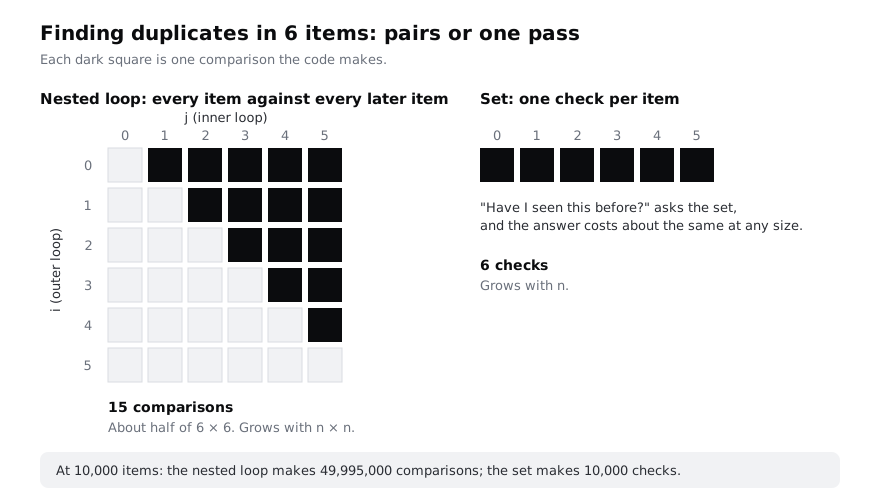
The diagram shows where the work comes from. For 6 items, the inner loop runs 5 + 4 + 3 + 2 + 1 = 15 times, about half of 6 × 6:
Check it worked
The first line is [4, 7]. Then you see something like:
  1,000 items   nested 14.6 ms
 10,000 items   nested 1.52 s
100,000 items   nested about 152.00 s (predicted, not run)
The 10,000-item run is about 100 times slower than the 1,000-item run, not 10 times. That is why the script does not try 100,000 items: another hundredfold jump would take minutes. On a low-cost Android phone running Python in Termux, multiply these times by several more.
Step 5 · Put the numbers in one table and name the patterns
Now collect every measurement in one table, with a column that shows how many times longer each size took than the one before. Write growth.py:
cat > growth.py <<'PY'
from duplicates import duplicates_nested
from lookup import MISSING
from loop import total
from timing import SIZES, fmt, time_it


def row(name, make_code, number, sizes=SIZES):
    previous = None
    cells = []
    for n in SIZES:
        if n not in sizes:
            cells.append(f"{'(skipped)':>18}")
            continue
        seconds = time_it(make_code(list(range(n))), number=number)
        factor = f"x{seconds / previous:.0f}" if previous else ""
        cells.append(f"{fmt(seconds):>11} {factor:>6}")
        previous = seconds
    print(f"{name:<14}" + "".join(cells))


print(f"{'':<14}" + "".join(f"{n:>18,}" for n in SIZES))
row("set lookup", lambda items: (lambda s=set(items): MISSING in s), 1_000)
row("list lookup", lambda items: (lambda: MISSING in items), 200)
row("single loop", lambda items: (lambda: total(items)), 20)
row("nested loop", lambda items: (lambda: duplicates_nested(items)), 1, sizes=SIZES[:2])
PY
python3 growth.pyrowtimes one kind of code at each size and prints a row of the table.make_codeis a function that receives the list for one size and returns the code to time.factoris this size's time divided by the previous size's time:x10means ten times longer.- For the set,
lambda s=set(items): MISSING in sbuilds the set once, when the code is made, so only the lookup is timed. - The nested loop skips 100,000 items, for the reason you saw in the last step.
Each tenfold step in the data tells you the growth:
- About x1: O(1), constant time. The work does not depend on n. Set lookup is the example.
- About x10: O(n), linear time. The work grows in step with n. Ten times the data, ten times the work. The single loop and the list lookup both scan every item.
- About x100: O(n²), quadratic time. The work grows with n × n. Ten times the data, ten times ten the work. The nested loop compares every pair.
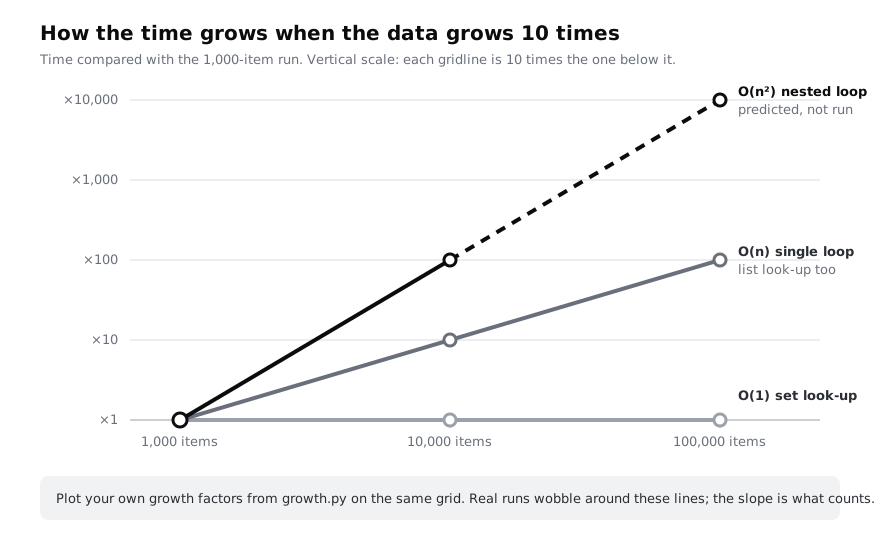
Plotted on a scale where each gridline is ten times the last, the three patterns become three straight lines with different slopes:
Check it worked
You see a header row with the three sizes and four rows of times. The set lookup factors are close to x1, the list lookup and single loop factors are close to x10, and the nested loop factor is close to x100. The numbers wobble: an x8 or x13 is normal, and very fast timings such as the set's are the noisiest. Run the script again if a factor looks far out. Mark your three patterns on the chart above with your own factors.
Step 6 · Rewrite the duplicate finder to O(n) with a set
The nested loop is slow because it asks "does this item match any other item?" by checking them all. A set answers "have I seen this before?" in constant time. Go through the list once and keep the values seen so far in a set. Write duplicates_fast.py:
cat > duplicates_fast.py <<'PY'
from duplicates import duplicates_nested
from timing import SIZES, fmt, time_it


def duplicates_with_set(items):
    seen = set()
    dupes = set()
    for item in items:
        if item in seen:
            dupes.add(item)
        else:
            seen.add(item)
    return sorted(dupes)


if __name__ == "__main__":
    sample = [4, 7, 1, 7, 9, 4, 7]
    print(duplicates_with_set(sample))

    mixed = [n % 700 for n in range(1_000)]
    print("same answer:", duplicates_with_set(mixed) == duplicates_nested(mixed))

    for n in SIZES:
        items = list(range(n))
        one_run = time_it(lambda: duplicates_with_set(items), number=20)
        print(f"{n:>7,} items   with set {fmt(one_run):>9}")
PY
python3 duplicates_fast.pyseenholds every value met so far.dupescollects values met a second time; it is a set too, so a value that appears three times is still recorded once.- Each item costs one set lookup and at most one set insert, both constant time, so the whole function does work in step with n: O(n).
mixedis a 1,000-item list where the values 0 to 299 appear twice. Comparing the two functions' answers on it checks that the faster version is also correct.sorted(dupes)costs a little extra when there are many duplicates, but sorting is fast compared with comparing every pair.
Check it worked
The output starts with [4, 7] and same answer: True. Then three timing lines, something like 40 µs, 400 µs and 4 ms: about x10 per step, the O(n) pattern. Compare the 10,000-item line with the nested version from earlier: milliseconds or less against more than a second. The fast version handles 100,000 items in a fraction of the time the slow one needed for 1,000.
Step 7 · Read code and guess its growth
With the three patterns in mind, you can often guess the growth of code by reading it, before you time anything. Ask: for each item, how much work does the code do?
- A fixed number of steps, whatever the size: O(1).
- One pass over the data, with constant work per item: O(n).
- For each item, another pass over the data: O(n²). Watch for passes that hide inside one line:
x in some_list,some_list.index(x),some_list.count(x)andsome_list.remove(x)each scan the list.
Here are three functions. Before you run anything, write down your guess for each:
cat > guess.py <<'PY'
from timing import fmt, time_it


def last_item(items):
    return items[-1]


def count_negatives(items):
    count = 0
    for x in items:
        if x < 0:
            count += 1
    return count


def common_items(a, b):
    return [x for x in a if x in b]


if __name__ == "__main__":
    tests = [
        ("last_item", lambda n: (lambda d=list(range(n)): last_item(d)), 1_000),
        ("count_negatives", lambda n: (lambda d=list(range(n)): count_negatives(d)), 20),
        ("common_items", lambda n: (lambda a=list(range(n)), b=list(range(n, 2 * n)): common_items(a, b)), 1),
    ]
    for name, make_code, number in tests:
        small = time_it(make_code(1_000), number=number)
        large = time_it(make_code(10_000), number=number)
        print(f"{name:<16} 1,000: {fmt(small):>9}   10,000: {fmt(large):>9}   x{large / small:.0f}")
PY
python3 guess.py
The script times each function at 1,000 and 10,000 items and prints the growth factor. In common_items, the lists a and b share no values, so every x in b has to scan all of b.
Check it worked
You see three lines. Compare the factors with your guesses:
last_itemis about x1. Reading one position in a list is O(1), whatever the list's length.count_negativesis about x10. One pass with constant work per item is O(n).common_itemsis about x100. It looks like one loop, butx in bon a list is a second loop hidden inside it, so it is O(n²). Changingx in btox in set_b, withset_b = set(b)built once before the loop, brings it down to O(n).
If you guessed common_items as O(n), that is the most common mistake, and the reason to time code you are unsure about.
Step 8 · Know what Big-O leaves out
Big-O describes how work grows, not how fast code is. Keep these points in mind when you use it:
- It ignores fixed costs. Your
totalloop and the built-insumare both O(n), butsumis several times faster. Big-O says only that both grow ten times when the data does. - Small data hides the difference. At 20 items, a nested loop does 190 comparisons and finishes in microseconds. O(n²) code becomes a problem when the data grows, which is often after the code has shipped: a list of 500 customers in testing becomes 50,000 a year later.
- It usually means the worst case. A list lookup that finds its value at the front is fast; O(n) describes the search that has to go to the end.
- Speed costs memory. The set version keeps a copy of the values. For a few million numbers that is fine on a laptop, but on a phone with 2 GB of memory it is worth knowing.
Remove the demo folder when you have finished:
cd ~
rm -rf ~/big-o-demoCheck it worked
Run ls ~/big-o-demo. It prints No such file or directory, which confirms the folder is gone. As a final self-check, open any script you wrote recently, find its loops, and write the Big-O of each next to it as a comment. If a loop contains in on a list, .index() or .count(), count that as a loop too.
Next steps
- Use the same timing method on a real algorithm: search a list with linear and binary search introduces O(log n), which grows even more slowly than O(n).
- See O(n²) and O(n log n) side by side: sort a list with insertion sort and sorted().
- Count the calls a function makes to itself: understand recursion with small examples.
- Revisit the loops this tutorial timed: loop over lists, ranges and dictionaries with for.
Part of these paths
Related tutorials
- Search a list with linear and binary searchYou will write linear search and binary search in Python, watch binary search halve a sorted phone book in a printed trace, fix the classic off-by-one loop, and test both functions and the standard library's bisect against the same inputs.
- Sort a list: write insertion sort, then use sorted with a keyYou will write insertion sort from the way you sort cards by hand, watch it work pass by pass, time it against Python's sorted(), sort student records by score and name with key and reverse, and finish with a test that checks your sort against sorted() on 500 random lists.
- Understand recursion with small examples and the call stackYou will write four recursive functions in Python, from a countdown to a folder-tree walker, break one on purpose to see RecursionError, rewrite another as a loop, and be able to trace any recursive call on paper.
Need this done for you?
Padding does this work for growing companies, from the first diagnosis to a system that keeps working.
Get new tutorials