AI in design · Intermediate · 18 min
Show uncertainty and sources in AI answers
By Padding · Updated 18 Nov 2026
Figma (web) or any design tool, a spreadsheet and a video-call tool for remote sessions · November 2026
You will have three tested answer layouts for an AI assistant, one sourced, one uncertain and one out of scope, plus the rules that decide which layout each answer gets.
On this page
An AI assistant that writes every answer in the same calm, fluent paragraph gives people no way to tell a fact copied from the clinic's own page from a guess. Either they trust everything, and some of them act on a wrong answer, or they get burned once and trust nothing, and the assistant becomes clutter.
The goal of this tutorial is not to make people trust the assistant more. It is to make their trust match how reliable each answer actually is: high when the answer comes straight from a page the clinic maintains, lower when the pages do not settle the question, and none at all for questions the assistant should not be answering.
The running example is Larkfield Clinic, the fictional community clinic whose booking app has screens for Home, Choose a service, Pick a time, Your details, Confirm and Booked. The clinic has added a small assistant that answers questions such as "can I get a travel vaccine this week?" from the clinic's own pages and live appointment times, and hands people over to the booking form. You will design three answer layouts for it, sourced, uncertain and out of scope, decide which signals show uncertainty, and test the wording with five people.
Step 1 · Sort real questions into three answer types
Open a spreadsheet and call the first tab Questions. Collect 20 to 30 questions people really ask. For Larkfield, they come from the front desk's notes and the contact form; for your own product, use support tickets, search logs or the questions from your chat interface research. Remove names and anything else that identifies a person before the questions go anywhere near the sheet.
Add four columns: question, answer type, why, and source page. Give every question one of three types:
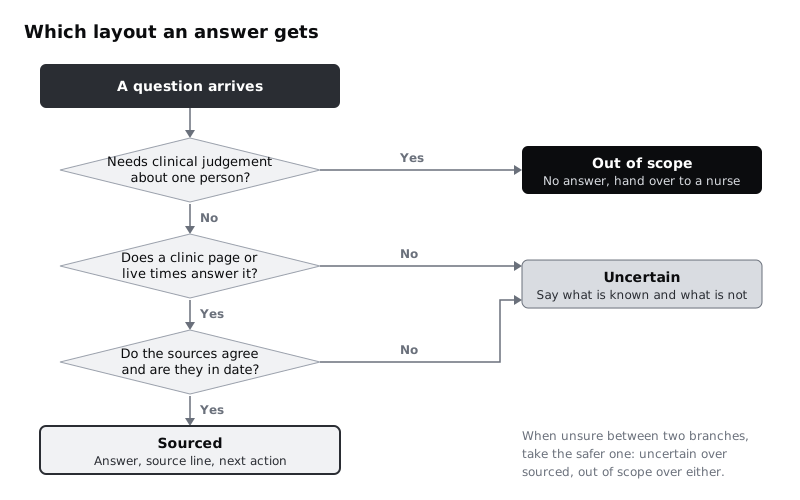
- Sourced. A clinic page or the live appointment list answers it directly. "Can I get a travel vaccine this week?" is sourced: the Travel vaccinations page says nurses give them, and the appointment list shows the free times.
- Uncertain. The question is in scope, but the pages do not settle it. They say nothing, they are out of date, or two of them disagree. "Do you give the yellow fever vaccine?" is uncertain if the Travel vaccinations page lists other vaccines and does not mention it. "Are you open on 28 December?" is uncertain if the Opening hours page gives normal weekday hours with no holiday exceptions and a holiday news post says the clinic is closed that day.
- Out of scope. The assistant should not answer, however good its sources. For a clinic, that is anything that needs clinical judgement about one person: "I'm pregnant, which travel vaccines are safe for me?", "Is this rash serious?", "Can I take ibuprofen with my blood pressure tablets?" These go to a nurse.
Write the "why" in a few words, such as "page lists other vaccines, not this one" or "asks about her own health". When you cannot decide between sourced and uncertain, choose uncertain. When you cannot decide whether a question needs clinical judgement, choose out of scope.
Check it worked
The Questions tab has at least 20 rows, every row has one of the three types and a reason, and every sourced row names the page that answers it. At least three rows are uncertain and at least three are out of scope; if not, go back to the raw questions, because a sheet where everything is sourced usually means the hard questions were left out.
Step 2 · List the sources the assistant may cite
Add a tab called Sources. The assistant can only show where an answer came from if the team agrees what counts as a source. List each one with five columns: title as people see it, link, owner, last updated and what it may be used for.
For Larkfield:
- Travel vaccinations,
larkfield.example/travel-vaccinations, practice nurse lead, updated 3 November 2026, which travel vaccines are given and how to book. - Opening hours,
larkfield.example/opening-hours, practice manager, updated 1 October 2026, normal hours only. - Services,
larkfield.example/services, practice manager, updated 1 October 2026, the five appointment types: GP appointment, Nurse appointment, Blood test, Vaccination and Medication review. - Holiday news posts,
larkfield.example/news, practice manager, one post per holiday, closures and changed hours for that holiday only. A post counts as a source until the last date it covers has passed. - Free appointment times, from the booking system, checked when the question is asked, which times are free.
Then write down what is not a source: general health websites, the model's own background knowledge, and news posts whose dates have passed or that are not about opening times. An answer built from those is uncertain at best, even when it is probably right, because nobody at the clinic can stand behind it.
Look at the "last updated" column. Any page more than six months old gets flagged to its owner now. Showing sources does not help if the source is wrong.
Check it worked
Every source page named in the Questions tab appears in Sources, with an owner and a date. You can say, for any row, who at the clinic would fix that page if it were wrong. The "not a source" list is written down in the same tab.
Step 3 · Design the sourced answer
In your design file, add a page called Assistant answers and a frame called Answer / Sourced. Build it from the chat message component you already have, and put the parts in this order:
- The answer, first and short. "Yes. Nurses give travel vaccinations here. The earliest free Vaccination appointment is Friday 11 December at 14:40." Lead with what the person asked; do not open with "Based on the clinic's pages...".
- The source line. Under the answer, in
Body/Smallandtext-muted: "From Travel vaccinations, updated 3 Nov 2026 · Free times checked 09:12". Each page title is a link to the page. The link text is the page title, never "source 1" or "[1]", so a screen reader user hears where the link goes. - The next action. A secondary button, "Book this time", that opens Pick a time with Vaccination already chosen. The assistant does not book; the normal booking form does.
Keep sources to the one or two that the answer actually uses. A list of five links looks thorough and is never read. If two sentences in the answer come from different pages, the source line names both, in the order the sentences use them.
A short quote helps when the page is long or slow to load. Under the source line, an expandable "What the page says" row shows the sentence the answer is based on. For people on prepaid mobile data or an older Android phone, this saves opening a full web page to check one line, so test the expanded row on a slow connection before you decide its default state.
Check it worked
Read the Answer / Sourced frame top to bottom. The first sentence answers the question, every fact in the answer can be found in a source named in the source line, each source link reads as a page title, and the source line shows a date. The only button hands over to the booking form.
Step 4 · Compare confidence scores with plainer signals
The obvious way to show uncertainty is a number: "72% confident". Before you use one, put it beside the alternatives. Duplicate Answer / Sourced three times, change each copy to the yellow fever question, and give each a different signal:
- A, a score. The answer with a badge reading "Confidence 72%".
- B, a label. The same answer with a badge reading "Low confidence".
- C, plain wording. No badge. The answer itself says what is known and what is not: "The Travel vaccinations page doesn't list yellow fever, so I can't confirm the clinic gives it. Call 01234 567 890 to check before you book."
Now judge each one with three questions in a new tab called Signals:
- Can the person act on it? 72% does not tell anyone what to do. C tells them to call.
- Is it true? A score from the model is not the probability that the answer is right unless your team has measured that against real outcomes. Showing an unmeasured number implies a precision nobody has.
- Does it stay accurate when the answer changes? A badge has to be set by something. Plain wording is written from the routing in step 1, which the team can check.
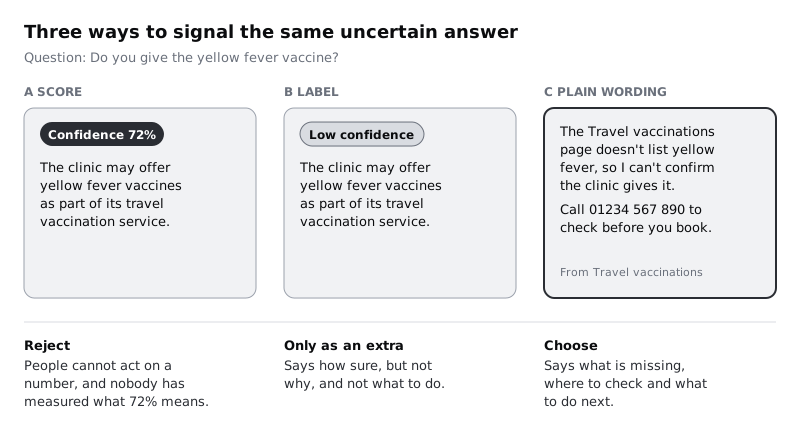
For Larkfield, C wins, and B is kept only as a short label on top of C if testing shows people skim past the wording. Whatever you choose, uncertainty is never shown by colour alone: a yellow bubble with no words means nothing to someone who cannot see the difference, or to anyone who has not been told what yellow means.
Check it worked
The Signals tab has the three versions in rows and the three questions as columns, with a written answer in every cell. You have one chosen signal and one sentence saying why, and the rejected frames stay on the page, labelled, so the team can see what was tried.
Step 5 · Design the uncertain answer
Rename the chosen frame Answer / Uncertain and tidy it into a pattern every uncertain answer can follow. It has four parts:
- What the sources do say. "The Travel vaccinations page lists hepatitis A, typhoid and other travel vaccines."
- What they do not settle, said plainly. "It doesn't mention yellow fever, so I can't confirm the clinic gives it." Use "I can't confirm", not "I'm not sure" or "I think", so the reason is the missing source, not the assistant's mood.
- The source line. The same style as the sourced layout, so people can check the gap for themselves.
- Two ways forward. A primary action that gets a definite answer, here "Call the clinic", and a secondary one that keeps them moving if the answer turns out to be yes, here "See Vaccination times".
Make the pattern visible as well as written: a notice-tint panel behind the message, with the alert icon from the Larkfield icon set and a Label text line reading "Not confirmed". The words carry the meaning; the panel and icon help people spot it when they scroll back.
Write two more uncertain frames from your Questions tab: one where the pages say nothing, and one where two pages disagree. For the disagreement, use the 28 December question and quote both sources: "The Opening hours page says the clinic is open 08:00 to 18:30 on weekdays, which would include Monday 28 December. A holiday news post from 2 December says the clinic is closed from 25 to 28 December. The two pages disagree about 28 December, so I can't confirm whether the clinic is open that day." The source line names both pages, and the primary action is still "Call the clinic". Never let the assistant pick one quietly. The news post is a listed source because it is still in date, so this is a real disagreement, and the fix belongs with the practice manager, who owns both pages.
If the clinic answers in more than one language, give the uncertain wording to a fluent speaker to translate, not the assistant. Hedging words such as "can't confirm" are the ones most likely to come out softer or stronger in another language, and they carry the whole meaning of this layout.
Check it worked
You have three Answer / Uncertain frames, each with the four parts in the same order. Cover the panel and icon with your hand: the words alone still say the answer is not confirmed. Every action button goes to a real place, the phone number or a screen in the booking flow, and none of them says "Try again".
Step 6 · Design the out-of-scope answer
Add a frame called Answer / Out of scope. This one does not answer the question at all, even partly. A half-answer to "which vaccines are safe in pregnancy" is worse than none, because people stop reading once they have something that sounds like advice.
Put these parts in order:
- What the assistant can't do, in one sentence. "I can't give advice about your own health, including which vaccines are right for you."
- Who can. "A nurse can go through this with you at a Nurse appointment."
- The handover. A primary button, "Ask a nurse to call me", that opens the nurse call-back request, and a secondary button, "Book a nurse appointment", that opens Pick a time with Nurse appointment chosen.
- The urgent line, every time. "If it's an emergency, call your local emergency number now." Keep it on every out-of-scope answer; the assistant should not decide whether something is urgent.
This is the same screen as the F4 out-of-scope refusal in /tutorials/design-error-refusal-and-fallback-states-for-ai, so take the refusal wording, the call-back button and the emergency line from there rather than writing new ones, and follow its rule that a clinician signs off the emergency line before release. The one difference is the second button. F4 is about a symptom, so it offers "Book a GP appointment"; this example is about vaccines, which nurses give, so it offers "Book a nurse appointment". Make the second button a property of the out-of-scope variant, not a second design.
Do not explain the refusal at length or apologise more than once. Do not show sources here: a source line suggests the clinic's pages were used to judge the question, which invites people to read the answer into them.
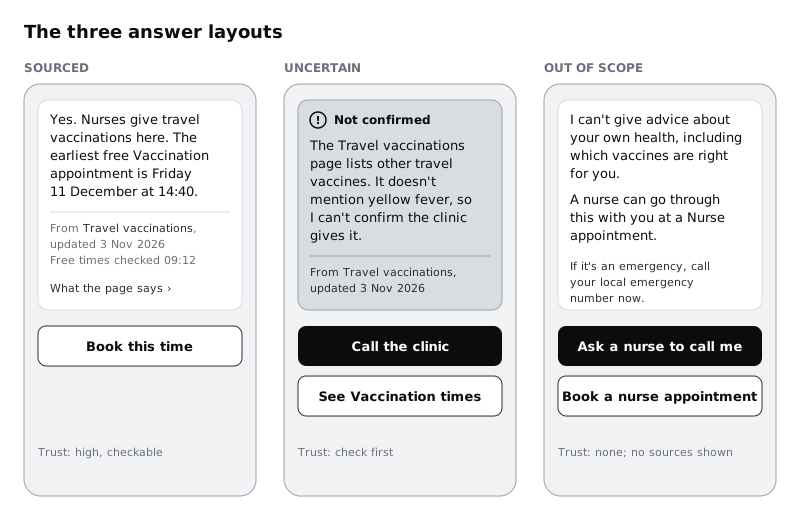
Turn the three layouts into one component with a variant property called type and values sourced, uncertain and out of scope, so the chat screens can switch between them without anyone rebuilding the parts.
Check it worked
The Answer / Out of scope frame contains no medical information at all, has an "Ask a nurse to call me" button and a button that opens Pick a time with Nurse appointment chosen, and shows the emergency line in the same words as the F4 refusal. That line is marked "needs clinician sign-off" until a clinician at the clinic has approved it, and the frame is not released before then. Select an answer instance on a chat screen and switch its type in the right sidebar: all three layouts appear in turn, each with its own action.
Step 7 · Test whether people's trust matches the answer
Trust you cannot measure is trust you are guessing about. Build a simple test with five people who have not seen the assistant. Show each person six answers, two of each type, in a different order for each person, and ask three questions after each:
- "Where did this answer come from?"
- "How sure would you be about acting on it, from 1 (not at all) to 5 (completely)?"
- "What would you do next?"
Add a tab called Trust test with one row per person per answer. Score question 1 as right if they named the clinic page or said the assistant could not answer, question 3 as right if their next step matches the layout's action, and copy the 1 to 5 number as it is.
Then compare the average certainty by type. Five people and ten ratings per type are enough to spot a large gap but not to compare averages closely, so treat the averages as a rough signal and rely on the answers to "where did this answer come from?" and "what would you do next?" for your conclusions. You are looking for a clear gap: sourced answers high, uncertain answers clearly lower, out of scope answers giving no certainty about the health question at all. The failures to look for:
- Uncertain scored nearly as high as sourced. People missed the hedge. Move "I can't confirm" earlier, or add the "Not confirmed" label above the text.
- Sourced scored low. The source line is not being read or is not believed. Check whether people could name the page.
- Someone answered their health question from the out-of-scope layout. Rewrite until nobody does. This result blocks release, as does an emergency line without clinician sign-off from step 6.
Check it worked
The Trust test tab has 30 rows. You have the average certainty for each type and a written gap between sourced and uncertain. Every out-of-scope row has the next step "ask a nurse to call" or "book a nurse". Any wording change you made is noted in the tab, with the result that prompted it.
Step 8 · Write the rules and the review into the handover
The layouts only work if the system picks the right one. Add a section to the design handover called "Which answer layout to use" and write the rules from the earlier steps as plain conditions the engineers can build and test against:
- Use
out of scopewhen a question asks for clinical judgement about one person. This check runs before any source lookup. - Use
sourcedonly when every fact in the answer can be found in a listed source, and every source named is in date. - Use
uncertainin every other case, including when sources disagree or none is found. - Never show a source the answer did not use. Never show a numeric confidence score.
Then add the human check, because the routing will be wrong sometimes and nothing on screen will tell you. Each week, someone at the clinic, for Larkfield the practice nurse lead, reads 20 answers picked at random from that week, checks each one against its source, and logs the result in a Review tab: question, layout shown, layout it should have had, and any fact that did not match its source. A sourced answer with a wrong fact, or a clinical question that got a sourced or uncertain answer, goes to the team the same day.
Check it worked
The handover has the four rules as written conditions, each traceable to a step in this tutorial. The Review tab exists with its columns, a named reviewer and a day of the week. Pick any frame on the Assistant answers page and say which rule puts an answer into that layout.
Next steps
You now have three answer layouts, a test that shows people's trust follows the answer, and a weekly review that catches the cases the rules miss.
- The layouts sit inside a conversation. If you have not designed that yet, start with /tutorials/design-a-chat-interface-for-an-ai-assistant.
- Uncertainty is one kind of failure. For timeouts, refusals and a provider going down, read /tutorials/design-error-refusal-and-fallback-states-for-ai.
- To tighten the wording of the uncertain and out-of-scope messages, use /tutorials/write-interface-copy-for-labels-buttons-and-errors.
- To test the assistant inside the full booking flow, plan a session with /tutorials/plan-a-usability-test.
Related tutorials
- Write team rules for using AI in design workYou will have a one-page AI policy for your design team, covering approved tools, data that never goes in, client disclosure, who checks output and how generated assets are labelled, plus a three-question check every designer runs before using AI on a task.
- Write prompts that give usable design outputYou will have turned a one-line design prompt into a five-part prompt, compared the output at every version in a prompt log, and saved a reusable prompt template with three before and after examples for design tasks.
- Use Figma's built-in AI features on a real fileYou will have tried Figma's built-in AI tools for layers, text, search and images on a copy of a real design file, timed and checked each result, and written a keep-or-skip verdict for every tool on a scorecard beside your screens.
Need this done for you?
Padding does this work for growing companies, from the first diagnosis to a system that keeps working.
Get new tutorials