Product and project management · Intermediate · 15 min
Split a large user story into thin vertical slices
By Padding · Updated 18 Nov 2026
Any document editor · November 2026
You will turn the Larkfield Clinic story "patients can book online" into nine thin slices plus a spike, each one usable by a patient or receptionist, in a delivery order with a marked cut line for when time runs short.
On this page
"As a patient, I want to book an appointment online so that I do not have to phone the clinic at 8am." Every clinic team agrees this is the right story. Nobody can finish it in a sprint, because hidden inside it are new and registered patients, GPs and nurses, children booked by parents, cancellations, a link to the clinic's diary, a second language and the Monday-morning rush.
The usual response is to split it by layer: build the database, then the API, then the screens. That feels orderly and delivers nothing anyone can use until the last layer lands. This tutorial does the opposite. You cut the story into thin vertical slices, each of which goes through every layer and gives a patient or receptionist something real, however small.
The running example is Larkfield Clinic, the fictional community clinic, at an earlier stage: before its booking app existed, when it first adds online booking. You use six splitting patterns named by Richard Lawrence and Peter Green: workflow steps, business-rule variations, variations in data, simple then complex, defer performance, and a spike for the unknown. You end with nine slices and a spike in a sensible order, a cut line, and a one-line demo for each slice.
Step 1 · Write down the big story and everything hiding in it
Open a new document called "Larkfield online booking: slices". At the top, write the story exactly as the team uses it today:
As a patient, I want to book an appointment online so that I do not have to phone the clinic at 8am.
Under it, make a heading "Hiding in this story" and list every question someone has asked about it, every "what about...", and every rule the receptionists mention. Do not sort or judge them yet. For Larkfield the list looks like this:
- Registered patients and new patients who are not on the list yet
- GP appointments (10 minutes) and nurse appointments (20 minutes)
- Parents booking for their children
- Cancelling and changing a booking
- Where open times come from: the receptionists' paper rota, or the clinic's diary system
- Patients who read Larkfield's second language more easily than English
- Monday at 8am, when half the week's demand arrives in an hour
- Patients on low-end Android phones with prepaid data, who will give up on a heavy page
Each line is a source of complexity. Each one is also a candidate place to cut.
Check it worked
Your document has the original story and at least six "hiding" items. Read the list to someone who knows the clinic: if they add an item you missed, write it in. If every item on your list is a technical task ("set up the database"), you are listing work, not complexity; rewrite them as things a patient or receptionist does or needs.
Step 2 · See why splitting by layer fails
Before cutting, look at what most teams do first, so you can recognise it and say no to it. A horizontal split of the Larkfield story gives four cards:
- Design and build the booking database tables
- Build the booking API
- Add confirmation and cancellation logic
- Build the booking screens
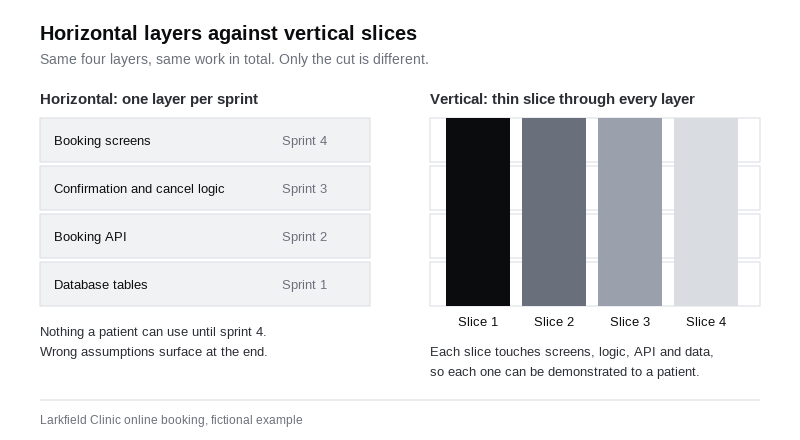
Play it forward. At the end of sprint 1 the team demonstrates some tables. The clinic manager nods. At the end of sprint 2 they show API calls in a developer tool. In sprint 4 the screens arrive and a receptionist tries them for the first time. She points out that nurse appointments are 20 minutes, that new patients must be checked before they can book, and that two of the GPs only see children on Tuesdays. Those rules change the tables built in sprint 1. Six to eight weeks of work now needs reopening, and no patient has booked anything.
Three things went wrong, and vertical slices fix each one:
- No feedback until the end. A slice through every layer can be shown to a receptionist in sprint 1.
- Nothing can be released early. A layer has no value alone; a slice does.
- No card can be dropped. If time runs short, you cannot ship the database without the screens. You can ship four slices out of nine.
Write a short paragraph under a heading "Why not by layer" in your document, in your own words, using your team's version of this story. You will use it when someone suggests "let's do the backend first".
Check it worked
Your "Why not by layer" paragraph names one rule that would have been found late under a horizontal split. Ask yourself: if the team stopped after the first card of a horizontal split, could a patient do anything? The answer should be no, and your paragraph should say so.
Step 3 · Find the thinnest path with workflow steps
The first pattern is to follow the steps a person goes through and ask which ones can be done by hand, for now, so that the rest can ship. Write the Larkfield booking journey as steps:
- See which times are open
- Choose a time
- Give your details
- Get a confirmation
- Turn up, or cancel
The thinnest useful slice can be step 1 alone, as long as the patient can act on it: a list of open times is useful because they can phone and ask for a time by name, so the call is short. For Larkfield the first slices are:
- Slice 1: Patient sees this week's open GP times. Receptionists type the open times into a simple form each morning. Patients see them on a page and phone to book a time they have already chosen. This alone cuts the length of 8am calls.
- Slice 2: Registered patient books an open GP time. The patient enters name, date of birth and phone number, gets an on-screen reference, and the time disappears from the list. The receptionist sees the booking in today's list.
- Slice 3: Patient cancels with their booking reference. The time reappears for others.
Notice what is deliberately manual: receptionists enter times by hand, and anything unusual still goes by phone. That is the point. Each slice works end to end with a little human help, and later slices remove the help.
Write these three slices in your document under a heading "Slices", one line each, starting with who can do what.
Check it worked
Each of your three slices starts with a person (patient or receptionist) and a verb they can do. For each one, write a one-line demo below it, such as "Receptionist adds three times; on a phone, the page shows those three times." If you cannot write the demo without saying "and then, once the next slice is done...", the slice is not complete; move the missing part into it.
Step 4 · Split out rule variations and data variations
Now look back at your "hiding" list. Many items are variations on a working path: the same journey with a different rule or different data. Each variation becomes its own slice, added after the simplest version works.
Business-rule variations change what the system allows:
- Slice 4: Nurse appointments. Same journey, but 20-minute slots and a separate list. Before this slice, nurse appointments stay phone-only.
- Slice 5: New patient requests a first visit. A new patient cannot book directly; they send a request, and a receptionist approves it after checking registration. Before this slice, new patients phone as they do now.
Variations in data keep the rule but change the information:
- Slice 6: Booking pages in the clinic's second language. The same pages with translated labels, dates and messages. Test with real translated text, which is often longer than English and can break narrow layouts on small phone screens.
- Slice 7: Parent books for a child on their record. The patient chooses which family member the booking is for.
For each variation, ask the receptionists how common it is. Larkfield's receptionists say about a third of calls are for nurse appointments and about one in ten from new patients. That tells you the order, which you set in a later step.
Check it worked
You now have seven slices. Pick slices 4 to 7 one at a time and confirm that slice 2 (registered patient books a GP time) still works without it. If removing a variation slice would break the basic booking, you have split it badly: the basic slice depends on it, so the two need merging or the boundary moving.
Step 5 · Go simple, then complex, and defer performance
Two more patterns deal with the parts that are hard to build rather than hard to define.
Simple then complex. In slice 1, receptionists type open times by hand. The complex version reads them straight from the clinic's diary system. That becomes its own slice, added once the simple version proves people use online booking at all:
- Slice 8: Open times sync from the clinic diary automatically. Receptionists stop entering times; bookings appear in the diary.
Defer performance. Make it work first, then make it fast under load. Larkfield's 8am Monday rush is real, but the team does not yet know how many patients will book online rather than phone. So:
- Slice 9: Handle Monday 8am demand without slowing down. Load tested to a target agreed with the clinic, based on what slices 1 to 3 show about real use.
Be careful what you defer. Peak load can wait; basic page weight cannot. A patient on a low-end Android phone with a few megabytes of prepaid data left will not wait for a heavy page, whatever the server can handle. Write "pages under 500 KB and usable on a slow connection" into the acceptance criteria of slices 1 and 2, so it is part of the first release, not slice 9.
Check it worked
Slice 8 replaces a manual step that an earlier slice relies on, and you can name that step ("receptionist enters times each morning"). Slice 9 has a sentence saying what evidence will set its target. Slices 1 and 2 each carry a page-weight or slow-connection criterion.
Step 6 · Break out a spike for the unknown
Slice 8 has a problem: nobody knows whether Larkfield's diary system lets other software read and write appointments. That one question could make slice 8 a week or impossible. You cannot estimate it, so you do not try.
Instead, add a spike: a short, time-boxed piece of investigation whose output is an answer, not software. Write it like this:
- Spike: Can we read and write the clinic diary? Time box: two days. Output: a one-page note answering three questions: is there an official way to connect to the diary, what does it allow (read times, write bookings, both), and what would it cost the clinic in effort or fees. Decision after the spike: build slice 8, change it, or drop it and keep manual entry.
Put the spike at the top of your list, labelled "Slice 0", so it runs alongside slices 1 and 2. Then the answer is ready before anyone needs to plan slice 8.
A spike is the one item on your list that is not a vertical slice and that is correct. Keep spikes rare, short and tied to one decision. If you find yourself writing three spikes, the story probably needs more research before it needs splitting.
Check it worked
Your spike has a time box in days, a written output, and a named decision it feeds. Ask a teammate: "When this spike ends, what will we know that we do not know now?" If they cannot answer in one sentence, the spike is too vague; narrow it to the question blocking slice 8.
Step 7 · Test every slice and set the order
You have nine slices and a spike. Now test each slice against INVEST, Bill Wake's checklist for a good story: Independent, Negotiable, Valuable, Estimable, Small and Testable. Slicing work most often fails on two letters:
- Valuable: would a patient or receptionist notice if this slice shipped alone? "Add the bookings table" fails. "Patient cancels with their reference" passes.
- Small: can the team finish it within one sprint, with room for testing? If not, apply the patterns again to that slice.
Then order the slices. Put first what gives the most value soonest and what teaches you the most. For Larkfield:
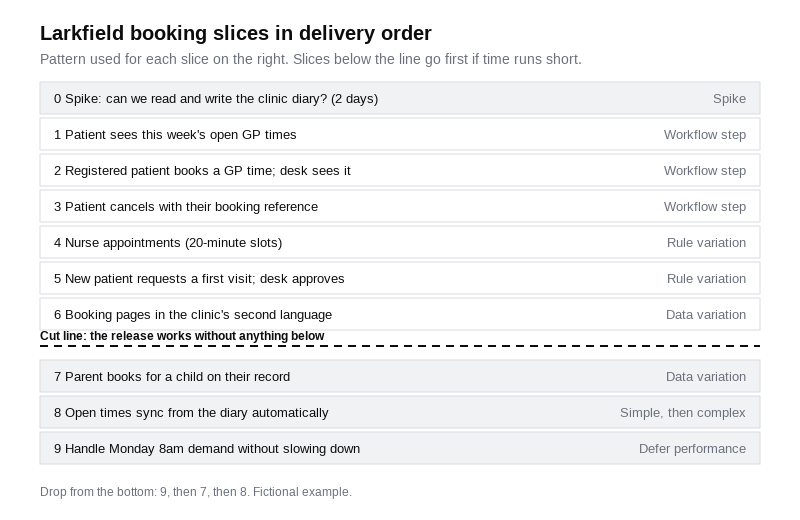
Draw a cut line in your document: everything above it is a release the clinic would accept; everything below it is welcome but optional. Under the line, write which slices to drop first if time runs short, and why. For Larkfield:
- Drop slice 9 first: real demand may never need it, and slices 1 to 3 will show whether it does.
- Drop slice 7 next: parents can phone for their children as they do now.
- Drop slice 8 next, or sooner if the spike says the diary cannot connect: manual entry costs receptionists ten minutes a morning.
Slice 6 sits above the line for Larkfield because the clinic's own research shows many patients prefer the second language. If your users' needs differ, your line will too. The order is a product decision, so share it with whoever owns the budget and the timeline, and agree it rather than announcing it.
Check it worked
Every slice above the cut line passes "Valuable" and "Small". Your document has a cut line and a "drop first" list with a reason for each item. Cover everything below the cut line with your hand: what remains should still describe a release you would be comfortable putting in front of patients.
Step 8 · Prove each slice can be demonstrated on its own
The final check is the one that matters most. Under each slice, you already wrote a one-line demo. Now read the demos in order, as if you were standing in front of the clinic manager at the end of each sprint:
- Slice 1: "On a phone, the page shows the three times the receptionist entered this morning."
- Slice 2: "I book the 10:20 with Dr Okafor; it disappears from the list and appears on the desk screen."
- Slice 3: "I cancel with reference LK-4821; 10:20 is back on the list."
...and so on to slice 9. Each demo should need only that slice and the slices before it, never a later one. If a demo needs a later slice, either reorder or move the missing part into the earlier slice.
Finally, take the top three slices into your next planning session and write acceptance criteria for each one. The tutorial on user stories with acceptance criteria shows how.
Check it worked
You have nine slices plus a spike, each with a demo line that names what someone sees. Read the demos aloud in order: none mentions a feature from a later slice. Show the list to one developer and one receptionist; each should be able to say, for any slice, "I would know if this was done."
Next steps
Your slices are only as good as their acceptance criteria, so write those next with Write user stories with clear acceptance criteria. When the team asks how long the nine slices will take, answer with Estimate work with ranges instead of false precision. To turn each slice into a card a developer can start on without a meeting, follow Write tickets developers want to pick up. If a story keeps resisting being split, go back to the need behind it with Write job stories with jobs to be done.
Related tutorials
- Write user stories with clear acceptance criteriaYou will have five user stories for a clinic's reschedule feature, each checked against INVEST and carrying Given / When / Then acceptance criteria that a developer and a tester read the same way.
- Write tickets developers want to pick upYou will rewrite three vague backlog tickets into ones a developer can start without asking a question, and save the structure as a ticket template in your tracker.
- Write a weekly stakeholder update people readYou will have a reusable weekly update template and one finished update under 250 words, whose first two lines tell any reader whether they need to act.
Need this done for you?
Padding does this work for growing companies, from the first diagnosis to a system that keeps working.
Get new tutorials