AI in design · Beginner · 14 min
Decide whether a feature needs AI at all
By Padding · Updated 18 Nov 2026
Any shared document or spreadsheet · November 2026
You will have a one-page decision record that tests three proposed AI features against simpler options, the cost of a wrong answer, the data they need and who checks their output, ending in a go, change or drop for each with the reasons.
On this page
"Can we add AI to this?" is a question about a technology. The question that matters is about the job: what goes wrong for people now, and what is the cheapest dependable way to fix it. Sometimes the answer involves a model. Often it is a clearer label, a fixed rule or a form.
This tutorial gives you a short test you can run on any proposed AI feature, in an afternoon, with no prototype. It is allowed to say no. You check each idea against four things in order: whether a simpler option does most of the job, whether you have the data and may use it, what a wrong answer costs, and who checks the output before it counts. Then you write down a decision and what would make you revisit it.
The example is Larkfield Clinic, a fictional community clinic with an appointment booking app (Home, Choose a service, Pick a time, Your details, Confirm, Booked) for five services: GP appointment, Nurse appointment, Blood tests, Travel health and Child check-up. At a planning meeting, three AI ideas came up: a booking assistant patients can ask questions, "smart" reminder timing, and visit notes summarised automatically for patients. You will finish with a go, change or drop for each.
Step 1 · Rewrite each proposal as a job, not a technology
Open a new document and call it AI decisions. Make one heading per proposal. Under each, write the proposal as it was said in the meeting, then rewrite it underneath as a job: who has the problem, in what situation, and what goes wrong today. Leave the word AI out of the rewrite.
For Larkfield:
- Booking assistant. As proposed: "an AI assistant that answers booking questions". As a job: patients choosing a service do not know which one fits ("is a travel jab the nurse or travel health?"), so they phone reception or book the wrong type, and reception rebooks about a dozen a week.
- Smart reminder timing. As proposed: "AI that works out the best time to send each reminder". As a job: some patients miss appointments even though the app texts them a reminder the day before, and each missed slot is a slot another patient could have had.
- Auto-summarised visit notes. As proposed: "AI summaries of visit notes for patients". As a job: after a visit, patients forget what they were told about follow-up and medicines, and nurses spend time each evening writing plain-language summaries for the patients who ask.
If you cannot write the job, stop there. A feature with no job behind it is a drop, and you have your first decision.
Add one line under each job: how you know the problem is real and roughly how big it is. Reception's rebooking count, the missed-appointment rate and the nurses' evening time are all things someone at the clinic can tell you. A guess is acceptable for now if you label it as a guess.
Check it worked
Your AI decisions document has three headings. Under each, the job is written in one or two sentences, names a person and a situation, and does not contain the word AI or the name of any tool. Each job has a line saying where its size comes from, marked as measured or guessed.
Step 2 · Find the simplest thing that could do the job
For each job, list two or three ways to solve it without a model. Think about the dull options first: better words on a screen, a default, a fixed rule, a choice the person makes themselves, a template, a human doing it with better tools. Then write one honest line on what each option would not solve.
For Larkfield:
- Booking assistant. Make the existing descriptions on Choose a service clearer in a patient's words: for example, extend Travel health's "Jabs and advice before a trip abroad" to say that travel jabs are booked there, not as a Nurse appointment. Show the next free time for each service on Home. Neither answers an unusual question, but reception says most calls are about which service to pick and when the next slot is.
- Smart reminder timing. Let the patient choose on Your details: a reminder the day before, on the morning of the visit, or both. Add a reply option ("Reply C to cancel") so a slot is freed when someone cannot come. This does not adapt to each patient's habits, but it lets the patient decide.
- Auto-summarised visit notes. Give nurses a short template with fixed headings (what we did, what to do next, medicines, when to come back) that they fill in before the patient leaves. This makes the summaries consistent but does not save much nurse time; the time goes on the writing.
Then answer the first question for each proposal, with a yes or no: does a simpler option do most of the job? "Most" is a judgement, so write a sentence of reasoning next to it.
At Larkfield the answers are: booking assistant, no (the descriptions fix the common case, but patients still ask about specific situations); reminders, yes (patient-chosen timing plus a reply to cancel covers what the team wanted); visit notes, no (the template helps consistency, not time).
A note for clinics whose patients use basic phones or prepaid data: an SMS reminder works on any handset and costs the patient nothing to receive in most markets, while anything that needs the app open and online does not. Simpler options often reach more people.
Check it worked
Each proposal has at least two non-AI options, each with a line saying what it would not solve. Each proposal has a yes or no to "does a simpler option do most of the job?" with a sentence of reasoning. Show the list to the person who knows the service day to day and ask whether you have missed an obvious option; add any they name.
Step 3 · Check the data the feature needs and whether you may use it
Any proposal that got a yes in the last step is now a drop. Move it to the bottom of the document under a heading Dropped, with the simpler option you will ship instead. For Larkfield, smart reminder timing moves there, replaced by patient-chosen timing and a reply to cancel.
For the rest, list what the feature would need to read to work, where that data lives today, and whether you are allowed to use it this way. Sit down with whoever knows what data you hold, such as the practice manager or a data protection lead.
- Booking assistant. To explain services and offer times, it needs the service descriptions, opening hours and free slots. Larkfield holds all three and they are not personal. Question 2: yes (confirmed by the practice manager, 17 November 2026). Whether it should ever answer "is my cough a GP or nurse thing" is not a data question; it comes up when you price a wrong answer.
- Auto-summarised visit notes. It needs each patient's visit notes. The clinic holds them, but they are health data, which most data protection laws treat as a special or sensitive category with extra conditions. Larkfield's data protection lead confirmed the clinic may process them this way on three conditions: the processing runs on a service covered by the clinic's existing data processing agreement, in the same region as its records system; patients are told in the clinic's privacy notice and at the visit that a draft summary is produced from their notes; and drafts are deleted once the clinician signs or discards them. Question 2: yes, with those conditions (confirmed by the data protection lead, 17 November 2026). Without that confirmation, the answer would be no and the decision would be change: get the confirmation first.
Had reminder timing stayed in, this step would also have sunk it: learning each patient's best reminder time needs a long history of bookings and no-shows per patient, and a clinic of Larkfield's size has a few visits a year for most patients. There is not enough to learn from.
Answer the second question with yes or no: do you hold the data, and may you use it this way? Where it is yes for part of the feature and no for another part, write both and name which part passes. Write any conditions attached to a yes next to it; they become requirements for the design.
Check it worked
Each remaining proposal lists the data it needs, where it lives and who confirmed it may be used. The answer to question 2 is written as yes, no, or split, and a split answer names which part of the feature passes. The person you checked with is named in the document, or the line says Not confirmed in bold.
Step 4 · Price a wrong answer
Every AI output is sometimes wrong. The question is what happens when it is. For each remaining proposal, write three short answers:
- Who is harmed, and how? Name the person and the consequence.
- Would anyone notice? A wrong time shown on a booking screen is visible; a missing line in a summary is not.
- Can it be undone? A booking can be moved. A patient who stopped taking a medicine because a summary left it out cannot easily be reached in time.
Then rate the cost as low, medium or high.
- Booking assistant. Wrong service suggested: the patient books Nurse appointment instead of Travel health, reception moves it, low. Wrong free time: the booking screens check the slot when the patient taps it, low. Anything resembling medical advice: high, and not always noticed.
- Auto-summarised visit notes. A summary that drops an allergy, changes a dose or invents a follow-up date: high, and silent, because the patient trusts the clinic's letter and has no other copy to compare.
Answer the third question: would a wrong answer be costly or hard to notice? For the assistant it is split: low for logistics, high for anything clinical. For visit notes it is yes.
Check it worked
Each remaining proposal has the three answers and a rating. Read the worst case for each aloud to the person who knows the service. If they wince at a case you rated low, raise it; they know the consequences better than you do.
Step 5 · Name who checks the output and when
A high cost is not automatically a drop. It means a qualified person has to check the output before it counts, and that the check has to be realistic. For each remaining proposal, write who would review the output, at what point (before it reaches anyone, after, or never), and how long it takes them.
- Booking assistant. Nobody can read every reply before a patient sees it; that would remove the point of the assistant. So the high-cost part (anything clinical) has no reviewer. The low-cost part needs a different check: before launch, staff run a set of real questions through it and mark each answer, and the booking screens confirm every time and service the patient picks.
- Auto-summarised visit notes. The nurse or GP who saw the patient reviews the draft, edits it and signs it before it is sent. The summary is drafted from their own notes about a visit they just did, so they can spot a dropped allergy. The team estimates that reviewing a draft takes a couple of minutes against roughly ten to write one; that estimate becomes something to measure in the pilot.
Answer the fourth question: will a qualified person check every output before it counts? Be strict. "The patient can always phone us" is not a review.
A review that is skipped when the clinic is busy is not a review either. Write down what happens on the busiest day: if the nurse has no time, the summary is not sent, and the patient gets the template version instead.
Check it worked
Each remaining proposal names a reviewer by role, the point at which they review, and an estimate of the time it takes. The busy-day fallback is written down. Any proposal where the high-cost part has no reviewer is marked so in bold.
Step 6 · Score each proposal and make the call
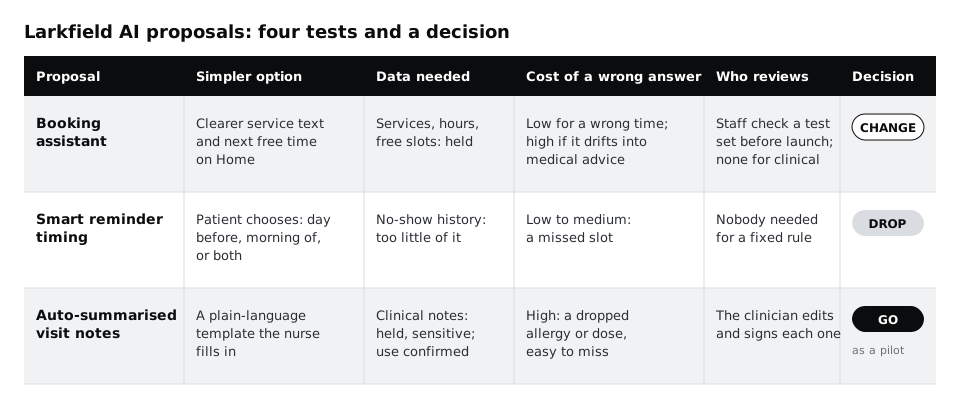
Put the answers into a decision sheet: a table with one row per proposal and columns for the proposal, simpler option, data needed, cost of a wrong answer, who reviews and decision, in the same order as the questions. The job sits under each heading in your document; the sheet only needs the proposal name. Include the dropped proposal, so the sheet shows all three.
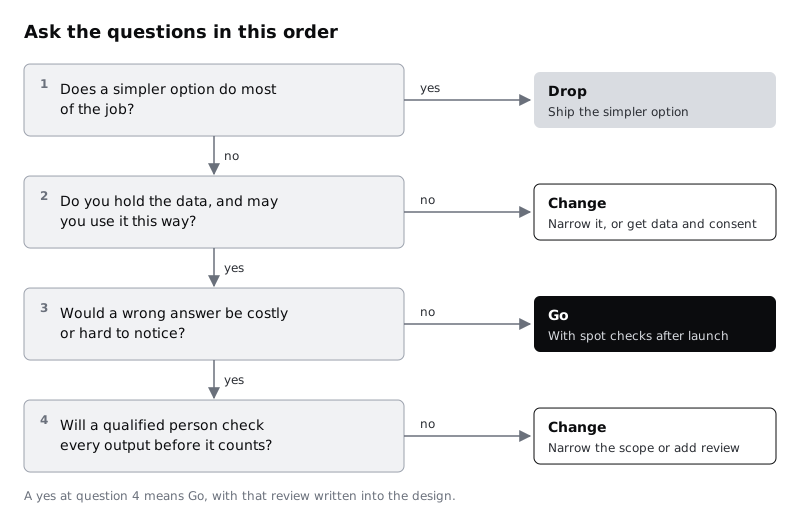
Read the decision off the four answers in order. Stop at the first one that decides it:
- A simpler option does most of the job: drop, and ship that option.
- You do not have the data or may not use it: change the proposal to the part you can support, or get the data and consent first.
- A wrong answer is cheap and easy to notice: go, with spot checks after launch.
- A wrong answer is costly: go only if a qualified person checks every output before it counts. If not, change it by narrowing the scope until the costly part is gone, or by adding a review.
For Larkfield:
- Smart reminder timing: drop. Stopped at question 1. Ship patient-chosen timing and a reply to cancel.
- Booking assistant: change. Passed questions 1 and 2, then stopped at question 4: a wrong clinical answer is costly and nobody can check every reply before a patient sees it, so the scope is narrowed until the clinical part is gone. Ship the clearer service descriptions first. Then, if the remaining questions still justify it, build an assistant narrowed to services, hours, visits and free times, which hands anything clinical to a person and anything to do with booking to the normal booking screens.
- Auto-summarised visit notes: go, as a pilot. Passed all four, with the data protection lead's conditions written into the design. Drafts go to the clinician only; nothing reaches a patient unsigned.
Under each decision, write two or three sentences of reasons in plain words. Someone reading the document in six months, who was not at the meeting, should understand why.
Check it worked
Your decision sheet has a row for every proposal, including the dropped one, and each row ends in exactly one of go, change or drop. Each decision names the question that decided it and has a short paragraph of reasons. For any go, the reviewer from the previous step appears in the row.
Step 7 · Write the decision record and what would change it
Decisions like these go stale. A clinic that grows, or a better simpler option, can flip one. Turn the document into a one-page record that people can find again, then add a trigger for each decision: the evidence that would make you look at it again.
Add these lines under each proposal:
- Decision and date: for example
Change, 18 November 2026. - What we are doing instead or first: the simpler option or the narrowed scope, with an owner.
- What would make us revisit it: a measurable trigger. For reminders:
Missed appointments stay above the current rate for three months after patient-chosen timing ships.For the assistant:Reception still logs more than five service mix-ups a week after the new descriptions.For visit notes:A signed summary is found to contain an error the clinician missed, which stops the pilot until the review step is fixed. - How we will know the go is working: for visit notes, the time a clinician spends per summary, how many drafts need heavy edits, and patient questions about their summary. Measure them during the pilot; do not assume the estimate from the review step.
Share the record with everyone who was in the planning meeting and ask each of them to comment, agree or object. Record any objections in the document rather than editing them away.
If more ideas arrive later, run them through the same four questions and add them to the same record. Over time it shows which kinds of feature tend to pass and which tend to drop, and it gives anyone proposing a new one the questions they will be asked.
Check it worked
Your record fits on one page, has a decision, date, owner and revisit trigger for every proposal, and each trigger is something you can count or observe. Everyone from the planning meeting has commented or approved. If someone objected, the objection is in the document with your reply.
Next steps
You now know which of the three ideas deserves design time and on what terms.
- Before testing any job, make sure it is framed well with /tutorials/write-a-problem-statement-before-you-design.
- Design the narrowed Larkfield assistant, with its scope and hand-offs, in /tutorials/design-a-chat-interface-for-an-ai-assistant.
- Test whether a go idea is worth building by faking it with a person first, in /tutorials/prototype-an-ai-feature-with-a-human-behind-the-curtain.
- Design the clinician's review and sign-off for the visit note pilot with /tutorials/let-people-review-edit-and-undo-what-ai-does.
Related tutorials
- Write team rules for using AI in design workYou will have a one-page AI policy for your design team, covering approved tools, data that never goes in, client disclosure, who checks output and how generated assets are labelled, plus a three-question check every designer runs before using AI on a task.
- Write prompts that give usable design outputYou will have turned a one-line design prompt into a five-part prompt, compared the output at every version in a prompt log, and saved a reusable prompt template with three before and after examples for design tasks.
- Use Figma's built-in AI features on a real fileYou will have tried Figma's built-in AI tools for layers, text, search and images on a copy of a real design file, timed and checked each result, and written a keep-or-skip verdict for every tool on a scorecard beside your screens.
Need this done for you?
Padding does this work for growing companies, from the first diagnosis to a system that keeps working.
Get new tutorials