Product and project management · Beginner · 14 min
Keep a risk register for your project
By Padding · Updated 18 Nov 2026
Google Sheets or Excel · November 2026
You will have a spreadsheet risk register with eight scored risks, each with an owner, a response, a trigger and a review date, plus an issues log and a likelihood and impact grid you can share.
On this page
Every project has a list of things that might go wrong. On most teams that list lives in people's heads, comes out as a worried comment in a meeting, and is forgotten until one of the things happens. A risk register puts the list where everyone can see it, gives each risk a person who watches it, and makes you decide in advance what you will do.
It does not need special software. A spreadsheet with ten columns and a fortnightly half-hour review does the job for most small and medium projects. What makes it work is the discipline of how each risk is written, not the tool.
The running example is Larkfield Clinic, the fictional community clinic building online booking and SMS appointment reminders. You are its product lead. The team:
- Amina Bello, practice manager. Owns contracts, budget and patient complaints.
- Daniel Mwangi, tech lead. Owns the build, the release and the rollback.
- Grace Osei, reception lead. Trains reception and runs the phones.
- Dr Tunde Okafor, GP lead. His patients get online booking first.
The project has two fixed points. A (fictional) regulator rule says every patient needs a recorded consent before the clinic sends any appointment message, with a deadline of Monday 1 March 2027. And online booking starts its staged rollout on Monday 18 January 2027. The clinic is also switching SMS providers, and the new contract is waiting for Amina's approval.
If you have a project of your own, use it as you go. The steps are the same.
Step 1 · Set up the register and its columns
Create a new spreadsheet and name it after the project ("Larkfield booking: risk register"). Rename the first tab Risks and give it these columns:
- ID: R1, R2 and so on. IDs never get reused, so a closed R4 stays R4.
- Risk: the risk in one sentence, written as cause, event and effect (next step).
- Likelihood: 1, 2 or 3.
- Impact: 1, 2 or 3.
- Score: likelihood multiplied by impact. In the first data row, if Likelihood is column C and Impact is column D, type
=C2*D2and fill it down. - Owner: one named person.
- Response: avoid, reduce, transfer or accept, followed by the action.
- Trigger: the sign that tells you the risk is becoming real.
- Review date: when the owner next reports on it.
- Status: open or closed.
Above the table, or on a short second tab called Scales, write down what the numbers mean. Without written definitions, one person's 3 is another person's 1. Larkfield's scales:
- Likelihood 1, unlikely: we would be surprised if it happened before launch.
- Likelihood 2, possible: it could go either way.
- Likelihood 3, likely: it will happen unless we act.
- Impact 1, minor: an inconvenience; no committed date moves and no patient is affected.
- Impact 2, moderate: a committed date moves by up to a week, or patients are inconvenienced but safe.
- Impact 3, severe: a fixed date is missed, patient data is exposed, or patients miss care.
Three levels are enough for a small project. A five-point scale invites long arguments about whether something is a 3 or a 4, and the arguments do not change the action.
Share the spreadsheet with the whole team, with edit rights for anyone who will own a risk.
Check it worked
Your spreadsheet has a Risks tab with the ten column headings, a written definition for every likelihood and impact level, and the Score column multiplies the two numbers when you type test values into the first row. Delete the test values once the formula works.
Step 2 · Write each risk as cause, event and effect
This is the step that decides whether the register is useful. A risk written as a vague worry ("SMS provider", "staff might not like it") cannot be owned, scored or watched, because nobody knows what exactly would have to happen.
Write every risk as one sentence in three parts:
- Cause: something that is true today. A fact, not a fear.
- Event: the uncertain thing that may happen because of it. It has not happened yet.
- Effect: what it would do to the project's dates, cost, quality or users.
A pattern that works: "Because [cause], [event] may happen, which would [effect]."
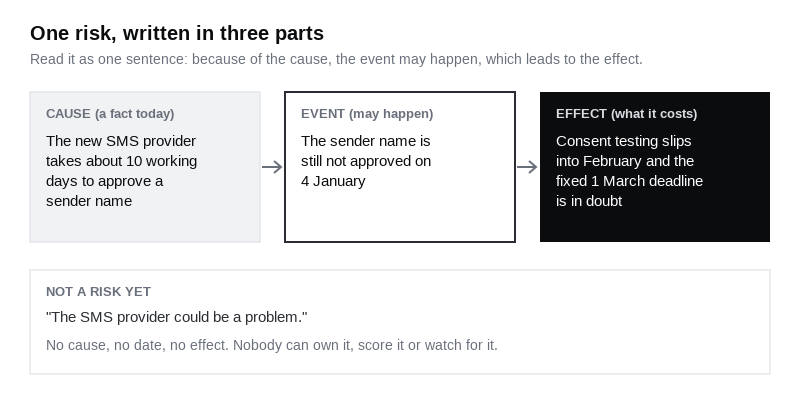
Here is Larkfield's first risk, before and after:
- Before: "The SMS provider could be a problem."
- After: "Because the new SMS provider takes about 10 working days to approve a sender name, the name may still not be approved on 4 January, which would push consent testing into February and put the fixed 1 March deadline in doubt."
The rewrite tells you what to watch (the approval), when it matters (4 January) and what it costs (the regulator deadline). Now you can do something about it.
Two traps to avoid. First, a cause on its own is not a risk: "Daniel is the only person who knows the release process" is a fact. Ask what that fact could lead to. Second, an event that has already happened is not a risk either. It is an issue, and it goes in the issues log you set up later.
Check it worked
Read R1 aloud. It has the words "because" and "may", names a date or a measurable thing, and ends with an effect on a date, a cost or the people using the service. Someone who has never heard of the project could explain from that sentence alone what you are worried about.
Step 3 · List eight risks with the team
Book 45 minutes with the people who know the work. For Larkfield that is Amina, Daniel, Grace and Dr Okafor. Before the meeting, ask each person to bring two things that could stop the project landing well.
In the meeting, go through five areas so the list does not end up all technical:
- Suppliers and contracts: anyone outside the team you depend on.
- People: single points of knowledge, leave, training.
- Technology: performance, integrations, data.
- Users: who might find the service hard to use, and what they will do instead.
- Money and rules: budgets, regulator deadlines, consent and privacy.
Write each suggestion as cause, event and effect on the spot. If nobody can name the cause, park the idea in a "to investigate" note under the table rather than adding a vague row.
Larkfield's eight risks:
- R1. Because the new SMS provider takes about 10 working days to approve a sender name, the name may still not be approved on 4 January, which would push consent testing into February and put the 1 March deadline in doubt.
- R2. Because many Larkfield patients book on low-cost Android phones using prepaid mobile data, the booking pages may load too slowly or fail on a weak connection, which would send patients back to the phone queue and leave the 8am rush unchanged.
- R3. Because reception staff have never used the new online bookings view, they may miss or double-book online appointments in the first week, which would mean patients arriving for slots that are already taken.
- R4. Because Daniel is the only person who has practised the release and rollback, a fault during the rollout while he is unavailable may take a day or more to undo, which would leave patients facing a broken booking page.
- R5. Because the reminder texts are written only in English and many patients prefer another language, some patients may misread a reminder or a cancellation notice, which would lead to missed appointments.
- R6. Because the appointment system supplier plans an update in January, the update may change how bookings are passed to the system, which would break online booking during the rollout.
- R7. Because each reminder is a paid message, a fault in the reminder schedule may send several texts per appointment, which would overspend the messaging budget and annoy patients.
- R8. Because Saturday clinics are not in the online system for the first release, patients may keep phoning on Saturdays to ask why, which would add calls for the weekend reception shift.
Notice R2 and R5. In many places, including much of Africa, patients use entry-level Android phones, pay for data as they go, and read more comfortably in a language other than the one the project team writes in. Those are not edge cases to add at the end. They are often where the largest risks to a patient service sit, so ask about them in every risk session.
Check it worked
Your Risks tab has eight rows, R1 to R8. Every Risk cell contains a cause, an uncertain event and an effect, and at least three of the five areas above are covered. None of the rows describes something that has already happened.
Step 4 · Score likelihood and impact
Go down the list with the team and give each risk a likelihood and an impact from your written scales. Score impact as if nothing is done about it yet; you will see how the response lowers it later.
Two habits keep the scoring honest. Score quickly: if the room cannot agree within a minute, take the higher number and move on, since the point is ranking, not precision. And ask "compared with which risk?" when someone hesitates: putting R7 next to R1 usually settles where it belongs.
Larkfield's scores:
- R1: likelihood 3, impact 3, score 9.
- R2: likelihood 2, impact 3, score 6.
- R3: likelihood 2, impact 3, score 6.
- R4: likelihood 2, impact 2, score 4.
- R5: likelihood 2, impact 2, score 4.
- R6: likelihood 1, impact 3, score 3.
- R8: likelihood 3, impact 1, score 3.
- R7: likelihood 1, impact 2, score 2.
Sort the Risks tab by Score, highest first. Then draw the grid: a three-by-three square with likelihood along the bottom and impact up the side, and each risk ID written in its cell. You can draw it in a few spreadsheet cells, on a slide or by hand; the picture is what matters, because it shows at a glance that R1 is alone in the worst corner and that most of the list sits in the middle.
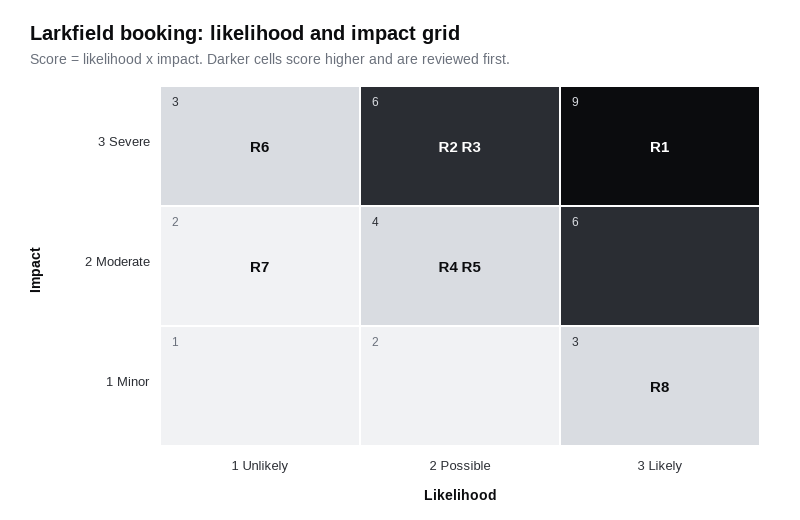
A note on R6 and R8, which both score 3. The score treats them the same, but R6 is unlikely and severe while R8 is likely and minor. Keep an eye on low-likelihood, high-impact risks like R6: they are the ones teams forget until they happen.
Check it worked
Every row has a likelihood, an impact and a calculated score. The list is sorted with the highest score at the top, and your grid has eight IDs in it, each in the cell that matches its two numbers.
Step 5 · Give every risk an owner, a response and a trigger
An owner is the one person who watches the risk and reports on it. They do not have to fix it alone, but they are the person you ask. Pick whoever is closest to the cause: the contract risk belongs to the person who signs contracts.
Then choose one of four responses for each risk and write the action next to it:
- Avoid: change the plan so the risk cannot happen.
- Reduce: act now to make it less likely, or less damaging if it happens.
- Transfer: make someone else carry the consequences, usually through a contract. This moves the cost of fixing a problem, not the harm to users, so it is rarely enough by itself.
- Accept: decide consciously to live with it, because acting would cost more than the risk. Accept is a decision, not a shrug, so write down why.
Finally, write a trigger for each risk: a specific, observable sign that it is turning real. A good trigger has a date or a number in it, so the owner knows when to raise the alarm without a judgement call.
Larkfield's responses and triggers:
- R1. Owner: Amina Bello. Reduce: sign the contract by Friday 11 December and submit the sender name application the same day. Trigger: contract not signed by 11 December, or no approval by Monday 4 January.
- R2. Owner: Daniel Mwangi. Reduce: keep the booking pages small, with no video or large images, and test every release on a low-cost Android phone with mobile data throttled to a slow connection. Trigger: the booking flow takes more than 10 seconds to finish on the test phone.
- R3. Owner: Grace Osei. Reduce: train every receptionist on the online bookings view by Monday 11 January and run a practice session with dummy bookings. Trigger: any receptionist not trained by 11 January.
- R4. Owner: Daniel Mwangi. Reduce: write the rollback steps down and have a second developer practise them once before 14 January. Trigger: rollback not rehearsed by Thursday 14 January.
- R5. Owner: you. Reduce: translate the reminder and cancellation texts into the clinic's two most-used languages other than English, checked by a native-speaking member of staff. Trigger: translations not checked by Tuesday 5 January.
- R6. Owner: Amina Bello. Transfer and reduce: ask the supplier, under the existing support contract, to give four weeks' notice of interface changes and to fix breaking changes; Daniel tests the update on the test site before it reaches live. Trigger: supplier release notes mention booking or appointment changes.
- R7. Owner: Daniel Mwangi. Avoid: the system sends at most one reminder per appointment, and any second send is blocked in the code. Trigger: any appointment with more than one reminder in the daily send report.
- R8. Owner: Grace Osei. Accept: Saturday reception already answers the phones, and adding Saturday clinics to the first release would delay it. The help page says Saturday clinics are coming later. Trigger: more than 20 Saturday calls about online booking in one weekend.
Set every review date to the next review meeting (next step), and earlier for any risk whose trigger date comes sooner.
Check it worked
Sort or filter by Owner: every row has a single named person, and nobody is listed as a team or "TBC". Every Response cell starts with one of the four words, and every Trigger cell contains a date or a number. Read R8: its reason for accepting the risk is written down.
Step 6 · Add an issues log for risks that happen
Some risks will happen despite everything. When one does, it stops being a risk and becomes an issue: something you now have to deal with, not something you are watching.
Add a second tab called Issues with these columns: ID (I1, I2 and so on), From risk (the risk ID, or "none" if it came out of nowhere), What happened, Date raised, Effect so far, Action, Owner, Due, and Status (open or resolved).
At Larkfield, on Tuesday 22 December, Amina reports that the contract was signed on 10 December but the provider has asked for proof that the clinic owns the sender name before it approves it. R1's trigger has not quite fired, but the event is clearly under way. You log it:
- I1. From risk: R1. What happened: provider asked for proof of ownership of the sender name, approval paused. Date raised: 22 December. Effect so far: approval now expected around 8 January, four days after R1's trigger date. Action: Amina sends the clinic's registration certificate today; Daniel starts consent testing against the provider's test sender so that only the final check waits for the real name. Owner: Amina Bello. Due: 23 December. Status: open.
On the Risks tab, leave R1 open with a note "see I1" until the issue is resolved, then close it. Do not delete it: a closed risk with its issue next to it is the record of what went wrong and what you did, and it helps you write the risks for your next project.
Check it worked
Your Issues tab has the nine column headings and at least one row. Each issue that came from a risk names that risk's ID, and the matching row on the Risks tab carries a note pointing back to the issue.
Step 7 · Review it every two weeks and report the top three
A register nobody reads is worse than none, because it gives a false sense of control. Book a 30-minute review every second week with the risk owners. Larkfield's are on Tuesdays: 8 December, 22 December, 5 January and 19 January, then fortnightly until the March deadline.
Run each review in the same order:
- Issues first. Go through each open issue: is the action done, and is it resolved?
- Triggers. Each owner says whether their trigger has fired. If it has, decide there and then whether the risk is now an issue.
- Rescore. Change likelihood or impact where something has changed, and say why in a short note on the row. When R3's training is finished, its likelihood drops from 2 to 1.
- New risks. Ask "what has changed since last time that could hurt us?" and write anything new as cause, event and effect.
- Close. Mark risks closed when they can no longer happen, for example R1 once the sender name is approved.
After each review, re-sort by score and copy the top three into your weekly stakeholder update. One line each: what might happen, what it would affect, what you are doing, and the owner. Link to the register for the rest rather than pasting the whole table. For Larkfield on 8 December:
Top risks (full register: link)- R1, score 9: sender name approval may run past 4 January and threaten the 1 March consent deadline. Contract to be signed by 11 Dec. Owner: Amina.- R2, score 6: booking pages may fail on low-cost phones with slow data, sending patients back to the phones. Testing every release on a throttled Android phone. Owner: Daniel.- R3, score 6: reception may miss online bookings in week one. Training complete by 11 Jan. Owner: Grace.
Readers outside the team need the shape of the risk and what is being done. The detail stays in the register.
Check it worked
Your calendar has a recurring review every two weeks with every risk owner invited. Your next stakeholder update has a top-risks section with three lines, each naming a score, an effect, an action and an owner, and a link to the register.
Step 8 · Run a final check on the register
Before you share the register outside the team, read every row once more against four questions:
- Does the risk sentence have a cause, an uncertain event and an effect?
- Is there exactly one named owner?
- Does the trigger contain a date or a number someone can check?
- Is there a review date on or before the next review meeting?
Fix any row that fails. The usual culprits are a trigger like "if things slip" (replace it with the date that matters) and a risk that has quietly become a fact (move it to the Issues tab).
Check it worked
All eight risks pass the four questions. Every risk has an owner and a trigger, and none of them is written as a vague worry. Your likelihood and impact grid matches the scores on the Risks tab, and the register link is in the team's shared project space.
Next steps
- Feed your top risks into a clear weekly message with write a weekly stakeholder update.
- Turn the risks that remain at launch into checklist items and a watch list with run a launch checklist for a new feature.
- Put honest uncertainty into your dates as well as your risks with estimate work with ranges instead of false precision.
- When a risk becomes an issue that moves a date, update your plan openly with keep a roadmap honest when plans change.
Related tutorials
- Write user stories with clear acceptance criteriaYou will have five user stories for a clinic's reschedule feature, each checked against INVEST and carrying Given / When / Then acceptance criteria that a developer and a tester read the same way.
- Write tickets developers want to pick upYou will rewrite three vague backlog tickets into ones a developer can start without asking a question, and save the structure as a ticket template in your tracker.
- Write a weekly stakeholder update people readYou will have a reusable weekly update template and one finished update under 250 words, whose first two lines tell any reader whether they need to act.
Need this done for you?
Padding does this work for growing companies, from the first diagnosis to a system that keeps working.
Get new tutorials