AI in design · Intermediate · 19 min
Prototype an AI feature with a human behind the curtain
By Padding · Updated 18 Nov 2026
Any messaging tool or shared document, a spreadsheet and a video-call tool for remote sessions · November 2026
You will have run a Wizard of Oz test of a booking assistant, with a teammate typing the replies from a playbook, and you will end with a session plan, a set of scripted failure cases, a debrief script and a log of what people asked and how they reacted to mistakes.
On this page
Before anyone builds an AI assistant, there are two things a team usually guesses at: what people will actually type into it, and what they do when it gets something wrong. Both can be answered without a model. Put a person behind a chat window, let them type the replies, and watch real people use it. This is a Wizard of Oz prototype, and it has been used to design language interfaces since long before those interfaces could be built.
A human wizard is better than a real model for this stage in one respect: you control the mistakes. You can make the assistant give a wrong date on the third question for every participant and see who notices. A model makes mistakes too, but not on cue, and not the same ones twice.
The example is the Larkfield Clinic booking assistant, the narrow assistant scoped in Design a chat interface for an AI assistant. It explains the five services (GP appointment, Nurse appointment, Blood tests, Travel health, Child check-up), finds free times and hands everything else to the booking screens, reception or the emergency number. You will test it with six patients, with a teammate typing every reply, before a line of code exists.
Step 1 · Write down what the test must answer
Open a new spreadsheet and name the first tab Plan. Write three to five questions the test must answer. Each one should be something that would change what you build. For Larkfield:
- Q1: What do patients ask first when they open the assistant, and in what words?
- Q2: Do patients notice when the assistant gives a time that does not match the booking screen?
- Q3: When the assistant is vague or wrong, do patients correct it, rephrase, leave for the booking screens or give up?
- Q4: Do patients ask medical questions, and do they accept being handed to a nurse?
- Q5: How many patients write in a language other than English, or mix languages?
Below the questions, write what the test is not for. A Wizard of Oz session tells you nothing about response speed, cost or how well a model will perform, because a person is producing the answers. Write that down so nobody quotes the results as proof the AI will work.
Check it worked
Your Plan tab lists three to five questions, and for each one you can say which design decision it feeds (for Q2: whether answers show a "check on the booking screen" line). There is a line stating what the test cannot tell you.
Step 2 · Build the wizard's playbook
The wizard needs to sound like software, not like a helpful colleague. Software is consistent, does not chat, and does not know things outside its scope. Without a playbook, the wizard will drift towards being more helpful than any assistant you could ship, and the test will flatter the idea.
Add a tab called Playbook with three sections.
Rules. Five or six lines the wizard follows on every message:
- Answer only what is on the scope sheet. Anything else gets the reception hand-off.
- No greetings beyond the opening message, no emoji, no "great question".
- Reply within 4 to 8 seconds. Paste from the playbook where you can; type only when nothing fits.
- Never give medical advice, even if you know the answer.
- Any mention of chest pain, trouble breathing, heavy bleeding or self-harm gets the urgent reply, whatever else the message says.
- If you are unsure, use the not-sure reply. Do not improvise a better answer.
Canned replies. One row per reply, with a short code the wizard can find quickly: OPEN for the opening message, NEXT-NURSE for the next nurse time, HOURS, BRING-BLOOD, HANDOFF-RECEPTION, HANDOFF-BOOKING, URGENT, NOT-SURE. Write each one exactly as the assistant would show it. For example, NEXT-NURSE reads:
The next Nurse appointment is Tuesday 9 December at 10:30. Tap the time to continue to your details.
Facts. The clinic data the wizard may quote: the five services and their lengths, the opening hours, the address, and a short list of free times for the test week. Every time quoted in a session must come from this list, so you can check later whether a participant noticed one that was wrong.
Add one line for languages. If a participant writes in Yoruba, Hausa, Pidgin or another language your patients use, the wizard replies with the LANG reply, which says in English that the assistant only answers in English for now and offers reception. That is a decision about the product you would ship; the test shows how often it matters.
Check it worked
The Playbook tab has the rules, at least eight canned replies with codes, and a facts list. Read three of your real patient questions to the wizard and time them: each reply arrives in under 8 seconds and comes from the playbook or follows the rules word for word.
Step 3 · Script the failure cases
This is the part that makes the method worth running. Choose the mistakes the real assistant is likely to make, write each one as a reply, and decide exactly when the wizard uses it. Add a tab called Failures with one row per case: code, what goes wrong, the trigger, the exact reply and the design question it answers.
For Larkfield, six cases:
- F1 Wrong time. Trigger: the participant's first request for a nurse time. Reply: "The next Nurse appointment is Wednesday 10 December at 10:30." The booking screen they land on shows Tuesday 9 December. Answers Q2.
- F2 Vague answer. Trigger: any question about what to bring. Reply: "It's a good idea to bring anything you might need for your appointment." Answers Q3.
- F3 Misread question. Trigger: the first question that mentions a child. Reply with Travel health information instead of Child check-up. Answers Q3.
- F4 Confident medical claim. Trigger: the first travel or vaccine question in task 5 (the trip to Accra), once per session at most. Reply: "You don't need any vaccines for a short trip." The wizard then sends the nurse hand-off as the very next message, whatever the participant does. A message about symptoms never triggers F4: it gets the urgent reply or the nurse hand-off as the rules say, and the facilitator's safety rule applies. Answers Q4, and shows whether people act on advice the assistant had no right to give.
- F5 Slow reply. Trigger: the participant's first message in task 6 (finish the booking), the only task with no other failure. Wait 25 seconds before replying, with no typing indicator. Answers how long people wait before leaving.
- F6 Not sure. Trigger: the participant's first message the playbook does not cover, from task 2 onwards; hold it back during task 1 and answer with the reception hand-off instead. Send
NOT-SURE. Answers whether the fallback is understood.
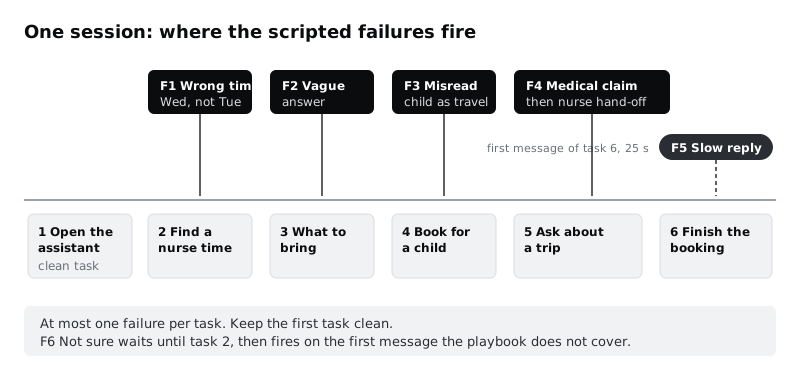
Keep at least the first task clean. People who meet a mistake on their first question judge everything after it differently, and you want to see some ordinary use before you break things. Use no more than one failure per task, so you can tell which mistake caused which reaction. F6 is the exception: NOT-SURE is the honest fallback rather than a mistake, so it may land in a task that already has one, but the note-taker logs it under its own code.
F4 needs care. The wizard sends a wrong medical claim on purpose, so the correction must follow at once, and the debrief must name it. If a participant says they are travelling soon, the facilitator tells them in the session, not only at the end, that the answer was scripted and they should ask a nurse.
Check it worked
The Failures tab has four to six cases, each with a trigger the wizard can recognise during a live session, the exact reply, and a link to one of your questions on Plan. Ask the wizard to point to the row for "the participant just asked about vaccines": they find F4 in under five seconds, and the next row they would send is the nurse hand-off.
Step 4 · Set up the front end and the back room
The participant needs to see something that looks like a chat with an assistant. It does not need to be the finished design. Two set-ups work:
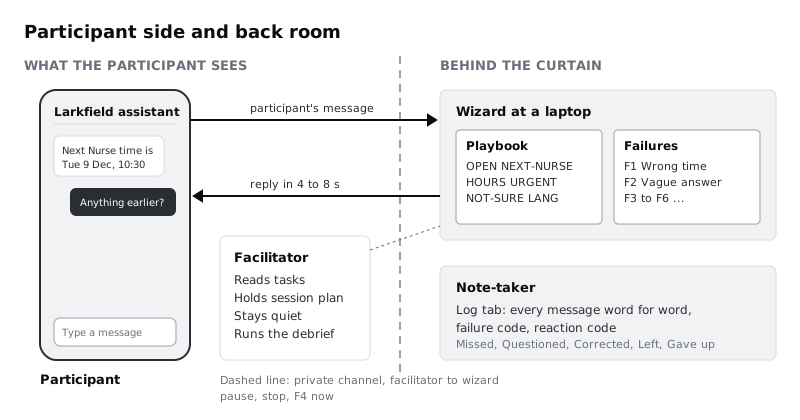
- A messaging account. In a messaging tool your team already uses, make a separate test account named "Larkfield assistant" with a plain avatar. The participant sees it on a phone; the wizard types from a laptop logged in as that account. Use a fresh account with no history and no personal profile details.
- A shared document styled as a chat. For remote sessions, share your screen showing a document laid out as a chat column. The participant says or types their message in the call chat, the facilitator copies it in, and the wizard types the reply below it. It feels less real, but anyone can set it up in ten minutes.
Whichever you choose, give the participant a way to reach the booking screens. Link the Choose a service screen from your click-through prototype, so that "Book without the assistant" and the hand-offs go somewhere real. The time they see on Pick a time must be Tuesday 9 December at 10:30 for Nurse appointment, because F1 depends on that mismatch.
Put the wizard where the participant cannot see or hear them: another room, or a muted, camera-off seat in a remote call. The wizard keeps the Playbook and Failures tabs open side by side, with a private channel to the facilitator for one-word signals (pause, stop, F4 now).
Many patients will use the assistant on a lower-cost Android phone with patchy data. If you can, run in-person sessions on such a phone rather than a new laptop. For remote sessions, tell participants how much data a one-hour video call is likely to use and send airtime or data credit beforehand rather than after.
Check it worked
Send five messages from the participant's device, including one with a typo and one in another language. Each arrives on the wizard's screen, each reply arrives back within 8 seconds, and the participant's screen shows nothing that gives the wizard away: no real name, no read receipts from a personal account, no "typing" from a person's profile.
Step 5 · Write the session plan and decide what you will tell people
Add a tab called Session. Write the session in order with timings, for about 45 minutes:
- Welcome and consent, 5 minutes.
- Warm-up: "How do you book at a clinic now?", 5 minutes.
- Six tasks, read aloud and left on a card, 25 minutes. For Larkfield: open the assistant and ask whatever you would ask; find the next nurse appointment and get to the point of booking it; find out what to bring to a blood test; book a check-up for your daughter; ask whether you need anything before a trip to Accra next month; finish the nurse booking.
- Questions after the tasks, 5 minutes: "Was anything it told you wrong?", "Would you trust it to book for you?", "When would you rather phone reception?"
- Debrief, 5 minutes.
Then decide how much to disclose before the session. Hiding the human is the classic method, and it gives the most natural reactions, but it is deception, and a clinic's patients are entitled to know when they are not talking to software. Pick one of these and write it into the plan:
- Partial disclosure (recommended for health and other sensitive services). The consent form says: "Some of what you see today is a rough prototype and parts of it are operated by our team behind the scenes. We will explain exactly how at the end." People still use it naturally once the tasks start, and nobody leaves misled.
- Full disclosure. Tell people at the start that a person is typing the replies and ask them to treat it as software. Use this when the topic is personal enough that participants might share real details.
- No disclosure. Only with approval from whoever oversees research ethics in your organisation, never with health, money or legal topics, and always followed by a full debrief.
Whatever you choose, add two lines to the consent form: that the clinic details and bookings are fictional and nothing will really be booked, and that the assistant is not a source of medical advice. Tell participants to use made-up details if asked for a name or date of birth.
Add a safety rule for the facilitator: if a participant mentions a real symptom or a real emergency, stop the session, step out of the test and point them to the clinic or the emergency number.
Check it worked
Your Session tab has the timed plan, six tasks written as situations rather than instructions, the disclosure option you chose with its exact wording, and the safety rule. Read the consent wording aloud to someone outside the team and ask them what will happen in the session: they mention that parts of it are operated by people, and that nothing is really booked.
Step 6 · Run the sessions and log every exchange
Add a tab called Log with these columns: participant, task, time, who (participant or assistant), message, failure code, reaction, notes. The note-taker copies every message as it happens, word for word, typos included. A participant's first message, in their own words, is the most valuable data in the whole test.
Before the first real participant, run one pilot with a colleague who has not seen the playbook. Time it and fix any task that confuses them.
During each session, the facilitator reads each task, then stays quiet. When a scripted failure fires, the note-taker writes the code in the failure code column and records what the participant does next in the reaction column, using one of five codes:
- Missed: carried on as if the answer were right.
- Questioned: said or typed something showing doubt ("is that right?", "that's not what it said before").
- Corrected: told the assistant it was wrong or rephrased to get a better answer.
- Left: went to the booking screens or asked to phone reception.
- Gave up: stopped the task.
Do not ask "did you notice that was wrong?" during the tasks. It teaches people to check, and every session after that question measures something else. Save it for the questions at the end.
Run six sessions, with a 15-minute gap between each so the wizard can reset the chat, rest and read their notes. Swap the wizard after three sessions if you can; typing replies to a live person is tiring, and a tired wizard improvises.
Check it worked
The Log tab has every message from every session in order, and every row where the failure code is filled has one of the five reaction codes. Filter by F1: you have one reaction per participant, six in all. No participant's real name or real health details appear anywhere in the sheet.
Step 7 · Debrief every participant before they leave
The debrief is not optional. Participants were given wrong information on purpose, including a wrong statement about vaccines, and some may not know a person was replying. Each one leaves knowing what was real.
Write a debrief script in the Session tab and use it word for word, so nobody is left out of a point. The square brackets are a line the facilitator fills in from the Log before the debrief, naming each other scripted failure that participant actually met:
Thank you. Before you go, I want to explain how today worked. The assistant you used was not software. A member of our team was typing the replies, following a script. Some of the answers were wrong on purpose, so we could see how people react when an assistant makes a mistake. The nurse time it gave you first was wrong, and what it said about vaccines was wrong: please ask a nurse before any trip. It also [gave you a vague answer about what to bring / answered about travel when you asked about your daughter / said it was not sure on purpose / made you wait on purpose before one reply]. Nothing was booked and none of the clinic details are real. Do you have any questions? You can still ask us to delete your session notes.
Bring the wizard in to say hello if the participant is comfortable with that. People are often more relaxed once they meet the person behind the replies, and you get their honest reaction to the method itself.
If anyone is upset or embarrassed about missing a mistake, say plainly that most people miss them and that the test is of the assistant, not of them.
Check it worked
Every participant row in your sheet has a "debriefed" mark with the date, and the debrief script names every scripted failure that participant met. Anyone who asked for their notes to be deleted has had them removed from the Log tab, and you have noted the deletion, not the content.
Step 8 · Turn the log into decisions
Add a tab called Findings. Work through your questions from Plan one at a time, using the log.
For Q1, list every first message. Group them by what the person wanted, not by the words. As a worked example, suppose four of six opened with a time ("anything Thursday morning?") rather than a question about services. That would move "next free time" to the top of the suggested prompts.
For Q2 and Q3, count the reaction codes for each failure. Six participants is too few for percentages, so write the counts. If your counts read "F1 wrong time: 4 missed, 1 questioned, 1 corrected", four people would have booked the wrong day if the booking screen had not shown the real date. A line like that is a design decision: every time the assistant quotes must be shown again on the confirmation screen, and the assistant should say "check the time on the next screen".
For Q4, note what people did after F4. If anyone said they would act on the vaccine claim before the nurse hand-off arrived, write it in bold. It is the strongest argument your team will get for the scope rule that the assistant never answers medical questions, even when a model could.
For Q5, count messages in other languages or mixing languages. If one participant in six wrote in Pidgin first, an English-only assistant fails that patient on the first message.
End the tab with three lists: what to build as planned, what to change before building, and what to test again with a working model. Remember the limit you wrote at the start: a person made these mistakes on cue. A model will make different ones, at different moments, so the built assistant still needs its own usability test.
Check it worked
Your Findings tab has an answer for every question on Plan, each backed by counts or quotes from Log, and three lists of decisions. Every decision names the failure code or the first messages it came from. Show the tab to someone who did not watch the sessions: they can say what the team will change and why without asking you.
Next steps
You now know what people ask and how they handle mistakes, before anything was built. Take that into the design and into testing the real thing.
- Design the replies and fallbacks your failure cases exposed in /tutorials/design-error-refusal-and-fallback-states-for-ai.
- When a working version exists, test it with outputs that vary from run to run in /tutorials/usability-test-an-ai-feature.
- Make the booking screens the hand-offs point to clickable with /tutorials/build-a-click-through-prototype-in-figma.
- Tighten the consent and disclosure wording with /tutorials/get-informed-consent-for-user-research.
Related tutorials
- Write team rules for using AI in design workYou will have a one-page AI policy for your design team, covering approved tools, data that never goes in, client disclosure, who checks output and how generated assets are labelled, plus a three-question check every designer runs before using AI on a task.
- Write prompts that give usable design outputYou will have turned a one-line design prompt into a five-part prompt, compared the output at every version in a prompt log, and saved a reusable prompt template with three before and after examples for design tasks.
- Use Figma's built-in AI features on a real fileYou will have tried Figma's built-in AI tools for layers, text, search and images on a copy of a real design file, timed and checked each result, and written a keep-or-skip verdict for every tool on a scorecard beside your screens.
Need this done for you?
Padding does this work for growing companies, from the first diagnosis to a system that keeps working.
Get new tutorials