AI in design · Beginner · 14 min
Remove personal data before sharing research with AI
By Padding · Updated 18 Nov 2026
Any document editor, a spreadsheet and a restricted work folder; any general-purpose AI assistant · November 2026
You will have a de-identified interview transcript that is safe to give an AI tool, a mapping file stored apart from it, and a short checklist to repeat for every transcript in the study.
On this page
An AI assistant can sort a pile of interview transcripts into themes in a minute. Before it can, you have to paste or upload those transcripts, and that copies everything in them to a service outside your organisation: names, phone numbers, the street someone lives on, the condition they mentioned in passing. Once it is sent, you cannot take it back.
This tutorial is the step before any AI research work. You check that your participants agreed to this use, read what the tool does with what you give it, and then strip the personal data out of one transcript, replacing it with codes. You keep a mapping file of those codes in a separate restricted place, so the transcript you share cannot be linked back to a person without it.
The example is the Larkfield Clinic booking study: eight patients interviewed about how they book appointments, recorded as audio, with each participant coded P01 to P08. The transcript used here is P03's. Everything about the participant is invented.
A note on the law, which is not legal advice. Removing names and putting codes in their place is pseudonymisation, not anonymisation. Under UK and EU GDPR, pseudonymised data is still personal data, because someone holding the key can link it back. Nigeria's Data Protection Act 2023 treats health information as sensitive personal data, as do Kenya's Data Protection Act 2019 and South Africa's POPIA in their own terms. The method below lowers the risk; it does not take your study outside the law. Show the finished checklist to whoever looks after data protection at your organisation before you send anything.
Step 1 · Check what your participants agreed to
Open the consent form your participants signed or answered, and the data-handling document for the study. Look for three things:
- Who will see what they say. If the form says "the research team of three people", an AI service run by another company is not on that list.
- Whether any outside service was named. Some forms mention transcription or AI tools by type. Most written before this year do not.
- What you promised about health details. The Larkfield form says "we will not write the details in our notes or report". Sending them to an AI tool would break that, even if the tool never shows them to anyone.
If the form does not cover sharing with an AI tool, you have two honest options: ask each participant, in writing, whether they agree to their de-identified transcript being processed by the named tool, or do the analysis without AI for this study. For future studies, add a line to the form before recruiting. Larkfield's new form reads: "After we remove your name and personal details, we may use an approved AI tool to help sort our notes. It will never see your name, phone number or address."
Write the answer for each participant in the code-to-name sheet, in a new column called AI use: yes, no or not asked.
Check it worked
Your code-to-name sheet has an AI use column with a value for every participant, and you can point to the sentence in the form, or the written reply, that each yes is based on. Any participant marked no or not asked is excluded from everything that follows.
Step 2 · Read the AI tool's data terms and write them down
Find the privacy, data controls or data usage pages for the exact tool and plan you will use. The terms for a free personal account and a work account from the same company are often different, so check the one you will actually log in to.
Add a section called AI tool to the study's data-handling document and answer five questions, each with the link you found the answer on and today's date:
- Training. Can what you send be used to train or improve the provider's models? Is there a setting to turn that off, and is it off on your account?
- Retention. How long are chats and uploaded files kept? Are they kept for a period after you delete them?
- Human review. Can the provider's staff read conversations, for example for safety checks?
- Account type. Is this a work account your organisation has approved, or a personal one?
- Location. Where is the data stored, if the provider says? This matters if your organisation has rules about data leaving the country.
If you cannot find an answer, write "not stated". Not stated is an answer: treat it as the less safe option. If your organisation has an approved list of AI tools, use one from that list.
Check it worked
The AI tool section has five answers, each with a link and a date. You have opened the settings in your own account and confirmed that any training setting matches what you wrote. If any answer is "not stated" or the account is personal, your data protection lead has seen the section before you continue.
Step 3 · Decide what counts as personal data in your transcript
Make a working copy of P03's transcript in the restricted study folder, named P03 transcript (de-identifying). Never edit the original. Do all of this on your own computer or work drive: pasting the raw transcript into an online AI tool, a translation site or a grammar checker to help you clean it would send the very data you are removing.
Write a list of tags at the top of the working copy. Each tag is a kind of personal data, and each has a rule: replace it with a code, generalise it, or delete it.
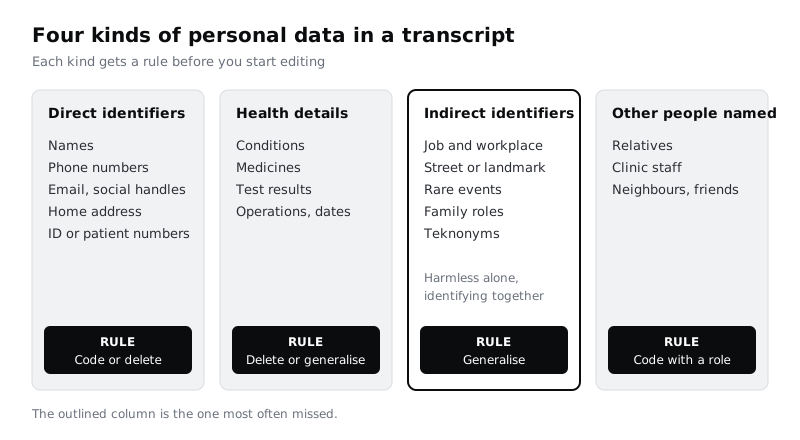
The column that catches people out is the third. A transcript with no name in it can still point to one person: "I work nights at the bakery on Station Road" is enough for anyone who knows the area. In a clinic that serves one neighbourhood, a workplace, a street and a family situation together can identify a patient to a colleague who reads the notes.
Then decide what the research needs to keep. The Larkfield study is about booking. That P03 works night shifts matters, because it explains why she books Tuesday mornings. Which bakery does not. That her son books for her matters. His name does not. Keep the fact, drop the detail that makes it findable.
Check it worked
The working copy starts with a tag list that covers all four columns in the diagram, each with a rule. For at least two indirect details in P03's transcript, you have written the general version you will keep, such as "works night shifts" for "works nights at the bakery on Station Road".
Step 4 · Set up the codes and a separate mapping file
Codes should be easy to spot in the text and impossible to mistake for real words. Use square brackets and capitals:
[P03]for the participant's own name, matching the code you already use.[PERSON-1],[PERSON-2]for anyone else named, numbered in the order they first appear. Add a short role so the text still reads:[PERSON-1, son],[STAFF-1, nurse].[PLACE-A],[PLACE-B]for streets, landmarks and workplaces, again with a general description:[PLACE-A, her workplace].[PHONE],[EMAIL],[ADDRESS]for contact details, with no number, because you will never need them back.[HEALTH]for a health detail you have deleted, so a reader knows something was there.
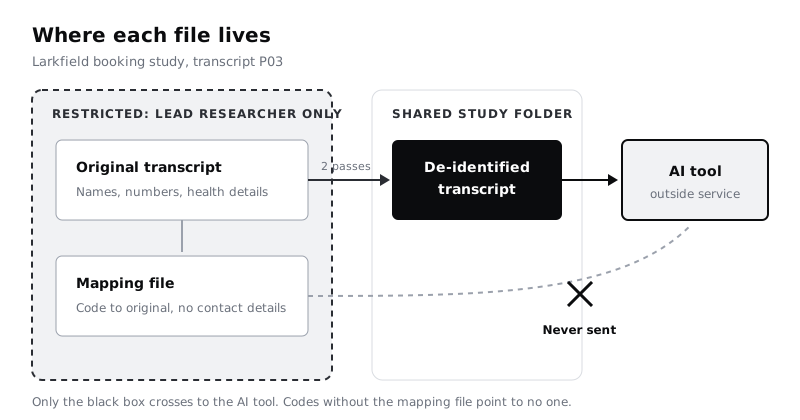
Create a spreadsheet called Larkfield booking study: mapping with four columns: Transcript, Code, Original and Reason. Save it next to the code-to-name sheet, in the place only the lead researcher can open, never in the shared study folder.
Only record what you might genuinely need to reverse. If two participants mention the same nurse, mapping [STAFF-1] to her name lets you see that both talked about the same person. A phone number or address you will never need again goes in no file at all: delete it, tag it, and move on.
Check it worked
The mapping spreadsheet exists in the lead researcher's restricted place, not in the study folder. Open the study folder's sharing settings: the mapping file is not listed there. The spreadsheet has no phone numbers, email addresses or home addresses in the Original column.
Step 5 · Remove identifiers in two passes
Work through the working copy twice. Each pass catches what the other misses.
Pass 1: search. Use your editor's find tool for things with a pattern:
- Each participant and staff name you know, and short forms of it. Funmilayo is also Funmi; Grace is also Sister Grace.
- Digits, to catch phone numbers, house numbers, dates of birth and hospital or ID numbers.
@for email addresses and social media handles.- Words like "road", "street", "close", "estate", "near", "behind" and "opposite", which often sit next to a place.
Automatic transcription often writes numbers out as words ("oh seven seven double oh"), so also search for "double", "oh" and the number words. Replace every hit with its code, and add a row to the mapping file if the rule says to.
Pass 2: read. Read the whole transcript from start to finish, slowly, looking for the third column: jobs, family roles, events and anything only a few people would say. Search cannot find "the only Saturday shift on our ward" or "since my operation in June".
Here is a passage from P03's transcript before and after both passes.
![Two versions of the same transcript passage. Before: the participant gives her name Funmilayo, her street Adeyemi Close behind the market, the phone number 07700 900142, a monthly blood pressure check, the nurse Sister Grace, her night job at the bakery on Station Road and her son Tunde. After: these read [P03], [ADDRESS], [PHONE], a regular check with a [HEALTH] tag, [STAFF-1, nurse], works night shifts, and PERSON-1, son], while the booking facts stay: Tuesday mornings, and the son books on his phone.
![PERSON-1, son], while the booking facts stay: Tuesday mornings, and the son books on his phone.](images%2Fremove-personal-data-before-sharing-research-with-ai-3.svg)
Names and forms of address vary. In mixed-language transcripts, check names in every language spoken, nicknames, and honorifics such as Sister, Mama or Alhaji. A teknonym such as "Mama Tunde", which addresses a parent by a child's name, identifies two people at once. Code it as [P03] and add the child as [PERSON-1].
Check it worked
Search the working copy for every original value in your mapping file, one at a time: none is found. Search for digits: the only numbers left are times, durations and counts that identify no one, such as "10:30" or "twice a month". Every code in the text appears in your tag list, and every coded name has a matching row in the mapping file.
Step 6 · Ask a colleague to try to re-identify the participant
You know the transcript too well to see what is left in it. Give the de-identified copy, and nothing else, to one colleague on the research team who knows the clinic and its area. Ask them one question: "Could you tell who this is, or narrow it down to a few people?"
If they can, ask which words gave it away. Usually it is a combination: a job, a day of the week and a family detail that are harmless one at a time. Generalise one of them further and ask again.
Then check the file itself, not only the text:
- The file name says
P03, not the participant's name. - Comments and tracked changes are deleted, since they can keep the original text.
- Speaker labels read
[P03]andInterviewer, not names. - Document properties (author, title) say nothing about the participant.
Save the result as a new file, P03 transcript (de-identified), in the shared study folder, and delete the working copy once you have checked it.
Check it worked
Your colleague could not name or narrow down the participant, and you have written their answer and any changes in the data-handling document. The de-identified file has no comments, no tracked changes, no names in the file name or speaker labels, and nothing personal in its document properties.
Step 7 · Write the checklist and share the first transcript
Add a checklist to the top of the data-handling document, in a section called Before sending a transcript to an AI tool:
- The participant said yes in the AI use column.
- The AI tool section is filled in, dated, and the tool and account match it.
- The working copy was edited on our own computer or drive, never in an online tool.
- Pass 1 (search) and pass 2 (read) are done.
- The mapping file is in the restricted place only, with no contact details in it.
- A colleague tried to re-identify the participant and could not.
- Comments, tracked changes, speaker names and file properties are clean.
- Only the de-identified file is sent. The original and the mapping file never are.
When you send P03's transcript, tell the tool not to guess at identities, for example: "These are de-identified interview notes. Codes in square brackets replace personal details. Do not try to infer who anyone is." Afterwards, treat what comes back as a draft: every theme and quote needs a human check against the source, which is the subject of /tutorials/synthesise-interview-notes-with-ai-and-check-it. If the tool lets you delete the chat, do so when the analysis is done, and remember the retention answer you wrote down: deleted may not mean gone at once.
Repeat the checklist for each of the other seven transcripts. Doing all eight before any analysis keeps a stray raw transcript out of the chat.
Check it worked
The data-handling document opens with an eight-item checklist, P03's line in the code-to-name sheet records the date the de-identified transcript was sent, and the shared study folder holds a de-identified file for every transcript you plan to analyse, each with its own ticked checklist.
Next steps
With de-identified transcripts and a checklist that travels with the study, you can start using AI on the research itself.
- Turn the transcripts into themes and check every claim with /tutorials/synthesise-interview-notes-with-ai-and-check-it.
- If your consent form did not cover AI use, rewrite it for the next study with /tutorials/get-informed-consent-for-user-research.
- Make this a rule for the whole team with /tutorials/write-team-rules-for-using-ai-in-design-work.
- Prefer to find the themes by hand this time? Use /tutorials/build-an-affinity-map-from-interview-notes.
Related tutorials
- Write team rules for using AI in design workYou will have a one-page AI policy for your design team, covering approved tools, data that never goes in, client disclosure, who checks output and how generated assets are labelled, plus a three-question check every designer runs before using AI on a task.
- Write prompts that give usable design outputYou will have turned a one-line design prompt into a five-part prompt, compared the output at every version in a prompt log, and saved a reusable prompt template with three before and after examples for design tasks.
- Use Figma's built-in AI features on a real fileYou will have tried Figma's built-in AI tools for layers, text, search and images on a copy of a real design file, timed and checked each result, and written a keep-or-skip verdict for every tool on a scorecard beside your screens.
Need this done for you?
Padding does this work for growing companies, from the first diagnosis to a system that keeps working.
Get new tutorials