UX and research · Beginner · 16 min
Run an open card sort
By Padding · Updated 18 Nov 2026
Index cards or an online card sorting tool, and a spreadsheet · November 2026
You will have a deck of 30 to 40 neutral content cards, sorts from around 15 participants, and every group and group name they made recorded in one sheet, ready to analyse.
On this page
Navigation menus are usually organised the way the organisation is organised. A clinic website ends up with sections called "Patient services", "Clinical teams" and "Practice information", because that is how the staff think about their own work. Patients arrive with a different question: "Can I get my blood test done on Saturday?" They have to guess which of those sections holds the answer.
An open card sort shows you how the people who use the site group its content when nobody has told them the categories. You give each participant a pile of cards, one piece of content per card, and ask them to sort the cards into groups that make sense to them and then name each group. "Open" means the group names are theirs. (In a closed sort you give them the categories; that is a test of a structure you already have, and a tree test does the same job better.)
The running example is the website for Larkfield Clinic, a fictional community clinic that is rebuilding its site alongside a new appointment booking app. Swap in your own site as you go.
This tutorial covers the sort itself, up to clean raw data. Reading the results and turning them into a navigation is the next tutorial in this set. Most of the effort here goes on one thing the outcome depends on: card labels that do not hint at where they belong.
Step 1 · Write down what the sort is for
Open a document called "Card sort plan". At the top, write the decision the sort will inform, in one sentence. For Larkfield: "How should the top level of the new website be organised so patients find practical information without phoning reception?"
Under it, write the scope: which part of the content you are sorting and which you are leaving out. A card sort works best on one layer of a site. Larkfield is sorting the patient-facing content and leaving out staff recruitment, board papers and the news archive, which have different audiences.
Then write who the participants are, in terms of behaviour: "Registered at Larkfield or a nearby clinic, has used the clinic for themselves or someone they care for in the last year." Staff do not count, however helpful they would be. You want the patients' mental model, not a second copy of the organisation chart.
Finally, choose in-person or online:
- In person, with paper cards on a table. You can watch people hesitate and ask them what they are thinking. Better for 6 to 10 people, and for people who are less comfortable with screens.
- Online, with a card sorting tool that supports open sorts. Participants sort on their own time and the tool records the data for you. Better when you want 15 or more people, or they are spread out.
You can mix the two, as long as every participant sees the same cards and the same instructions.
Check it worked
Your plan has four parts you can point to: one decision sentence, an in-scope and out-of-scope list, a participant description written as behaviour, and a chosen method. If your participant description mentions age or job title but not anything people have done, rewrite it.
Step 2 · Choose 30 to 40 pieces of content
Open a spreadsheet and call it "Larkfield card sort". On the first tab, called "Cards", add three columns: card_id, label and notes.
List the content people come to the site for. Pull it from the current site's pages, the questions reception gets on the phone, search terms if you have them, and anything the new site will add. You will probably end up with more than 60 items. Cut them down to 30 to 40 using these rules:
- One idea per card. "Opening hours and parking" is two cards, because people might put them in different places.
- Same level of detail throughout. "Blood tests" and "What to do if your blood test result letter is late" are at different depths. Pick the depth of a typical page, not a section and not a paragraph.
- Content people need, not pages that exist. If patients phone to ask whether there is step-free access, that is a card even if no page covers it today.
- Keep variety. Include the practical (parking, opening hours), the clinical (vaccinations, long-term condition reviews) and the administrative (registering, changing your details). A deck of only clinical services will only tell you how people group clinical services.
- Leave out navigation furniture. "Home", "Contact us" and "Search" are not content and every participant will put them in the same obvious place.
Fewer than about 30 cards and the groups are too thin to show a pattern. More than about 40 and people tire, rush the end, and dump the last cards anywhere. Larkfield settled on 36.
Give each card an ID (C01 to C36). The IDs are what you will record later, so they must never change, even when a label does.
Check it worked
The Cards tab has between 30 and 40 rows, each with an ID. Read down the label column: no row contains the word "and" joining two separate topics, and no row is a whole section ("Services") sitting next to single pages.
Step 3 · Rewrite labels that give away the answer
This is where most card sorts go wrong. If cards share an obvious word, people group them by that word instead of by meaning, and you learn about your labels rather than about your users. Go through every label in the sheet and fix the following.
Shared first words. "Book a blood test", "Book a travel vaccination" and "Book a smear test" will land in one pile called "Booking", whether or not patients think of them together. Describe the content instead: "Blood tests and what to bring", "Jabs needed before travelling abroad".
Category names inside the label. "Patient services: repeat prescriptions" tells people where to put it. Drop the prefix: "Order more of a regular medicine".
Internal terms. Staff say "PCN extended access hub"; patients say "evening and weekend appointments". If a label uses a word you would have to explain to a patient, replace it with what the thing does for them. The internal term goes in the notes column so you can match it up later.
Labels that are too short to mean anything. A card that only says "Hub" or "Forms" gets put in a "Don't know" pile or wherever there is space. Aim for three to seven words that a patient would understand without the website around it.
Words that match the groups you expect. If you suspect the answer is a section called "Your health", do not write "Your health records", "Your health check" and "Your health questions". This is the hardest bias to spot because you wrote the cards with the answer in mind. Ask someone who has not seen your draft navigation to read the deck and say which cards look like they belong together just from the words. Anything they pair up on wording alone, rewrite one of.
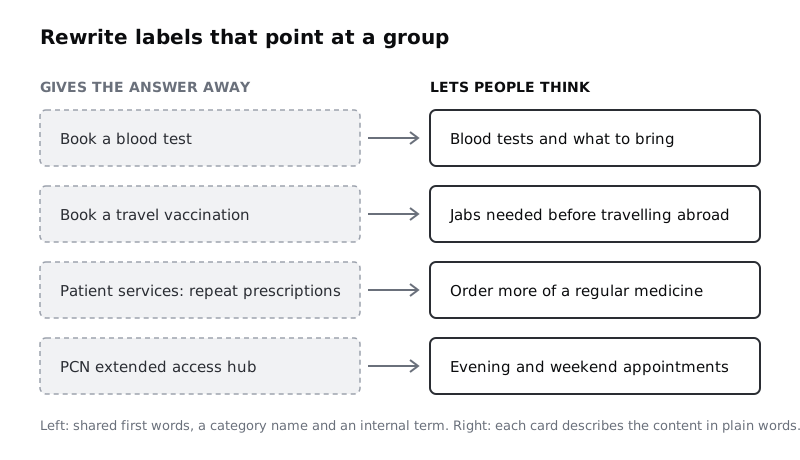
Keep labels neutral, not clever. "Jabs needed before travelling abroad" is plain; "Off on holiday?" is marketing copy and will be sorted by tone.
Check it worked
Sort the label column A to Z. No more than two cards start with the same word. Search the column for each of your current navigation section names: none appears. Every internal term you replaced is recorded in notes next to the new label.
Step 4 · Prepare the deck and the instructions
Write the instructions once and use them word for word with everyone. Larkfield's version:
You will see 36 cards, each describing something on a clinic's website. Put them into groups in whatever way makes sense to you. There are no right answers, and you can make as many or as few groups as you like. When you have finished, give each group a name that describes what is in it. If a card makes no sense to you, put it in a group called "Not sure".
The "Not sure" group matters. Without it, people force confusing cards into a group and you cannot tell a real choice from a shrug.
For an in-person sort, print each label on its own card with the ID small in a corner, where it is readable to you but not prominent. Print in a plain font, all the same size. Bring blank cards and a pen for group names, and a few elastic bands or envelopes so you can keep each finished group together. Shuffle the deck before every session so no card is always first.
For an online sort, enter the cards in your tool exactly as they appear in the sheet, with the IDs in a field participants do not see if the tool allows it. Turn on random card order if the tool offers it. Paste the instructions in word for word. Before sending it out, find the export and make sure you can get one row per participant per card, or something you can turn into that.
Then pilot it with one person who fits your participant description. Watch or read what they do. If they ask what a card means, rewrite it. If they finish in under five minutes, look for labels that were too easy to match on wording.
Check it worked
You have a printed or online deck with exactly the cards in your sheet, a fixed set of instructions saved in your plan, and one pilot sort done. Any card the pilot participant asked about has a new label in the sheet, with the change noted.
Step 5 · Book enough participants
An open sort needs more people than an interview study, because you are looking for patterns in how a group sorts, not stories from individuals. Around 15 participants is a common working number for a small open sort; with fewer, one person's unusual way of sorting can shape the result. In person, 8 to 10 sessions is a lot of facilitation, so many teams combine a handful in person (for the reasoning) with an online round (for the numbers).
Recruit from your participant description, not from colleagues. Add a second tab to the spreadsheet called "Participants" with columns participant_id, method (in person or online), date, completed and notes. Use IDs like P01, not names, and keep any contact details in a separate, private sheet.
Check it worked
The Participants tab has at least 15 rows, each with an ID and a method, and no names or email addresses in this file.
Step 6 · Run each sort without steering
For an in-person session, set the shuffled deck in one pile on a clear table. Read the instructions aloud, then ask the participant to talk through what they are doing as they go. Sit to one side, not opposite them, and keep quiet.
The hard part is not helping. When a participant asks "Where should this go?", say "Wherever makes sense to you; there are no wrong answers." When they ask what a card means, say "What do you think it means?" and note the card ID. Every question about a label is data about that label.
Write down, against the card ID:
- Cards they hesitated over, picked up and put back, or moved later.
- Things they said about why cards belong together ("these are all things I'd do before the appointment").
- Groups they merged or split, and why.
When they have placed every card, hand them the blank cards and ask them to name each group. If a name is vague ("Other", "Misc"), ask what the cards in it have in common, and write their answer down next to the name they chose. Do not change their name for them.
For an online sort, you cannot hear the reasoning, so add one optional question at the end: "Were any cards hard to place? Which ones, and why?"
Check it worked
For each in-person session, your notes list the participant ID, the card IDs they hesitated over or asked about, and at least one quote about why they grouped things. Every online participant shows as completed in the tool, and you have read their answers to the closing question.
Step 7 · Record every group exactly as made
Before you pack away an in-person sort, photograph the table from above so the group names and cards are both legible. Then record it in a third tab called "Raw data", with one row per card per participant:
participant: the participant ID.card_id: the card's ID, not its label.group_name: the name the participant wrote, exactly as written, including spelling.
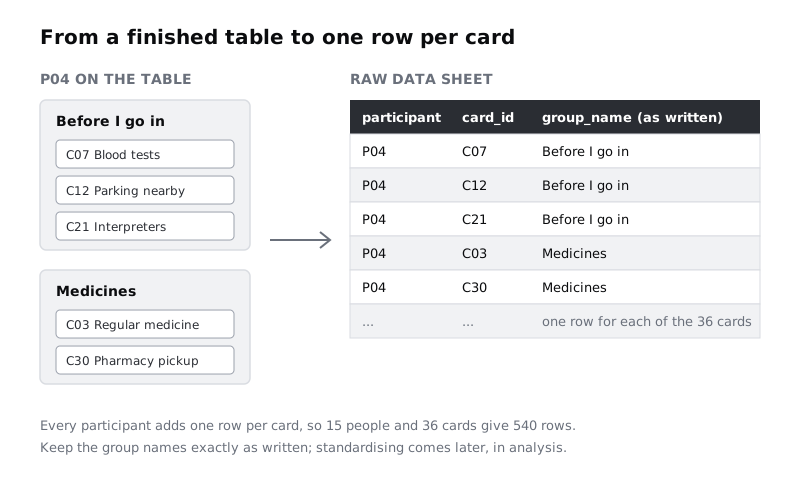
Do not tidy group names at this stage. If one person wrote "Before my appointment" and another wrote "Before I go in", record both as written. Merging similar names is a judgement call you make during analysis, where you can see all of them at once and record the choices. Doing it while recording hides those choices.
For an online sort, export the results and reshape them into the same three columns if they are not already in that form, so in-person and online sorts sit in one table.
Check it worked
Count the rows in the Raw data tab. It should equal the number of completed participants multiplied by the number of cards: 15 participants and 36 cards give 540 rows. Filter by any one participant: you see every card ID exactly once.
Step 8 · Check the data before you analyse it
Raw sort data has gaps you can only fix while the sessions are fresh. Run through these checks and fix or note each one:
- Missing cards. If a participant has fewer rows than there are cards, check the photo for a card you missed, or record the missing card with the group name
(not placed). - Duplicate cards. A card recorded twice for one person is a transcription slip. Check the photo.
- Unusable sorts. An online participant who put every card in one group, or finished 36 cards in under two minutes, probably did not engage. Mark them in the Participants tab and keep their rows, but flag them so you can include or exclude them deliberately during analysis.
- The "Not sure" group. Count how many people put each card there. A card that several people could not place is a labelling problem or a content problem. Note it now; it is often the most useful finding from the whole sort.
- Label changes mid-study. If you rewrote a card after the pilot or during the study, note which participants saw which version.
Finally, add a short "Notes" tab with what you observed in person: recurring reasons people gave, cards that caused debate, and any group that several people built with different names. These notes explain the numbers when you analyse them.
Check it worked
Your spreadsheet has four tabs: Cards, Participants, Raw data and Notes. The row count in Raw data matches participants times cards, apart from flagged sorts you have listed. You can name the three cards that most often went into "Not sure", and you have written down any participant you plan to exclude and why.
Next steps
You now have raw open sort data: who grouped what, under which names. Turn it into a structure with Analyse card sort results with a similarity matrix. Once you have a draft navigation, check that people can find things in it with Run a tree test on your navigation. If finding the right participants was the hard part, read Recruit participants for user research before your next round.
Part of these paths
Related tutorials
- Analyse card sort results with a similarity matrixYou will turn raw open card sort data into a similarity matrix in a plain spreadsheet, read which cards belong together, and finish with a draft site map that has the evidence for every section written beside it.
- Run a tree test on your navigationYou will have a proposed navigation tested with real people as a text-only tree, scored for success, directness and first click on every task, and a list of the labels to change before anyone designs a screen.
- Recruit participants for user researchYou will have a one-page recruitment plan, a private scheduling sheet and a first round of research sessions booked with the right people, including a spare for the person who does not turn up.
Need this done for you?
Padding does this work for growing companies, from the first diagnosis to a system that keeps working.
Get new tutorials