AI in design · Intermediate · 18 min
Synthesise interview notes with AI and check every claim
By Padding · Updated 18 Nov 2026
Any general-purpose AI assistant your organisation allows for research data, a document editor and a spreadsheet · November 2026
You will have a theme list drafted by an AI assistant and checked line by line against your own interview notes, a log of every mistake the AI made, and a clear view of where it saved you time and where it did not.
On this page
An AI assistant can read six interview transcripts and hand back a tidy list of themes in under a minute. The list will look finished. Each theme will have a confident name and two or three quotes underneath. Some of those quotes will be real. Some will be close to what someone said but not quite. And now and then one will be a sentence nobody said at all, written because it fits the theme.
That is the problem this tutorial deals with. Using AI for synthesis is not hard; checking its output is the actual skill. You will ask for themes in a form you can check, then test every quote, every count and every theme against the source, and look for what the AI left out. You end with a theme list you can defend in a room, a log of what went wrong, and an honest answer to the question your team will ask: did this save time?
The running example is Larkfield Clinic, a fictional community clinic with an appointment booking app. The team interviewed eight patients, P01 to P08, some of whom also book for family members, on one question: "How do people book appointments at Larkfield, and why do some miss them?" Six of them, P01 to P06, said yes to their de-identified notes going into an AI tool, so the synthesis here uses those six. Use your own notes in place of theirs.
If you have never grouped interview notes by hand, read /tutorials/build-an-affinity-map-from-interview-notes first. You need to know what a good theme looks like to judge one the AI wrote.
Step 1 · Prepare the notes as one checkable source
Before anything goes near an AI tool, the notes must be de-identified: no names, phone numbers, addresses, dates of birth or health details that could point to a person. If you have not done that, stop here and follow /tutorials/remove-personal-data-before-sharing-research-with-ai. Also check that your tool is one your organisation has approved for research data, and what its terms say about keeping or training on what you paste in.
Then put all the notes into one document, in a fixed format, so that every sentence the AI cites can be found again:
- One line per observation or quote. Split long paragraphs so each line holds one point.
- A line ID at the start of every line, made from the participant code and a running number:
P03-11is the eleventh line of P03's notes. - Quotation marks only around words the participant actually said. Your paraphrase has no quotation marks. This is the distinction the AI is most likely to blur, so make it sharp in the source.
- A header for each participant with the code and anything relevant that is not identifying, such as "books for a family member" or "first language Yoruba".
Two lines from P01's section of the Larkfield notes look like this:
P01-05 "I booked it three weeks out and it went clean out of my head"
P01-09 Does not open links in text messages; pays for mobile data in small bundles and saves it
Save this as the master source and do not edit it again during the synthesis. Every check later in this tutorial compares against this file.
Check it worked
Search the document for a quotation mark and read ten of the results: each one is a participant's own words, not your summary. Every line starts with an ID, no ID is used twice, and a search for any participant's real first name finds nothing. You can say how many lines each participant has.
Step 2 · Ask for themes in a form you can check
A loose prompt such as "summarise these interviews" gets a loose answer: smooth paragraphs with no way to trace a claim to a person. Ask instead for a structure where every claim carries its evidence.
Start a new conversation, so nothing from earlier chats shapes the answer. If your tool has a memory or personalisation setting, check what it carries across conversations and turn it off for this work if you can. Paste or attach the master source, then send a prompt along these lines:
These are de-identified notes from six interviews (P01 to P06) for a community
clinic's appointment booking app. Research question: "How do people book
appointments at Larkfield, and why do some miss them?"

Every line starts with an ID such as P03-11. Text in quotation marks is the
participant's own words.

1. First, list every participant code you can see and the highest line ID for each.
2. Group the notes into four to seven themes. Name each theme as a finding, in
   one sentence, not as a topic.
3. Under each theme give two to four supporting quotes. Copy each quote exactly,
   character for character, with its line ID. Only use text that is inside
   quotation marks in the notes.
4. For each theme, list the participant codes that support it and say how many.
5. Separately, list views held by only one participant, and any points where
   participants disagree with each other.
6. If you are not sure a quote is exact, say so. Do not reword quotes.
Asking for exact quotes with IDs does not stop the AI from inventing them. It makes invented ones findable. That is all you need from the prompt.
Check it worked
Your prompt names the research question, explains the line IDs and quotation marks, asks for the participant list first, asks for quotes with IDs and participant counts per theme, and asks separately for single views and disagreements. Save the prompt text in the spreadsheet on a tab called Prompt, so you can reuse it and compare runs.
Step 3 · Save the draft and check the AI read everything
Send the prompt. When the answer comes back, copy it in full into a new tab called AI draft, with the date and the tool you used at the top. Do not tidy it. You will mark it up, and the log you write later needs the original.
Then read the answer to part 1 first: the participant codes and highest line IDs. Compare them with your own counts. If the AI lists five participants when there are six, or says P06 ends at P06-12 when your notes go to P06-20, it did not read the whole source. When an input is too long for a tool, part of it may be left out without a clear warning, and a theme list built on part of the notes looks as finished as one built on all of them. If anything is missing, split the source into two halves, run the prompt on each, and check part 1 again.
For the Larkfield notes, the draft came back with five themes:
- A1 Phone queues put people off booking
- A2 Reminder texts stop people missing appointments
- A3 Patients want video appointments
- A4 Carers find the booking forms confusing
- A5 Appointments booked far ahead are forgotten
Under them sat eleven quotes, and a short list of single views that held only one item.
If you have time, run the same prompt once more in a fresh conversation and paste the second answer below the first. Themes that appear in both runs are more stable than themes that appear once. Do not treat agreement between two runs as proof; both runs can make the same mistake.
Check it worked
The AI draft tab holds the untouched answer, dated, with the tool named. The participant list and highest line IDs in the answer match your own counts for every participant. If they did not match at first, you have a second draft built from the complete notes.
Step 4 · Check every quote against the source
This is the longest step and the most important one. Make a tab called Quote check with these columns: theme, quote as given, line ID as given, what the source says, status, and a fixed line ID if one is needed.
For each quote, search the master source for a distinctive run of five or six of its words, not for the line ID. Searching the ID only shows you what is on that line; searching the words shows you whether they exist anywhere, and who said them. Then give each quote one of four statuses:
- Exact. The words match character for character, on the line given.
- Paraphrased. The meaning is close, but the wording has changed. Replace it with the real words from the source.
- Wrong participant. The words exist, but on another participant's line. Correct the ID. This changes the participant count for the theme.
- Not in notes. You cannot find the words, or anything close, anywhere in the source. Delete the quote.
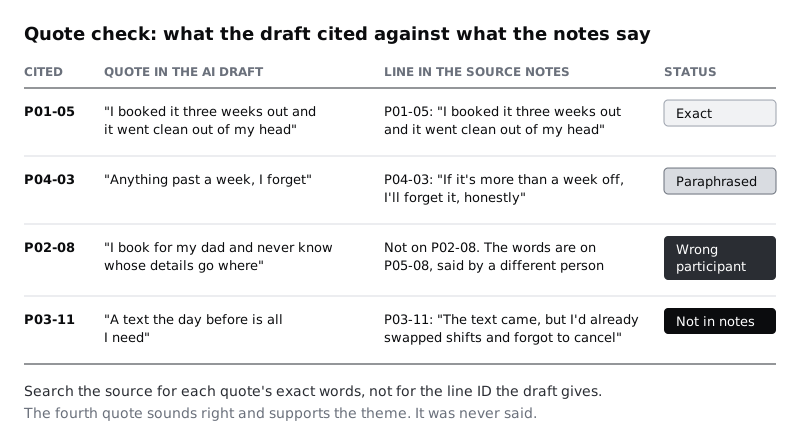
Of the eleven Larkfield quotes, seven were exact, two were paraphrased, one was attributed to the wrong participant and one did not exist. The invented one is the dangerous kind. "A text the day before is all I need" sounds like something a patient would say, and it backed up theme A2 neatly. The real line P03-11 says almost the opposite: the reminder arrived, and it did not help.
Look out for one more thing while you are here: a quote that is exact but cut so it changes meaning. "I'd rather book online" means something different if the full line goes on "but only if someone at reception can sort it when it breaks".
Check it worked
Every quote in the draft has a row in Quote check with one of the four statuses. No quote marked Exact differs from the source by even one word. Count the statuses and write the totals at the top of the tab; for Larkfield that is 7 exact, 2 paraphrased, 1 wrong participant, 1 not in notes.
Step 5 · Test each theme's spread and wording
A theme is only a pattern if more than one person supports it. Now that you know which quotes are real and who said them, recount.
Add a tab called Theme check with one row per theme and a column for each participant. Put a mark in a participant's column only if a checked quote (exact, or fixed from a paraphrase or wrong ID) from that person supports the theme. Ignore the AI's own count; it was based on quotes you have just corrected. Then read each theme's name against its evidence and ask three questions:
- How many participants support it now? A theme that rests on one person is a single view, however clearly it is put.
- Does the name claim more than the evidence? Watch for "most", "several", "patients want" and other words that imply a count.
- Do the quotes say what the name says? A theme can have real quotes under it that point somewhere else.
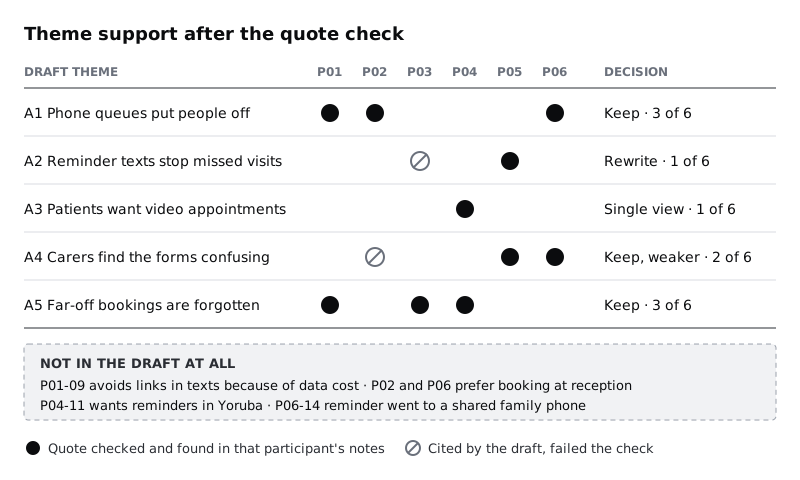
For Larkfield, the recount changed three of the five themes. A3 had one participant, P04, though the draft described "several participants" wanting video appointments; it moves to the single-views list. A2 lost its invented quote and was left with P05 alone, and P03's real line contradicts it. A4 lost P02 when the misattributed quote moved to P05, leaving two participants. A1 and A5 held at three of six each.
Check it worked
Every theme in Theme check has a participant count you worked out from checked quotes, and a decision: keep, rewrite, keep but mark as weaker, move to single views, or drop. No theme name contains a word like "most" or "several" that its count does not support.
Step 6 · Find what the AI left out
The quote check finds errors in what the AI wrote. It cannot find what the AI did not write. Summaries tend to favour what many people said in similar words, and the views that get lost are often the ones a design team most needs: the participant with a different phone set-up, a different language or a different reason for missing an appointment.
Do three things, and record what you find in a tab called Missed:
- Read one or two participants in full yourself. Choose the participant the draft quotes least, plus one more. Write down every observation that does not fit any theme.
- Ask the AI a narrow follow-up in the same conversation: "List every observation that does not fit any of your themes, and every point where two participants disagree, with line IDs." Check each answer against the source exactly as you checked the quotes.
- Search the source for views that tend to drop out. Words about language, cost, shared phones, mobile data, disability, caring for someone, shift work or travel. Read each hit.
For Larkfield, this turned up four things the draft never mentioned:
- P01-09: P01 does not open links in text messages because she pays for mobile data in small bundles. A reminder that only works through a link does not reach her.
- P02 and P06 both prefer booking face to face at reception. The draft folded them into "phone queues put people off", which hid that they did not want an online alternative.
- P04-11: P04 reads English as a second language and asked for reminders in Yoruba as well as English.
- P06-14: P06's family shares one phone, and her reminder went to her son.
None of these is a big theme. Each is the kind of thing that decides whether a booking app works for a whole group of patients, especially in places where prepaid data, shared handsets and several languages in one household are common.
With these in hand, return to A2. P03, P05 and P06 together support a better finding than the draft's: "Reminders help only when they reach the right person, on the right phone, in time to act."
Check it worked
The Missed tab lists every observation you found that the draft left out, each with its line ID and a note on whether it joins an existing theme, changes one, or stands as a single view. You have read at least one participant's notes in full yourself, and you checked every item from the follow-up question against the source.
Step 7 · Write the verified theme list and the error log
Now bring the checks together into two short outputs.
The verified theme list is what you share with the team. For each theme give the finding as a sentence, the participant count, two or three checked quotes with line IDs, and a note of any contradiction. Below the themes, list the single views and the disagreements. For Larkfield:
- Phone queues put people off booking (3 of 6: P01, P02, P06). P02 and P06 want reception booking, not an online alternative.
- Appointments booked more than a week ahead are forgotten (3 of 6: P01, P03, P04).
- Reminders help only when they reach the right person, on the right phone, in time to act (3 of 6: P03, P05, P06). Rewritten from the draft.
- Some patients book on behalf of a family member and lose track of whose details go where (2 of 6: P05, P06). Weaker; check in the next round.
- Single views: video appointments (P04); avoiding links in texts because of data cost (P01); reminders in Yoruba (P04).
The error log is a tab that records what the AI got wrong, one row per error type, with columns for the type, the count and an example. The Larkfield log has six rows:
- Quote not in notes: 1. P03-11, "A text the day before is all I need".
- Quote from the wrong participant: 1. P05-08 cited as P02-08.
- Paraphrase shown as a quote: 2. For example P04-03.
- Count overstated: 1. A3 described "several participants" for one.
- Theme dropped or rewritten: 2. A3 moved to single views; A2 rewritten.
- Observations missed: 4. P01-09, the reception preference of P02 and P06, P04-11 and P06-14.
Keep the log even when it is short. Over a few projects it shows you which checks catch the most problems with the way you work.
Check it worked
Every quote in the verified theme list has a status of Exact in Quote check (or was fixed to the exact words). Every participant count matches Theme check. A colleague who picks any quote at random can find it in the master source in under a minute by searching its words.
Step 8 · Decide where the AI saved time
The last output is an honest note on whether this was worth it. Record how long each part took, and compare it with your last synthesis done by hand, or with an estimate if you have not done one.
The Larkfield team's note read:
- Preparing the source with line IDs: 40 minutes. Needed anyway; it also made the manual check faster.
- Prompt and draft: 15 minutes, including the second run.
- Quote and theme checks: 1 hour 35 minutes.
- Finding what was missed: 45 minutes.
- Total: about 3 hours 15 minutes. Their last hand-built affinity map for six interviews took two people about 3 hours each.
Their conclusion: overall the AI route took about half the person-time (about 3 person-hours against 6), but nearly all of that saving came from the first grouping. The AI's theme names were a useful starting point to argue with. It saved no time on quotes, because every one still had to be checked, and it missed the four observations most relevant to patients on prepaid data, shared phones and second languages. Next time they would keep the AI draft but read two participants in full before looking at it, so their own reading is not shaped by the AI's themes.
Write your own note in the same shape: time per part, what the AI did well, what it got wrong, and what you will change. Two or three sentences of conclusion are enough.
Check it worked
You have a short note with a time for each part, a total, a comparison with doing it by hand, and at least one specific change for next time. The note names the error types from your log rather than saying the AI was "mostly accurate".
Next steps
- If you skipped de-identification, do it before the next run with /tutorials/remove-personal-data-before-sharing-research-with-ai.
- To judge AI themes well, you need to have built some by hand. Try /tutorials/build-an-affinity-map-from-interview-notes on your next round of interviews.
- Turn the verified themes into statements the team can design from with /tutorials/turn-research-themes-into-insights.
- Keep the theme list, the source and the error log together so findings can be traced later, using /tutorials/keep-research-findings-in-a-repository.
Related tutorials
- Write team rules for using AI in design workYou will have a one-page AI policy for your design team, covering approved tools, data that never goes in, client disclosure, who checks output and how generated assets are labelled, plus a three-question check every designer runs before using AI on a task.
- Write prompts that give usable design outputYou will have turned a one-line design prompt into a five-part prompt, compared the output at every version in a prompt log, and saved a reusable prompt template with three before and after examples for design tasks.
- Use Figma's built-in AI features on a real fileYou will have tried Figma's built-in AI tools for layers, text, search and images on a copy of a real design file, timed and checked each result, and written a keep-or-skip verdict for every tool on a scorecard beside your screens.
Need this done for you?
Padding does this work for growing companies, from the first diagnosis to a system that keeps working.
Get new tutorials