AI in design · Intermediate · 19 min
Design error, refusal and fallback states for AI features
By Padding · Updated 18 Nov 2026
Any design tool and a spreadsheet · November 2026
You will have a failure matrix for an AI booking assistant that covers wrong answers, refusals, outages and rate limits, with a non-AI way forward for every row and a set of state frames that keep people moving.
On this page
A normal feature fails in ways you can see. The server returns an error, the page says so, and the person tries again or gives up. An AI feature can fail like that too, but it has another way to fail that a normal feature does not: it can answer fluently, politely and wrongly. "Yes, you can see the nurse on Tuesday at 10:15" reads exactly like a correct answer, even when there is no 10:15 slot. Nothing in the interface turns red.
So designing failure for AI is two jobs. The first is the familiar one: decide what people see when the assistant cannot answer, will not answer or is not reachable. The second is to stop a confident wrong answer from turning into a wrong action, by checking anything that matters against a source the model cannot invent.
The running example is the booking assistant in the Larkfield Clinic app. It opens from Home, answers questions such as "can I get a travel vaccine this week", and can hand off to the normal booking flow: Choose a service, Pick a time, Your details, Confirm, Booked. The rule you will design to is simple: whatever goes wrong with the assistant, the person can still book, and they never have to type their request twice.
You are extending earlier work, not starting again. The chat interface tutorial already gave the assistant a 05 Assistant page with frames such as Not sure, Medical question and Unavailable, a Book an appointment button that opens Choose a service, and an always-visible Book without the assistant link. The streaming tutorial already designed the long wait and the timed-out ending. This tutorial finds the failures those frames do not cover yet, updates the existing frames where they fall short, and adds only what is missing.
Step 1 · List every way the assistant can fail
Open a spreadsheet and name the first tab Failures. Add these columns: ID, failure, example, who can tell, signal, what the person sees, way forward, what is kept, frame.
Fill the first three columns now. Work through the assistant's job from the person's side, not from the model's error codes. For Larkfield, the list has ten rows:
- F1 No answer. "Do you do ear syringing?" The clinic pages do not mention it, so the assistant has nothing to go on.
- F2 Wrong answer that looks right. "Nurse appointment Tuesday 9 December at 10:15 is free." The real slots that morning are 09:00, 09:20, 09:40, 10:30 and 11:00.
- F3 Misread request. "I need a jab for my trip" is treated as a blood test rather than a vaccination.
- F4 Out of scope. "Is this rash on my arm serious?" The assistant is for booking and clinic information, not medical advice.
- F5 Blocked request. "What time is Ada Bello's appointment?" or a message that tries to make the assistant ignore its instructions.
- F6 Provider down. The AI service returns an error or cannot be reached, while the rest of the app works.
- F7 Too slow. No new text has arrived for a long time.
- F8 Too many messages. The service limits how often the clinic, or one person, can send requests.
- F9 Cut off. The reply stops halfway through a sentence.
- F10 Language it handles poorly. Someone writes in Yoruba, or mixes Pidgin and English, and the assistant has not been checked in that language. It may still reply, confidently and badly.
F10 deserves its place. In many clinics in Nigeria, Ghana or Kenya, people switch languages in a single message, and an assistant tested only in English can misread them without showing any sign of doubt. Treat it as a failure to design for, not as a person getting it wrong.
Then add any rows your own product needs: a feature that reads documents can be handed a file it cannot open; one that writes can produce text that is too long for the field it fills.
Check it worked
Your Failures tab has at least ten rows, each with an ID, a one-line description and a concrete example a person could actually type or see. At least one row is a wrong answer that looks right, and at least one is about language. Each example names a real part of your product (a service, a slot, a screen), not "the AI says something wrong".
Step 2 · Mark which failures look like success
Fill in the who can tell column. For each row, ask: when this happens, does anything in the system know? There are three answers:
- The system knows. The provider returns an error (F6), the wait passes a time limit you set (F7), the service answers with a "too many requests" status (F8), or the reply ends without finishing (F9). Your developer can name the signal.
- The assistant can be told to know. It can be instructed to say when the clinic pages do not cover a question (F1), to recognise medical questions (F4) and to decline requests about other people (F5). This works most of the time, not every time, so these rows also need a backstop.
- Only the person can tell. A wrong slot, a wrong service or a bad reply in another language (F2, F3, F10) look exactly like success to the system. Nobody finds out until the person turns up at 10:15 to a locked door.
Book the half hour with your developer now and fill in the signal column together. Write what the system actually receives: "HTTP 503 from the AI service", "no new text for 10 seconds", "HTTP 429, sometimes with a Retry-After header", "reply ended because of the length limit", "assistant reply contains the not-found marker". Where there is no signal, write "none" in capitals. Those rows are the ones the rest of this tutorial works hardest on.
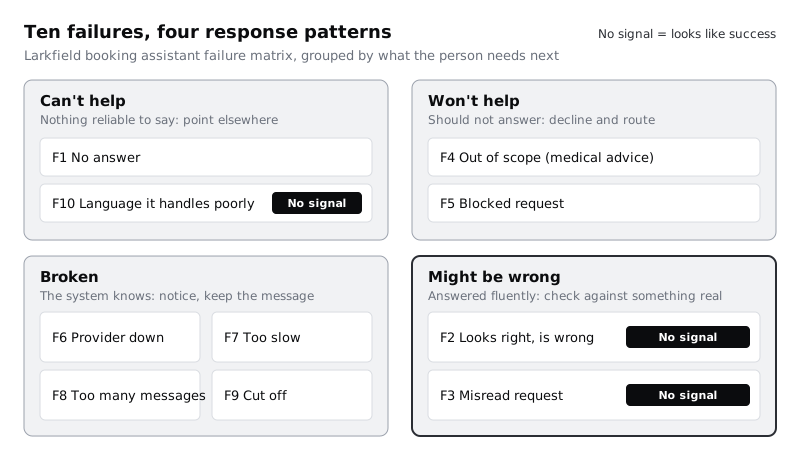
Now group the rows by the response they need. Four patterns cover most AI features:
- Can't help: the assistant has nothing reliable to say (F1, F10).
- Won't help: it could say something but should not (F4, F5).
- Broken: the assistant is not working (F6 to F9).
- Might be wrong: it answered, and the answer needs checking against something real (F2, F3).
Add a column called pattern and fill it in.
Check it worked
Every row has a value in who can tell and signal, and every signal is something a developer agreed the system really receives, or the word NONE. Every row has one of the four patterns. Filter on NONE: those rows are all in Might be wrong or Can't help, never in Broken.
Step 3 · Give every row a way forward that does not need the AI
Fill in way forward and what is kept. The way forward is where the person goes next, and for nearly every row it should be a path that works without the assistant. Larkfield has three:
- The booking form. Open Choose a service, or Pick a time with the service already chosen, filled in with anything the assistant had understood.
- The phone. The clinic's number, 01234 567 890, which the Pick a time screen already shows as a fallback.
- A person. For F4, a short nurse call-back request (name, phone number, a best time to call), and for anything urgent, the local emergency number. If your product has no such request yet, add it to the list of frames to build.
Then decide what is kept. The person has already told the assistant something; making them type it again is the most common way a fallback fails. For Larkfield:
- The message they typed stays in the input box after any Broken failure, so they can send it again with one tap.
- Anything the assistant understood with confidence (a service, a day) carries over into the form. "Nurse appointment, Tuesday 9 December" opens Pick a time with Nurse appointment and Tue 9 already selected.
- Nothing carries over that the assistant guessed. If it was unsure whether "jab" meant a vaccination, the form opens on Choose a service with nothing selected.
Write one rule at the top of the sheet: every failure state has a non-AI way forward that is one tap away. Not hidden under a menu, not after a second attempt. The Book without the assistant link above the text box already meets this for the booking form; the failure states below put the way forward in the message itself as well, so nobody has to look for it.
Check it worked
Every row has a way forward that names a real screen, a phone number or a person, and none of them says "try again" on its own. Pick F6: you can say exactly which screen opens, and which fields are already filled in when it does. Every row has an entry under what is kept, even if the entry is "nothing, because it was a guess".
Step 4 · Write refusals that point somewhere
Now write what the person sees for the Can't help and Won't help rows. A refusal is still a reply, and a bare "I can't help with that" leaves the person with nowhere to go. Give each refusal three parts, in this order: what the assistant cannot do, a short reason if one helps, and the way forward from the previous step as a button or link.
Larkfield's drafts:
- F1 No answer: "I can't find anything about ear syringing on the clinic's pages. Reception can tell you if it's offered." Buttons: Call reception, See all services.
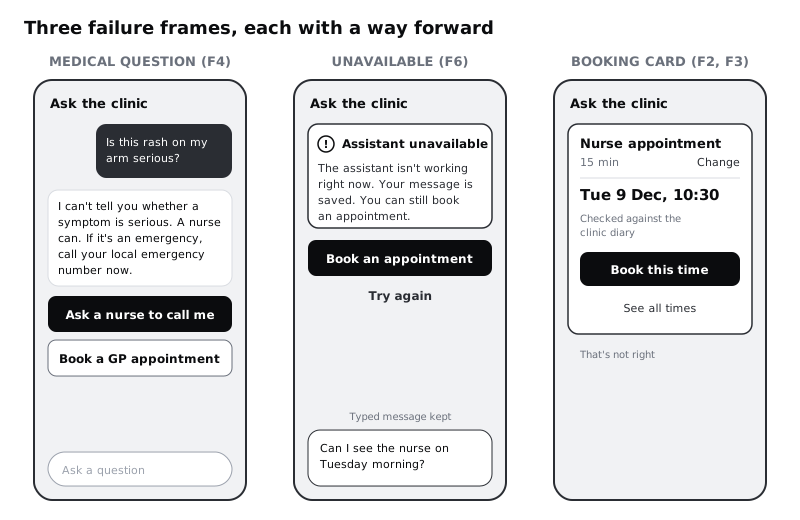
- F4 Out of scope: "I can't tell you whether a symptom is serious. A nurse can. If it's an emergency, call your local emergency number now." Buttons: Ask a nurse to call me, Book a GP appointment.
- F5 Blocked request: "I can only help with your own appointments. I can show yours, or help you book one." Buttons: My appointments, Book an appointment.
- F10 Language: "I can answer in English and French at the moment. You can book in the form, or call reception and ask for an interpreter." Buttons: Book an appointment, Call reception.
Read each one against four checks. It does not blame the person ("you asked something I can't answer"). It does not lecture: F5 does not explain privacy law or say the request was suspicious, it just says what the assistant does. It does not leak anything: F5 does not confirm whether Ada Bello is a patient. And it is honest about what the assistant is, so F4 says "I can't tell you", not "I'm not allowed to", which invites people to argue.
For F4, write the emergency line in your country's own words before release and have a clinician sign it off. A medical refusal is the one place where the wording has to be checked by someone qualified, not only by the design team.
Check it worked
Every Can't help and Won't help row has a message of two sentences or fewer and at least one button that matches its way forward. Read the messages aloud: none contains "you" as the subject of a mistake, none of them describes the request as wrong, and F5 reveals nothing about anyone else. The F4 wording is marked "needs clinician sign-off" in the sheet.
Step 5 · Design the notices for when the assistant is broken
The Broken rows split in two. F7 and F9 happen while an answer is on its way, and the streaming tutorial has already designed them, so reuse its thresholds and frames rather than inventing new ones. F6 and F8 happen before any answer starts, and they belong on the existing Unavailable frame.
- F7 Too slow: this is the streaming tutorial's
3b Still checkingframe. At 10 seconds with no new text, the status line changes toStill checking. This can take a little longer on a slow connection.with the quieterOr choose a time yourselflink to Pick a time under it. Do not set a second threshold here, and do not cancel the request on the person's behalf. In the frame column, write3b Still checking. - F9 Cut off: when the connection drops, or nothing new arrives for 30 seconds counted from the last text received, this is the streaming tutorial's
7 Timed outframe: the partial text stays, marked as unfinished, withThis answer didn't finish. Your connection may have dropped.and the actionsTry againandChoose a time yourself. One case is new: the reply ends because it hit a length limit. The connection was fine, so the second sentence would be wrong. Add a version of7 Timed outfor it that keeps the first sentence and both actions and drops "Your connection may have dropped." Either way, never let a cut-off answer read as complete; "You can book a vaccination on" is worse than nothing. - F6 Provider down: update the existing
Unavailableframe rather than drawing a new one. Keep its sentence and itsBook an appointmentbutton, and add two things it did not have: "Your message is saved. You can still book an appointment." with the person's message left in the input box, and a secondary Try again. - F8 Too many messages: a second version of
Unavailable: "The assistant is busy. Try again in a minute, or book an appointment." with the same buttons. If the service says how long to wait, use that number; if not, do not invent one.
Three details make these notices work on real phones. First, separate "the assistant is down" from "you are offline": if the phone has no connection, the booking form will not work either, so use the offline state from the general error-state work instead (see Next steps). Second, do not retry automatically in a loop. On a slow connection or prepaid data, five silent retries cost the person data and time and usually fail the same way; retry once at most, then show the notice. Third, the notice must be announced to screen reader users without stealing focus from the input box, and it must not rely on colour alone: use an icon and words as well as the notice background.
Check it worked
In the sheet, F7 names 3b Still checking and F9 names 7 Timed out from your streaming frames, with the same 10 second and 30 second thresholds; nothing in this file sets a different number. 7 Timed out has a length-limit version without the connection sentence. Unavailable has two versions, F6 and F8, each with a Book an appointment button, and in the F6 version the person's typed message is visible in the input box. Turn your screen to greyscale: you can still tell a notice from a normal assistant reply by its icon and heading, not only its colour. The handoff note on Unavailable says "announce as a status message, do not move focus".
Step 6 · Put a check between the assistant and anything it books
The Might be wrong rows have no signal, so a better message will not catch them. The fix is structural: the assistant can suggest, but only the clinic's booking system can say what exists. Design for these rules:
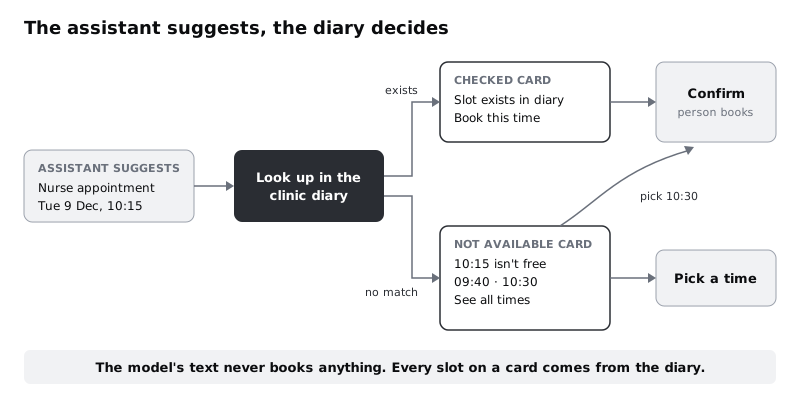
- Slots and services come from the booking system, not from the model's text. When the assistant suggests a time, the app looks it up in the diary and shows a booking card built from the diary's data: service, day, time, duration. If the model said 10:15 and the diary has no 10:15, the card says so.
- Show what was understood, with a way to change it. The card's first line is the service it picked, with a Change link that opens Choose a service. This is where F3 gets caught: the person sees "Blood test" when they meant a vaccination.
- Nothing is booked from the chat. The card's main button, Book this time, opens the normal Confirm screen with the details filled in. The person books on the same screen as everyone else, and sees the same summary.
Design two versions of the card. Checked shows the slot from the diary: "Nurse appointment · 15 min, Tue 9 Dec, 10:30", with a small line "Checked against the clinic diary". Not available shows when the diary disagrees: "10:15 isn't free on Tue 9 Dec. The nearest times are 09:40 and 10:30", each as a button, plus See all times, which opens Pick a time.
For factual answers that are not slots, such as "do you offer travel vaccines", the same idea applies with sources instead of a diary: the answer links to the clinic page it came from, so the person can check. That is covered in the tutorial on showing uncertainty and sources.
Add a quiet "That's not right" control under every assistant reply that leads to an action. It opens the form with nothing guessed carried over, and logs the reply so the team can review it. Reading those logs every week is the human check that catches what the design cannot.
Check it worked
Your file has a booking card in two versions, Checked and Not available. Every value on the Checked card (service, duration, day, time) is marked in your handoff notes as coming from the booking system, not from the assistant's reply. Follow the 10:15 example through your frames: it ends at a Not available card with real times, never at a Confirm screen showing 10:15. Rows F2 and F3 in the sheet name the card as their frame.
Step 7 · Build the frames and walk every row through
Fill in the last column, frame, and build what is missing. Most rows land on frames you already have, so update those and keep their names; duplicates drift apart, and the team ends up maintaining two Unavailable screens with different buttons. For Larkfield, on the 05 Assistant page:
Assistant / Not sure(F1): update it. It already covers a question the assistant could not match. Add a second version,No answer, for a question it understood but the clinic pages do not cover, with the F1 copy and the Call reception and See all services buttons. Same frame, because the person's next step is the same: something other than the assistant.Assistant / Medical question(F4): update it. Its current version, for "which vaccines do I need", ends in a Travel health booking button and reception, and stays as it is. Add aSymptomversion for the rash question with the F4 copy. This version adds Ask a nurse to call me, which the chat tutorial did not have, and swaps the Travel health button for Book a GP appointment.Assistant / Unavailable(F6 and F8): update it, as in the previous step.Assistant / Declined(F5, and F10 with its own copy): new.Assistant / Booking card(F2 and F3, Checked and Not available): new.
On the Streaming states page, F7 uses 3b Still checking and F9 uses 7 Timed out with its new length-limit version. Keep one label for the button that opens the booking flow across both pages: Book an appointment, as in the chat tutorial.
Then walk the matrix with a colleague who did not build it. Read each row's example aloud, show the frame, and ask them to point to what they would tap next. Mark three things in the sheet for each row: could they find the way forward without help, did it lead to a screen that exists in the file, and was anything they had already said kept.
Finish with the test that matters most for AI features. Hide the assistant entirely, as if the provider were down for a day, and book the example appointment (Nurse appointment, Tuesday 9 December, 10:30) from Home. If that is not possible in two taps more than usual, the fallback is not finished.
Check it worked
The frame column has an entry for every row, and every frame named exists in your file. Your walk-through marks show yes in all three checks for every row; where one says no, you have changed the frame and walked that row again. With the assistant hidden, you can reach Booked for the example appointment using only the normal flow.
Next steps
Your matrix is also a test plan: every row is a situation to stage with real people, and every NONE in the signal column is a reason to keep reviewing what the assistant says after launch.
- For the failures that have nothing to do with AI (no connection, a slot taken while someone types, an expired session), use /tutorials/design-error-states-that-help-people-recover.
- To show where an answer came from and when the assistant is unsure, before it gets as far as failing, read /tutorials/show-uncertainty-and-sources-in-ai-answers.
- For the long wait and the timed-out ending that F7 and F9 reuse, see /tutorials/design-for-streaming-ai-answers-and-long-waits.
- To see whether people actually notice and use these fallbacks, run /tutorials/usability-test-an-ai-feature.
Part of these paths
Related tutorials
- Show uncertainty and sources in AI answersYou will have three tested answer layouts for an AI assistant, one sourced, one uncertain and one out of scope, plus the rules that decide which layout each answer gets.
- Design error states that help people recoverYou will have an error matrix covering every way a booking can fail outside the form, and five Figma state frames that keep the person's work, say what happened in plain words and offer a next step.
- Design a chat interface for an AI assistantYou will have a scope sheet for a task-focused booking assistant and seven Figma frames covering its main chat states, from the opening message to hand-offs to the real booking form and to a person.
Need this done for you?
Padding does this work for growing companies, from the first diagnosis to a system that keeps working.
Get new tutorials