UX and research · Intermediate · 16 min
Draw a service blueprint for an appointment service
By Padding · Updated 18 Nov 2026
A spreadsheet (or a whiteboard and sticky notes), your journey map and your observation notes · November 2026
You will have a service blueprint of one appointment booking that lines up what patients do with what staff and systems do behind them, with each behind-the-scenes failure marked and backed by evidence.
On this page
A journey map tells you where patients struggle. It rarely tells you why. The patient on hold for two minutes knows only that the line went quiet. The reason sits somewhere they cannot see: a receptionist walking down a corridor, a calendar that cannot record how long a visit takes, a waiting list kept on paper in a drawer.
A service blueprint puts those hidden parts on the same page as the patient's experience. It keeps the patient's actions as the spine and adds rows underneath for what staff do in front of the patient, what staff do out of sight, and the systems everyone relies on. Lines between the rows show where the patient's view stops. Read down any column and you can trace a visible problem to the place it starts.
This tutorial continues the Larkfield Clinic example, a fictional community clinic planning an appointment booking app (Home, Choose a service, Pick a time, Your details, Confirm, Booked). You already have a current-state journey map with pain points such as the morning phone queue and forgotten appointments, and field notes from a morning with Funmi at the reception desk. You will blueprint one scenario in detail and end with a short list of the failures behind it, each with its evidence. The blueprint describes today. Ideas for the app go on a separate parking list, as they did for the journey map.
Step 1 · Pick one scenario and set its edges
A blueprint of "booking at Larkfield" in general turns into a process chart of the whole clinic. Choose one concrete scenario that a real patient went through and that touches the pain points you care about. Write it at the top of a new spreadsheet tab, or on a card in the corner of the board:
- Scenario: an adult patient rings to book a routine dressing change with the nurse, wants one this week, and accepts a later slot.
- Starts when: the patient first dials the clinic.
- Ends when: the patient arrives at the reception desk on the day.
- Built from: the journey map, its Sources tab (P1 to P6, OBS, LOG, EM) and the contextual inquiry work sequence for "patient asks for an earlier slot".
Pick the scenario your research covers best, not the one with the most drama. A blueprint is only as good as the observation behind its lower rows, and you need to have watched staff handle this scenario at least once.
Check it worked
Your tab or board has four labelled lines: Scenario, Starts when, Ends when, Built from. Every source named under Built from is one you can open now. If you cannot name an observation of staff handling this scenario, choose a scenario you did observe, or plan a contextual inquiry before you go further.
Step 2 · Lay out the rows and the three lines
Set up the grid before you fill anything in. Down the first column, write five row labels, top to bottom:
- Evidence: what the patient sees, hears or holds at each moment (a ringing tone, a text message, an appointment card).
- Patient actions: what the patient does.
- Front stage: what staff do that the patient can see or hear.
- Back stage: what staff do that the patient cannot see.
- Support systems: the tools, records, rules and other teams that staff depend on.
Between the rows, draw three horizontal lines and label them:
- Line of interaction, between patient actions and front stage. Anything that crosses it is a moment of contact.
- Line of visibility, between front stage and back stage. Everything below it is invisible to the patient.
- Line of internal interaction, between back stage and support systems. Crossing it means staff hand work to a system or another team.
In a spreadsheet, use a thick border for the first line, a dashed border for the second and a dotted one for the third, so the lines survive printing in black and white.
Check it worked
Your grid has five labelled rows in the order above and three labelled lines between them. Point at any empty cell and say aloud whether the patient could see what goes in it. If you cannot tell from the grid alone, label the lines more clearly.
Step 3 · Fill the patient actions row from your journey map
Columns in a blueprint are finer than journey map stages. Each column is one patient action, in order. Take them from the journey map's Actions row and the patients' own accounts, keeping the source reference on each:
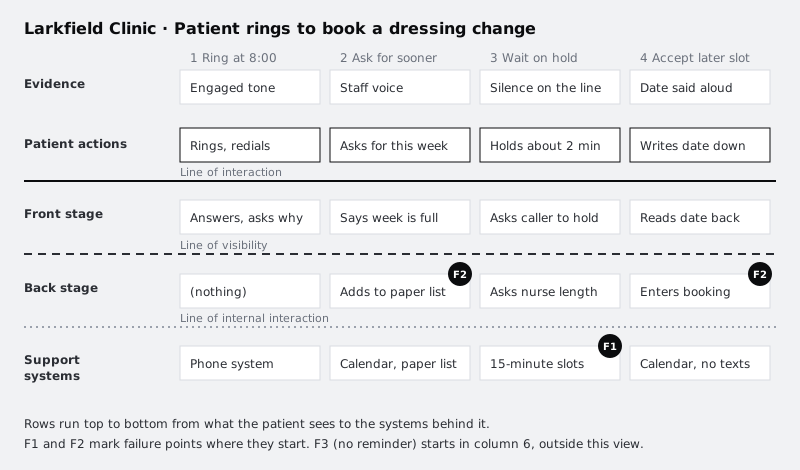
- Rings at 8:00, gets an engaged tone, redials (P2-04, P5-02, LOG)
- Asks for an appointment this week (P2-05, OBS-03)
- Waits on hold (OBS-08)
- Accepts a slot next Thursday (OBS-08)
- Writes the date in their phone calendar (P3-09)
- Waits several days with no contact from the clinic (P3, P5)
- Arrives at the desk and gives their name (OBS-14)
Include actions where the patient does nothing because the clinic does nothing. Column 6 matters: a wait with no contact is where a reminder would go, and the blueprint needs a column there to show that nothing happens below it either.
Then fill the Evidence row above each action with what the patient actually perceives: the engaged tone, the receptionist's voice, silence on hold, the date read aloud, nothing for several days, the desk on the day. If a patient gets nothing tangible (no text, no letter), write "nothing" rather than leaving the cell blank.
Check it worked
The patient actions row has one column per action, in time order, and every action carries at least one source reference. The evidence row has an entry in every column, including the word "nothing" where the patient receives nothing. Read the two rows across: they should tell the scenario as the patient would, with no staff or system detail yet.
Step 4 · Add front-stage staff actions
Now go below the line of interaction. For each column, write what staff do that the patient sees or hears. Use your observation notes, not the clinic's process document:
- Column 1: Funmi answers, asks what the call is about (OBS-01).
- Column 2: says this week is full (OBS-03).
- Column 3: "Can you hold a moment?" (OBS-08).
- Column 4: offers next Thursday, reads the date and time back (OBS-08).
- Column 5: nothing.
- Column 6: nothing.
- Column 7: greets the patient, checks them in (OBS-14).
Several cells stay empty or say "nothing", and that is the finding. A front-stage row full of gaps shows a service where the patient carries the work between contacts.
Write each entry from the patient's side of the line: what they would notice. "Checks the calendar" belongs back stage if the patient only hears a pause; "Says this week is full" is front stage because the patient hears it.
Check it worked
Every front-stage entry is something the patient could report afterwards ("she told me the week was full"). Every entry has an OBS or other source reference. Columns where staff do nothing visible say "nothing" in this row.
Step 5 · Add back-stage actions and support systems
Go below the line of visibility. This is where the contextual inquiry pays off. For each column, list what staff did out of the patient's sight, and then, under the line of internal interaction, what they relied on:
- Column 1, back stage: nothing. Support: clinic phone line, which gives an engaged tone rather than a queue (P2-04, LOG).
- Column 2, back stage: checks this week in the calendar; writes the patient's initials on the paper cancellation list (OBS-03, OBS-04). Support: practice calendar; the calendar's own waiting list (sends no messages, not used); paper list in the reception drawer.
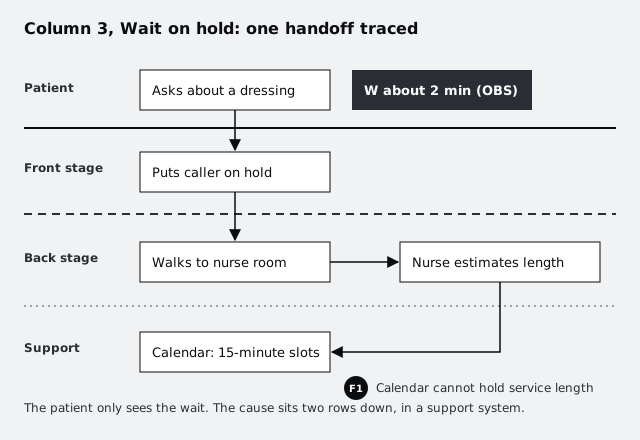
- Column 3, back stage: walks to the nurse room to ask Nurse Adaeze how long a dressing change takes (OBS-08). Support: the calendar's fixed 15-minute slots; the nurse's own judgement.
- Column 4, back stage: enters the booking; keeps the patient on the paper list in case a slot opens (OBS-09). Support: practice calendar; paper list.
- Column 5, back stage: nothing. Support: no confirmation text; the date exists only in the call (P3-09).
- Column 6, back stage: nothing. Support: no reminder system (P3, P5, confirmed by Funmi in OBS-21).
- Column 7, back stage: finds the booking and marks the patient as arrived (OBS-14). Support: practice calendar.
Name support systems specifically. "IT" or "the system" hides the cause; "practice calendar, 15-minute slots only" and "paper list, rung through by hand when someone cancels" show it. Include people outside the front desk when work passes to them, such as the nurse, because a handoff to another person is a support dependency like any tool.
Check it worked
Each column has an entry in the back-stage and support-system rows, even if the entry is "nothing" or "no system". Every support entry names a specific tool, record, rule or person. Count your handoffs across the line of internal interaction: you can point to each one and say who or what receives the work.
Step 6 · Connect the rows and trace the handoffs
Draw arrows wherever one action triggers another: from the patient's request down to the front-stage reply, from the reply down to the back-stage check, from the back-stage check across to the nurse and down to the calendar. In a spreadsheet, a short note such as "→ col 3 back stage" in the cell does the same job.
Next to any arrow where time passes, add a W for wait, with the length and its source. In column 3 the caller holds for about two minutes while Funmi walks to the nurse room (OBS-08). In column 6 the patient waits several days with no contact (P3, P5).
Look for arrows that go nowhere. The paper cancellation list receives patients in column 2 and 4, but no arrow leaves it in this scenario: nobody is rung back unless someone happens to cancel and Funmi has time to work down the list. That dead end is a finding.
Check it worked
Every column has at least one arrow or "→" note linking a row to the row below. Every wait has a W, a length and a source. You can name at least one place where work enters something and does not come back out.
Step 7 · Mark failure points with their evidence
A failure point is a place where the service breaks, slows down or depends on someone remembering. Mark each one with an F in the row where it starts, not the row where the patient feels it. Then write it up in a list below the blueprint, with the same structure as the journey map's pain points: what goes wrong, where it starts, what the patient feels, and the sources.
For Larkfield:
- F1: The calendar cannot record visit length. Starts in support systems (column 3). Patients feel it as time on hold. Sources: OBS-08, OBS-12; Funmi confirmed it happens "most mornings" (OBS-21).
- F2: The calendar's waiting list sends no messages, so staff keep a paper list that only works when someone has time. Starts back stage (columns 2 and 4). Patients feel it as being told the week is full when slots later open. Sources: OBS-04, OBS-09, OBS-17.
- F3: No reminder of any kind. Starts in support systems (column 6). Patients feel it as having to remember, and some forget. Sources: P3, P5, OBS-21. Links to the journey map pain point "Forgotten appointments".
Note how each failure explains a pain point the journey map already showed. That link is the reason to draw a blueprint: the journey map said the morning phone queue is painful, and the blueprint shows part of why the calls take so long.
If you suspect a failure the research does not show, such as double bookings when a paper-list patient gets a slot and keeps the later one, mark it in the guess style you used on the journey map and add it to "Questions for the next round".
Check it worked
Each F on the blueprint has a matching entry in the list, and each entry names the row and column where it starts, the patient-side effect and at least two sources. Any failure with one source or none is marked as a guess. At least one entry links back to a named pain point on your journey map.
Step 8 · Walk the blueprint with the people in its lower rows
The lower rows describe other people's work, so they get the final say on whether it is right. Book thirty minutes with Funmi, and if you can, ten minutes with Nurse Adaeze. Read each column from the top down and ask:
- Is the order right, and is anything you do missing?
- Is there a system, list or person you use here that is not on the grid?
- Do the failure points match what you see, and is anything marked as a failure actually fine?
Record the review as a new source (for example REV-02) and add it to the entries it changes. Staff often correct timing and sequence. Funmi might say she only works through the paper list after 10:00, once the phone queue dies down, so a cancellation made at 8:30 sits unfilled while callers are being told the week is full. That changes F2 from "works when someone has time" to "cannot work during the morning peak", which points to a different fix: offering freed slots without a person in the loop.
Finally, add the review date and "Reviewed with: reception, nursing" under the scenario lines.
Check it worked
The blueprint shows a review date and the roles of the reviewers, the Sources tab has a REV entry, and every change since the review carries that reference. You can say in one sentence which failure point the review changed most.
Next steps
You now have one scenario traced from what patients notice down to the tools and rules that cause it, with three failures you can defend. The next job is to decide which of them the app should take on and which need a change at the clinic instead.
- Rank the failures alongside the journey map's pain points in Prioritise opportunities from a journey map.
- Check or extend the patient side of the blueprint with Map a current-state customer journey.
- Fill gaps in the back-stage rows with another observation session, using Observe people at work with a contextual inquiry.
Part of these paths
Related tutorials
- Map a current-state customer journeyYou will have a journey map of how patients book, attend and follow up on a clinic appointment today, with every pain point tied to the research that shows it and every guess marked as a guess.
- Observe people at work with a contextual inquiryYou will have timestamped field notes from watching someone do their real work, and a numbered sequence of the work steps that marks every workaround and breakdown you saw.
Need this done for you?
Padding does this work for growing companies, from the first diagnosis to a system that keeps working.
Get new tutorials