UI and visual design · Intermediate · 16 min
Name design tokens from primitives to roles
By Padding · Updated 18 Nov 2026
Figma (web) · November 2026
You will have the Larkfield Clinic values split into a primitives collection and a semantic collection in Figma variables, every semantic token aliasing a primitive, and a one-paragraph naming rule your team can apply to any new token.
On this page
Right now every colour in the Larkfield file does two things at once. colour/accent holds the value #0F5E5A, and it also says what that value is for: main buttons, selected items, links. That is fine for thirteen colours on six screens. It stops being fine the day you need a second use for the same teal, a darker teal for pressed buttons, or a dark theme. Then one name is carrying a value and a decision, and you cannot change one without the other.
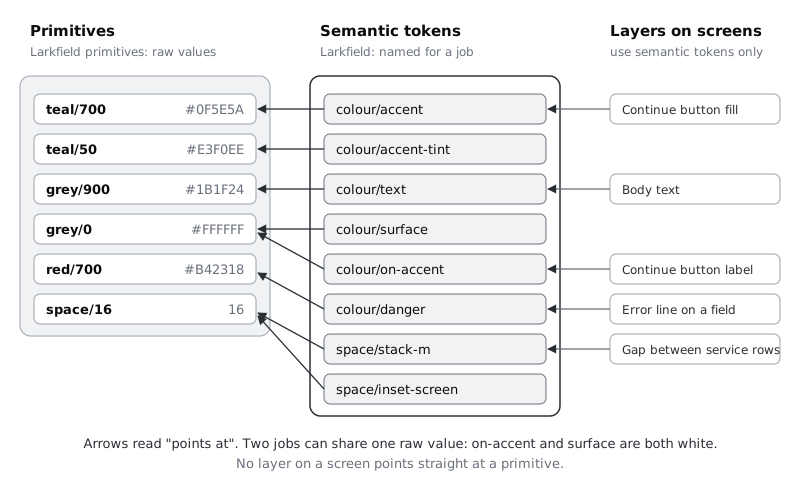
Design systems split the two into layers:
- Primitives are the raw values.
teal/700is #0F5E5A and says nothing about where it goes. There can be many of them, and nothing on a screen uses them directly. - Semantic tokens (also called role or alias tokens) are named for a job.
colour/accentdoes not hold a hex code any more. It points atteal/700. Layers on the screens use only these.
The split gives you two separate kinds of change. A rebrand edits primitives, and every job follows. A design decision ("selected slots should use the pale teal, not the dark one") changes which primitive a semantic token points at, and no raw value moves.
In this part of the series you take the keep and merge decisions from your audit, sort them into those two layers, write a naming rule before naming anything, then build both layers in Figma variables. You change no screen by hand, and the screens should look exactly the same at the end. That is how you know the structure is right.
Step 1 · Separate values from jobs on the audit sheet
Open the audit sheet from part 1. Its Value and Job columns are the two layers already; you just have not pulled them apart. Make a new frame beside it called Token sort (or a new tab in a spreadsheet, if you kept the audit there) with two lists side by side.
In the left list, write every distinct raw value you decided to keep, once each. Merged values do not get a row: the #0E5F5B icon strokes became #0F5E5A, the 15 px gap became 16, the 6 px banner radius became 8. For Larkfield the left list is:
- colours: #0F5E5A, #E3F0EE, #1B1F24, #5A6270, #7D8592, #D5D9DF, #F6F7F8, #FFFFFF, #B42318, #FDECEA, #8A5A00, #FFF4DC
- spacing: 4, 8, 12, 16, 24, 32
- corner radius: 8
In the right list, write every job, once each, in plain words: "main buttons and selected items", "text on a main button", "screen background", "gap between items in a list", "padding at the edge of a screen". Take them from the audit's Job column and from the colour list in the high-fidelity part of the earlier series.
Then draw a line from each job to its value. Some values get several lines. White is both "card and field background" and "text on a main button". 16 is both "screen padding" and "gap between list rows". This is the first sign you need two layers: one value, two jobs that might go separate ways later.
Some values get no line at all. Larkfield's 4 and 12 have no settled job yet; the audit marked them "Keep, part 5 decides". Leave them in the left list. A primitive does not need a job to exist.
Check it worked
Every value in the left list appears once, with no near-duplicates (no two greys a shade apart, no 15 beside 16). Every job in the right list has exactly one line to a value. At least two values (white and 16 for Larkfield) have two or more lines going into them.
Step 2 · Write the naming rule before you name anything
Names chosen one at a time drift. You end up with colour/accent, primaryText, bg-main and grey-dark in one file, and nobody can guess the name of the next token. Write the rule first, as a paragraph, and then apply it.
Here is Larkfield's. Copy it onto the Token sort frame and adjust it for your team:
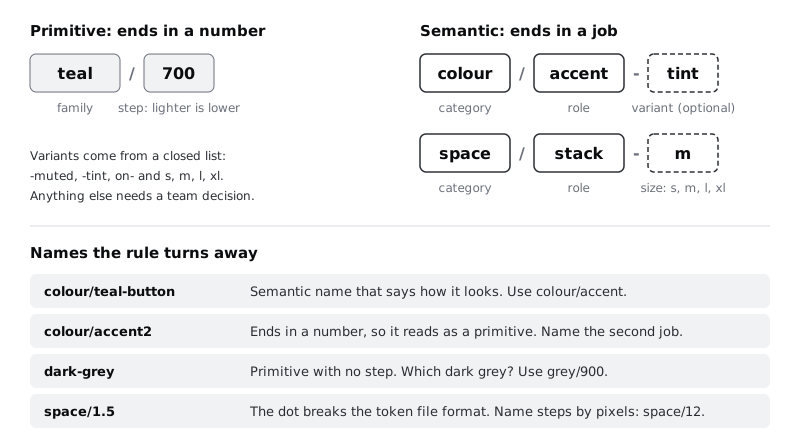
Larkfield token names. Every token name is lowercase English words and numbers, separated by/for groups and-within a word group. A primitive name isfamily/step, where the family is a hue (teal,grey,red,amber) or a measure (space,radius), and the step is a number: for colours lower is lighter, from 0 to 900; for sizes the step is the value in pixels. A semantic name iscategory/role, optionally followed by a variant, where the category iscolour,spaceorradius, the role is the job in one or two words, and the variant comes from a closed list:-muted,-tint,on-before a role for content placed on that role, and-s,-m,-l,-xlfor sizes. A primitive name always ends in a number and a semantic name never does. Names never contain a dot or curly braces. Adding a family, category, role or variant to these lists is a team decision, written in the change log.
The last two sentences of that rule matter more than they look. "Ends in a number" lets anyone tell the layer of a token from its name alone, in Figma, in code review or in a chat message. "No dots or curly braces" comes from the Design Tokens Community Group format, the JSON format many token tools read and write. Its 2025.10 version is a stable Community Group report, not a W3C Standard. In that format a dot separates groups in a reference, as in {teal.700}, so a name such as space/1.5 would break when you export it.
If your team works in more than one language (French and English in Yaoundé, English and Swahili in Nairobi, English and Hausa in Kano), pick one language for token names and keep it. The names become code identifiers, and one short English word per role is easier to type, search and review than a mix.
Check it worked
Your rule fits in one paragraph and lists every allowed family, category and variant. Test it on three names without looking at the diagram: colour/teal-button fails (a semantic name that describes appearance), grey/900 passes as a primitive, colour/accent2 fails (ends in a number). If your rule cannot reject the first and third, tighten it before going on.
Step 3 · Name the primitives
Go down the left list and give each value a name under the rule.
For colours, the step number says roughly how light the colour is, on a 0 to 900 scale. You are placing values by eye today. The next part of the series builds full tonal ramps in a perceptual colour space and may move a value to a different step, so leave gaps between steps rather than numbering 1, 2, 3. Larkfield's colour primitives:
| Primitive | Value |
| --- | --- |
| grey/0 | #FFFFFF |
| grey/50 | #F6F7F8 |
| grey/200 | #D5D9DF |
| grey/500 | #7D8592 |
| grey/600 | #5A6270 |
| grey/900 | #1B1F24 |
| teal/50 | #E3F0EE |
| teal/700 | #0F5E5A |
| red/50 | #FDECEA |
| red/700 | #B42318 |
| amber/50 | #FFF4DC |
| amber/700 | #8A5A00 |
The status colours share step numbers on purpose: red/700 and amber/700 are both "dark enough for text on white", and red/50 and amber/50 are both "pale enough to sit behind that text". Matching steps across hues is what makes a later rule such as "status text is always step 700" possible.
For sizes the step is the pixel value: space/4, space/8, space/12, space/16, space/24, space/32 and radius/8. Value names never lie about what they hold, which is exactly what you want from a raw value.
Check it worked
You have twelve colour primitives and seven size primitives, and every name ends in a number. Within each colour family, a higher step is always darker: grey/600 is darker than grey/500, which is darker than grey/200. No two primitives hold the same value.
Step 4 · Name the semantic tokens
Now go down the right list and give each job a name under the rule. Larkfield already has good semantic colour names from the high-fidelity work, so keep them exactly. Renaming them would gain nothing, and every fill on the screens is bound to them.
| Semantic token | Points at | Job |
| --- | --- | --- |
| colour/text | grey/900 | headings and body text |
| colour/text-muted | grey/600 | hints, secondary lines, durations |
| colour/surface | grey/0 | cards, fields, sheets |
| colour/canvas | grey/50 | screen background |
| colour/line | grey/200 | dividers between rows |
| colour/border | grey/500 | edges of fields, unselected slots, secondary buttons |
| colour/accent | teal/700 | main buttons, selected items, links |
| colour/accent-tint | teal/50 | selected backgrounds, the Booked banner |
| colour/on-accent | grey/0 | text on accent buttons |
| colour/danger | red/700 | error text and error borders |
| colour/danger-tint | red/50 | error message background |
| colour/notice | amber/700 | notice text such as "that time has gone" |
| colour/notice-tint | amber/50 | notice background |
Spacing and radius are new, so name them from the jobs the mid-fidelity scale gave them. "Stack" is the gap between siblings in a column; "inset" is padding inside a container:
| Semantic token | Points at | Job |
| --- | --- | --- |
| space/stack-s | space/8 | between things inside one group, such as a label and its field |
| space/stack-m | space/16 | between items in a list, such as service rows |
| space/stack-l | space/24 | between groups, such as Morning and Afternoon on Pick a time |
| space/stack-xl | space/32 | above the main action button |
| space/inset-screen | space/16 | padding at the left and right edges of a screen |
| radius/control | radius/8 | buttons, fields and time slots |
space/stack-m and space/inset-screen both point at 16 today. Keep them separate. If testing later shows the screen edge needs 20 on small phones, you change one alias, and the gaps between service rows stay as they are.
Resist naming a semantic token for a single component (space/time-slot-gap). Component-level tokens are a third layer some large systems add; a minimal system does not need it yet, and it doubles the token count.
Check it worked
Read each semantic name aloud and say its job without looking at the table. If you cannot, the name is describing something other than a job. No semantic name ends in a number or contains a colour word such as teal or grey. Every semantic token points at a primitive from the previous step, never at a hex code or a typed number.
Step 5 · Build the primitives collection in Figma
Open the variables window from the right sidebar with nothing selected. Create a new collection and name it Larkfield primitives. The existing Larkfield collection stays as it is; it becomes the semantic layer in the next step.
Add a colour variable for each colour primitive and a number variable for each size primitive, typing the names exactly as in your tables. The slash in each name puts it in a group, so the collection shows grey, teal, red, amber, space and radius as folders. Create colour variables with light and dark modes and Use number variables for spacing and corner radius show the window and each click in detail; this step only needs the names and values.
Then stop the primitives being picked by accident. Select all the colour primitives, open their settings and, under scoping, turn off every property, so they are not offered for fills, strokes or text. Do the same for the number primitives. They stay available as alias targets. If you publish this file as a library, also tick Hide from publishing for every primitive, so other files see only the semantic tokens.
Check it worked
The Larkfield primitives collection has six groups and nineteen variables, every name ending in a number. Select any layer on a screen and open the fill's variable picker: only Larkfield variables appear, none from Larkfield primitives.
Step 6 · Point the semantic tokens at the primitives
Open the Larkfield collection. Each colour variable still holds a hex code. Change each one into an alias: click its value cell, switch from the custom colour to the list of variables, and choose the primitive from your table. The cell then shows the primitive's name instead of a hex code.
Work down the table in order and tick each row on your Token sort frame as you go. Thirteen aliases is few enough that skipping one is easy and finding it later is annoying.
Then add the six spacing and radius tokens to Larkfield as number variables, each aliasing its primitive. Scope the space tokens to gap only (which covers auto layout gap and padding) and radius/control to corner radius only. Do not bind them to the screens yet. Part 5 settles the spacing scale and rebuilds Pick a time with it; today's job is the names and the structure.
Because you changed values, not names, every layer bound to colour/accent or colour/text keeps its binding. The screens should not change at all.
Check it worked
In the Larkfield collection, every value cell shows a primitive's name and none shows a hex code or a typed number. Hover over colour/accent: it resolves to #0F5E5A. Look at the 04 High fidelity frames (or your own screens) next to a copy made before this step: they are identical.
Step 7 · Prove the layers work with two changes
A structure you have not tested is a guess. Make two changes, look, and undo each.
A palette change. In Larkfield primitives, change teal/700 to an obviously different colour, such as #6B2FA0. On Pick a time, the Continue button, the selected 10:30 slot and every link change at once, because they all reach teal/700 through colour/accent. Undo.
A decision change. In Larkfield, point colour/accent-tint at grey/50 instead of teal/50. The Booked banner and any other accent-tint background turn grey and nothing else moves, even though colour/canvas also uses grey/50, because only the job changed. Undo, and check the alias reads teal/50 again.
If either change moved something you did not expect, a layer is bound to the wrong token or has a raw hex code left on it. Select that layer, check its fill in the right sidebar, and rebind it to the semantic token for its job.
Check it worked
After both undos, teal/700 holds #0F5E5A, colour/accent-tint points at teal/50, and the screens match the copy you compared against. You saw each change reach exactly the layers you predicted, and no others.
Step 8 · Record the token table and the rule
The structure now lives in Figma. The decisions behind it also need to live somewhere people read. On the Token sort frame, or a new frame called Tokens next to the audit, keep three things:
- the naming rule paragraph from the second step
- the two tables, primitives and semantic tokens, each semantic row with its job in plain words
- a short "open questions" list: Larkfield's is "4 and 12 have no job yet (part 5)" and "colour steps are placed by eye (part 3)"
This is what later parts of the series build on. The palette part rebuilds the colour primitives as full ramps and re-points the semantic tokens at new steps, using the same names. The spacing part decides the scale and fills in jobs for 4 and 12. When a developer turns the tokens into code, the names carry over: colour/accent-tint becomes something like --colour-accent-tint in CSS, or {"colour": {"accent-tint": {"$value": "{teal.50}"}}} in a Design Tokens Community Group JSON file, where the alias stays an alias.
Check it worked
Someone who has not seen this tutorial can open the Tokens frame, read the rule, and name a new token for "background of a success message" without asking you. Try it on a teammate. Larkfield's rule gives colour/success-tint, pointing at a green/50 primitive that does not exist yet. That gap is the right answer: adding the green family is a team decision under the rule.
Next steps
- Build a colour palette with tonal ramps is part 3: it replaces the hand-placed colour steps with even ramps and re-points the semantic tokens.
- Turn design tokens into CSS custom properties takes the same two layers into a stylesheet.
- Create colour variables with light and dark modes adds a second mode to a semantic collection, which is the payoff of the split you made here.
- If you skipped it, Audit your screens before you build a design system produces the value list this tutorial sorts.
Part of these paths
Related tutorials
- Audit your screens before you build a design systemYou will have an audit page in Figma that lists every colour, text setting, spacing value, corner radius and component your screens use, with each near-duplicate marked keep, merge or drop.
- Create colour variables with light and dark modesYou will have a Figma screen whose every colour comes from variables, so switching one setting on the frame turns it from light to dark and back.
- Turn design tokens into CSS custom propertiesYou will have a two-layer tokens.css file of primitive and semantic custom properties, component styles that use only the semantic layer, a Node script that enforces that rule, and a demo page that proves one primitive change reaches every component.
Need this done for you?
Padding does this work for growing companies, from the first diagnosis to a system that keeps working.
Get new tutorials