Product and project management · Beginner · 15 min
Run a Kanban board with work-in-progress limits
By Padding · Updated 18 Nov 2026
Any board tool · November 2026
You will have a Kanban board for the Larkfield Clinic support-and-fixes team with a limit on every working column, written rules for when a card may move, and a first week of cycle-time and throughput data.
On this page
Larkfield Clinic, the fictional community clinic, now has online booking and SMS appointment reminders. A small team keeps them running: three developers and a part-time tester. Their work arrives without warning. A receptionist reports that a nurse slot shows the wrong length. A patient gets the same reminder twice. The clinic manager asks for the day list to print on one page. Nobody can plan two weeks of this in advance, and the team's to-do list has grown to 40 items, eleven of them "in progress".
Eleven items in progress for four people means most of them are waiting, not moving. A Kanban board fixes this by making the flow visible and by capping how much work can be started at once. When a cap is reached, people finish things instead of starting more.
This tutorial uses the terms of The Kanban Guide (2025 edition): a workflow with clear start and finish points, a way of controlling work in progress (WIP), explicit policies, and four flow measures (WIP, throughput, work item age and cycle time). You build the board for Larkfield's team, set the limits, write the rules, and collect a week of data. Follow the same steps with your own team's work in place of the Larkfield items.
Step 1 · Map how work really flows today
Do not start from a template with "To do, Doing, Done". Start from what actually happened to recent work. With the team, pick the last ten items they finished and, for each one, say out loud what happened to it from the moment someone asked for it to the moment a patient or receptionist could use the change.
Write each stage on its own line in a document called "Larkfield support board". For Larkfield the stages kept coming back as:
- Someone reports a problem or asks for a change (by phone, email or the clinic's chat group)
- The team agrees it is worth doing soon
- A developer reproduces the problem and works out the cause
- A developer changes the code
- The tester checks the change, and a receptionist tries it if it affects the front desk
- The change goes live for patients
Also write down where items waited: "waiting for the clinic to confirm which wording is right" came up three times. Waiting matters as much as working, because cycle time counts both.
Check it worked
Your document lists between four and seven stages, each one something a person does, in the order it happens. Every one of the ten items you traced passed through those stages, perhaps skipping one. If an item does not fit, either add the stage it needed or note it as an exception to discuss.
Step 2 · Turn the stages into columns and fix the start and finish points
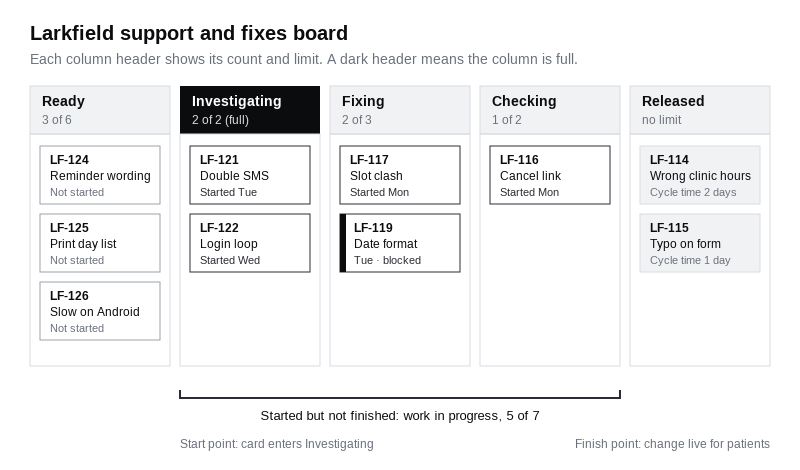
Each stage becomes a column. Larkfield's board has five:
- Ready: agreed to do next, not started
- Investigating: reproducing and finding the cause
- Fixing: changing the code
- Checking: tested by the tester, and by a receptionist where it touches the front desk
- Released: live for patients
New requests are kept in a separate list called "Requests", outside the board, so the board shows only work the team has agreed to. Waiting for the clinic is not a column; a waiting card stays where it is and is marked blocked, so it still counts against that column's limit.
Now decide the two points the guide asks every team to define. At Larkfield, a card starts when it moves from Ready into Investigating, and finishes when it reaches Released. Everything between those points is work in progress. Ready is a queue, not work in progress.
Build the board in your tool. If you work over a slow or prepaid mobile connection, as several of Larkfield's receptionists do, a shared spreadsheet with one row per card and a "Column" field works on a low-end Android phone. It does the job of a heavy board app, and the measures later in this tutorial are easier to calculate there.
Check it worked
Your board has one column per stage from your map, a Requests list kept off the board, and a written line at the top: "Started = enters Investigating. Finished = in Released." (with your own column names). Move one real card across the whole board and back. If you hesitate about which column it belongs in at any point, the column names are not clear enough yet; rename them.
Step 3 · Set a work-in-progress limit for each column
A limit is the largest number of cards a column may hold. The Kanban Guide requires a team to control WIP but leaves the method to the team; a limit per column is the most common way and the easiest to see.
Pick first limits from how many people do each kind of work, then adjust:
- Investigating: 2. Three developers, and investigation is where a stuck item hides longest.
- Fixing: 3. One per developer.
- Checking: 2. One tester, part time, plus a receptionist for front-desk changes.
- Ready: 6. Enough for about a week, so priorities stay fresh.
- Released: no limit. It is the finish line.
The total from Investigating to Checking is 7 for four people. That sounds tight compared with the eleven items Larkfield had open, and it is meant to. A limit that never bites changes nothing. Start lower than feels comfortable; raising a limit later is easy, and lowering one is hard.
Write each limit where everyone sees it. If your tool can show a limit on a column header, use that. If not, put it in the column name: "Fixing (3)".
Before the limits go live, deal with the work already in progress. Larkfield had eleven started items. The team finished two that were nearly done, put four back into Requests, and left five on the board, which fits under the limits.
Check it worked
Every column between your start and finish points has a number on it. Count the cards in each column: none holds more than its limit. If one does, the team decides today which card goes back to Ready or Requests; do not raise the limit to fit the mess.
Step 4 · Write explicit policies for when a card may move
Limits stop overloading. Policies stop arguments. A policy is a short, written rule that says what must be true before a card enters a column. Add a "Board rules" section to your document and pin it to the board.
Larkfield's rules:
- Into Ready: the product owner has agreed it, the card says who asked and what they saw, and it is small enough to finish in about a week. Larger items are split first.
- Into Investigating: there is room under the limit, and you write today's date on the card as its start date.
- Into Fixing: the cause is written on the card in one or two sentences.
- Into Checking: the change is reviewed by a second developer, and the card says how to test it.
- Into Released: the tester has passed it, a receptionist has tried it if it touches the front desk, and it is live. Write the finish date on the card.
- Blocked: mark the card blocked, write what it is waiting for and who was asked, and leave it in its column. It still counts against the limit.
- Pull, do not push: you move a card into a column only when you are about to work on it there. Nobody hands work onward to a full column.
- Urgent lane: if patients cannot book at all, one urgent card may enter Investigating even when it is full. Only one urgent card at a time. Write "exception" on it, so it shows up when you review the week.
The urgent lane is a deliberate exception, written down in advance. The Kanban Guide expects exceptions like this to be part of the team's agreed workflow, not decided card by card.
Check it worked
Your "Board rules" section has one rule per column boundary, a blocked rule, a pull rule and at most one exception. Take any card on the board and read the rule for its current column: the card should meet it. If you cannot tell from the card whether it does, the card is missing information the rule asks for.
Step 5 · Put a start date on every card and track the four measures
Flow measures come from two dates per card, so the dates are not optional. Larkfield adds two fields to each card, "Started" and "Finished". On a wall board, write them in the corner of the sticky note.
The four measures, as the Kanban Guide defines them:
- WIP: cards started but not finished. Count Investigating to Checking.
- Throughput: cards finished per unit of time. Larkfield counts per week.
- Work item age: time since a started card started. Look at this every day; it is the only measure that warns you while there is still time to act.
- Cycle time: time from start to finish for a finished card.
Agree one counting rule and keep it. Larkfield counts calendar days and includes both the start and finish day, so a card started and finished on the same day has a cycle time of 1. Cards that were started before the board existed have no reliable start date: count them in throughput when they finish, and leave them out of cycle time.
Keep a sheet with one row per finished card. After Larkfield's first week (Monday to Friday) it looks like this:
Item    Title                Started    Finished  Cycle time (days)
LF-110  Reminder time zone   pre-board  Mon       not counted
LF-114  Wrong clinic hours   Mon        Tue       2
LF-115  Typo on form         Tue        Tue       1
LF-116  Cancel link          Mon        Thu       4
LF-117  Slot clash           Mon        Fri       5
LF-121  Double SMS           Tue        Fri       4
LF-124  Reminder wording     Thu        Fri       2

Still in progress on Friday:
LF-119  Date format          Tue        (blocked)  age 4
LF-122 Login loop Wed - age 3Check it worked
Every card from Investigating onwards has a start date; every card in Released has a finish date. Your sheet has one row per finished card with a cycle time worked out by your counting rule. For a quick test, pick one finished card and count the days on a calendar: you should get the number on the sheet.
Step 6 · When a limit is hit, swarm instead of starting
On Wednesday, Investigating at Larkfield held two cards, its limit. A developer finished her fix and was free. The old habit would be to pull LF-125 from Ready and start investigating anyway. The rule says no.
Instead, follow this order every time someone is free:
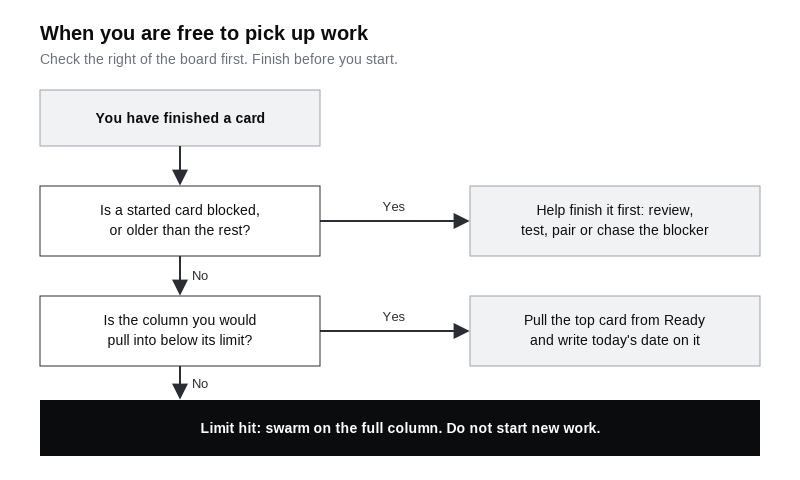
Swarming means the free person helps move a card that is already started. At Larkfield that Wednesday, it meant reviewing LF-117 so it could move to Checking, then chasing the clinic for the answer that had blocked LF-119 since Tuesday. A free person can also pair on an investigation, write a test, or take the checking load off the part-time tester. What they do not do is open a new item.
A full column is useful information. If Checking is full every day, the tester is the constraint, and starting more fixes only makes the queue in front of her longer. Note that pattern for the weekly review rather than working around it.
Check it worked
At the end of each day for a week, look at the board: no column holds more cards than its limit, except a single card marked "exception" under the urgent rule. Ask the team one question at stand-up: "Who started something new while a column was full?" The honest answer by the end of the week should be nobody.
Step 7 · Review the first week and draft a service level expectation
At the end of the week, spend 30 minutes with the team and the sheet.
Read the numbers first. Larkfield finished 7 cards (throughput 7 per week), 6 with known cycle times: 1, 2, 2, 4, 4 and 5 days. Half of them took 3 days or less. The oldest open card, LF-119, was 4 days old and blocked the whole time, waiting for the clinic.
Then ask three questions:
- Which card aged most, and why? LF-119 waited on the clinic. Larkfield's new rule: a card blocked for a full day is raised at the clinic's morning huddle.
- Did any limit feel wrong? Investigating filled twice; Checking never did. The team kept the limits for another week rather than change them on one week of data.
- Was the urgent lane used, and was it really urgent? It was not used. Good.
A service level expectation (SLE) is a forecast of how long a card should take from start to finish, with a likelihood, such as "85% of cards finish within 10 days". One week is too little data for one. Write a draft anyway, so the team has a target to test: Larkfield wrote "85% of cards finish within 6 days (draft, review after four weeks)". After four weeks and 20 or more finished cards, replace the guess with the value from your sheet: sort the cycle times and read off the number that 85% of them are at or below.
Check it worked
Your document now has a "Week 1 review" section with the throughput, the list of cycle times, the oldest open card and its age, at least one change to a rule or a reason not to change one, and a draft SLE with a review date.
Step 8 · Decide whether Kanban or sprints suits the work
Larkfield's other team, which is building online payments, works in two-week sprints. Both choices are right for their work. Use these questions for yours:
- Does work arrive unpredictably and need a response within days? Support, fixes and small requests suit Kanban. A team that plans two weeks ahead will keep breaking the plan.
- Are the items small and fairly independent? Kanban works best when most cards finish in about a week. A large feature with a shared goal suits a sprint goal better.
- Do people outside the team need a fixed rhythm? If the clinic wants a planned review every fortnight, sprints give that by default. A Kanban team can still hold a regular review, as Larkfield does every Friday.
- Do priorities change daily? Kanban lets you reorder Ready at any time without breaking a commitment.
It is not a strict either/or. Scrum teams can add WIP limits and flow measures to their sprints, and Scrum.org publishes a Kanban guide for Scrum teams on exactly that.
Check it worked
Write one paragraph at the top of your document, "Why this team uses Kanban" (or sprints), that answers the four questions with your own team's facts. If two or more answers point the other way, discuss with the team before the next week starts.
Next steps
- Use your throughput sheet to answer "when will it be done?" with forecasting delivery dates from throughput.
- Compare the sprint approach Larkfield's payments team uses in running two-week sprints with Scrum.
- Keep cards small enough to finish in a week with splitting a large user story into thin slices.
- Make the "Into Ready" rule easier to meet with writing tickets developers want to pick up.
Related tutorials
- Write user stories with clear acceptance criteriaYou will have five user stories for a clinic's reschedule feature, each checked against INVEST and carrying Given / When / Then acceptance criteria that a developer and a tester read the same way.
- Write tickets developers want to pick upYou will rewrite three vague backlog tickets into ones a developer can start without asking a question, and save the structure as a ticket template in your tracker.
- Write a weekly stakeholder update people readYou will have a reusable weekly update template and one finished update under 250 words, whose first two lines tell any reader whether they need to act.
Need this done for you?
Padding does this work for growing companies, from the first diagnosis to a system that keeps working.
Get new tutorials