UI and visual design · Beginner · 14 min
Show dates, times, phone numbers and money clearly
By Padding · Updated 18 Nov 2026
Any design tool and a spreadsheet · November 2026
You will have a formatting table that fixes how dates, times, time zones, phone numbers and prices appear in three locales, and the Larkfield booking screens updated to follow it.
On this page
A booking app is mostly a machine for passing four kinds of value between people: a date, a time, a phone number and, sometimes, a price. Get the words wrong and people hesitate. Get one of these values wrong and they turn up on the wrong day, miss the reminder text or pay the wrong amount. Most of those mistakes come from formats that look fine to the person who designed them and mean something else to the person reading.
This tutorial uses Larkfield Clinic, the fictional community clinic whose booking app runs Home, Choose a service, Pick a time, Your details, Confirm and Booked. Two things have changed since the screens were designed. Many Larkfield patients have family in Nigeria and Kenya and book their travel health appointments from there, on phones set to Lagos or Nairobi time, often with a +234 or +254 number. And the clinic group is lending the app to two partner clinics, one in Lagos and one in Nairobi, which charge in naira and Kenyan shillings.
You will list every value the screens show, decide how each kind is written in three locales (UK English, Nigerian English and Kenyan English), put the decisions in one formatting table and update the screens from it. The worked example is the booking used throughout the series: a Nurse appointment on Tuesday 9 December at 10:30.
Step 1 · List every date, time, phone number and amount on the screens
Open the Larkfield file and a new spreadsheet. Name the first tab Values and give it five columns: Screen, Where on the screen, Kind (date, time, phone or money), What it shows now, and Who reads it.
Go through the six screens and the four state frames in flow order and add a row for every value, including ones inside components. For Larkfield the list starts like this:
- Pick a time, week strip:
Tue 9, date - Pick a time, day heading:
Tue 9 Dec, date - Pick a time, slots:
09:00to16:00, time - Pick a time, fallback line:
Call 01234 567 890, phone - Your details, mobile field hint and error:
07700 900123, phone - Confirm, Date and time row, date and time
- Booked, the date and time again, and
We've sent a text to 07••• ••• 123, phone
Add the rows that will exist once the partners use the app, even though they are not drawn yet: a price line on Choose a service for paid services, and a price on Confirm. In the Who reads it column, write who could be reading that value and from where: a patient at home, a patient abroad, the clinic's front desk, the SMS reminder.
Then read down the Kind column and the What it shows now column together. Larkfield's mid-fidelity screens already avoid one trap (the day heading spells out the month), but they assume every reader is in the UK, on UK time, with a UK mobile number.
Check it worked
Your Values tab has a row for every date, time, phone number and price on all ten frames, with screen and position filled in, plus the price rows still to be drawn. Pick any frame, look at it and count the values you can see: the count matches the rows for that frame.
Step 2 · Write dates so nobody can misread them
The most common date mistake is a date written only in numbers. 09/12 is 9 December to someone in the UK, Nigeria or Kenya, and 12 September to someone who learned dates in the United States. Both readers are sure they are right. For an appointment, a numeric date costs someone a wasted trip or a missed appointment.
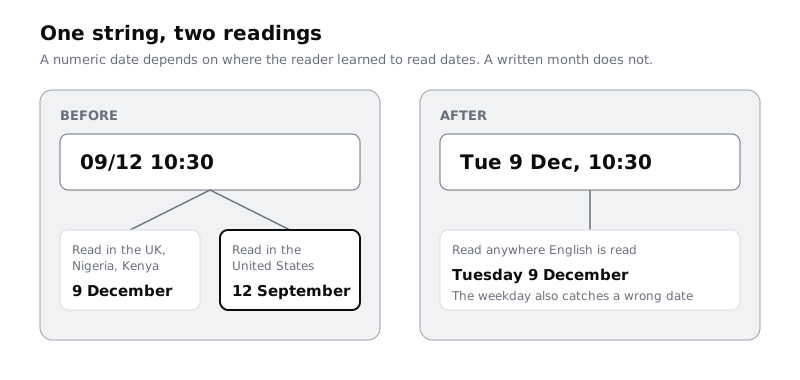
Settle three date forms and use nothing else:
- Short date for headings, lists and the week strip where space is tight: weekday, day, short month.
Tue 9 Dec. In the week strip,Tue 9is enough, because the month is in the heading above it. - Long date where the patient must remember it: Confirm, Booked and the SMS reminder.
Tuesday 9 December. - Relative words only as an extra, never in place of the date:
Tomorrow, Tuesday 9 December. "Tomorrow" on its own is wrong as soon as the patient reads the reminder after midnight.
Always include the weekday in a booking. People remember "the Tuesday" more easily than "the 9th", and if the weekday and the date disagree with what they expected, they notice before they arrive.
Leave the year out of booking screens unless the date is more than a few months ahead or falls in the next calendar year. When it does, add it to the long date: Tuesday 5 January 2027.
The common locale data that phones and browsers use (CLDR) gives all three of Larkfield's English locales a numeric short date such as 09/12/2025. That is correct for those countries, but the app should not use it. Ask for the written-month form in the handoff, so a developer who reaches for a default format does not bring numeric dates back.
Check it worked
Search your design file for / in text layers. No date on any screen is written in numbers only. Every booking date on Confirm and Booked has a weekday and a written month, and the week strip, day heading, Confirm and Booked all show the same date in their own form: Tue 9, Tue 9 Dec, Tuesday 9 December.
Step 3 · Choose 12 or 24-hour time for each locale
Larkfield's screens use the 24-hour clock: 09:00, 10:30, 14:00. That is normal on UK booking screens, train times and phone clocks. Many people in Nigeria and Kenya read and speak times in the 12-hour clock with am and pm in everyday English. Neither is wrong, but mixing them within one app is, and an afternoon slot written 2:00 with no am or pm is a real booking risk.
Do not settle this by guessing or by what your formatting library returns. For Larkfield, the Lagos and Nairobi clinics' front desk staff were asked how patients write appointment times on paper cards and in SMS. Both said 12-hour with am or pm. So:
- en-GB (Larkfield): 24-hour with a leading zero:
09:00,10:30,14:00. - en-NG (Lagos) and en-KE (Nairobi): 12-hour with a lowercase
amorpmafter a space:9:00 am,10:30 am,2:00 pm.
Note this decision in the table you make later, and in the handoff. The default locale data used by browsers and Node.js in late 2026 can give a 24-hour 10:30 for en-NG and en-KE as well, so a developer relying on the default would not match what you decided.
Three details for the 12-hour clock:
- Midday and midnight: write
12 noonand12 midnight.12:00 pmand12:00 amconfuse a lot of readers. For slots, avoid midnight altogether. - Slot buttons: the am or pm must fit inside the slot. In the Morning and Afternoon groups, you can drop it from the buttons, because the group heading already says which half of the day it is, and keep it everywhere else.
- Swahili: when the app gets a Swahili version, the hour in spoken Swahili time is counted from around 6 am, so 10:30 am is said as "saa nne na nusu asubuhi" (literally the fourth hour). Keep times as digits in the interface and tell translators not to convert them. Design for translation and longer text covers the note for translators.
Check it worked
Draw Pick a time once more for the Lagos locale, beside the UK one. Its slots read 9:00, 9:20, 9:40, 10:30, 11:00 under Morning and 2:00 to 4:00 under Afternoon, and the selected time shows 10:30 am everywhere outside the slot buttons. No time anywhere on that frame is written in the 24-hour clock, and no time on the UK frame has am or pm.
Step 4 · Say whose time it is
An appointment happens at the clinic, so its time is the clinic's time. A patient in Lagos booking a travel health appointment for when they are back in the UK sees the slots on a phone set to Lagos time. If the app converts the slot to their phone's time, they see 11:30 and arrive an hour late. If it shows 10:30 and says nothing, some people convert it in their head, wrongly.
The gap is not even fixed. The UK moves its clocks in summer and Nigeria and Kenya do not, so the gap to Lagos is one hour in December and none in July, and the gap to Nairobi is three hours in December and two in July.
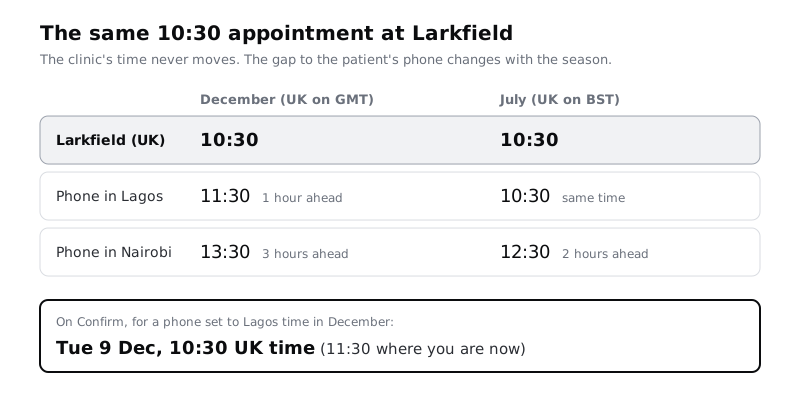
Set three rules and draw them:
- Slots, Confirm, Booked and the SMS always show the clinic's local time.
- When the phone's time zone differs from the clinic's, add the zone name after the time on Pick a time, Confirm and Booked:
10:30 UK time,10:30 am Lagos time. Use a place people know, not an abbreviation such as GMT, BST, WAT or EAT, which many patients cannot decode. - On Confirm and Booked only, add the patient's own time in brackets, in
Body/Smallandtext-muted:(11:30 where you are now). Leave it out when the times are the same.
Make a state frame called Confirm / Booking from abroad showing the Lagos case from the diagram. For developers, add a note that each appointment is stored with the clinic's time zone name (Europe/London, Africa/Lagos or Africa/Nairobi), not a fixed offset, so the summer change is handled.
Check it worked
Your file has a Confirm / Booking from abroad frame where the Date and time row reads Tue 9 Dec, 10:30 UK time with (11:30 where you are now) below it. The normal Confirm frame shows no zone label at all. Your handoff note names the three time zones by their full identifiers.
Step 5 · Write phone numbers people can read and dial
Larkfield's screens only know UK numbers, and two of them now break. The error on Your details says "Enter a mobile number with 11 digits, such as 07700 900123", which rejects a Kenyan mobile written the usual way, 0712 345 678, because that has 10 digits. And the fallback line Call 01234 567 890 cannot be dialled from Lagos as written, because a caller abroad drops the leading 0 and adds +44.
Settle how numbers are shown and how they are entered.
Showing a number. Group the digits the way people in that country write them, with spaces, so they can read it aloud or copy it to another phone:
- UK:
07700 900123; from abroad,+44 7700 900123 - Nigeria:
0803 123 4567; from abroad,+234 803 123 4567 - Kenya:
0712 345 678; from abroad,+254 712 345 678
Show a number in the local form to people in the same country and in the + form to everyone else. On Pick a time, the fallback line becomes Call 01234 567 890 for UK phones and Call +44 1234 567 890 for phones elsewhere. Mark every number the patient is meant to call, such as the clinic's fallback line, as a tap-to-call link; leave masked numbers and example numbers in field hints as plain text. Set every phone number as keep-together text so it never wraps across two lines.
Entering a number. Put a country selector in front of the mobile field, defaulting to the clinic's country, with the calling code showing (+44, +234, +254). Accept the number with or without the leading 0 and with or without spaces. Rewrite the hint and the error so they do not count digits: hint For example 07700 900123, error Enter a mobile number we can text, such as 07700 900123. For a number from another country, choose its country first. Ask developers to store the number in the international E.164 form (+447700900123) and to check it with a phone number library such as libphonenumber rather than a digit count.
Masking a number. Booked says We've sent a text to 07••• ••• 123. Keep the last three digits, and use the international form when the number is from another country: +234 ••• ••• 567 is clearer than a masked local number the patient does not recognise as theirs.
Use example numbers that cannot reach a real person. For mobile examples, the UK reserves 07700 900000 to 07700 900999 for fiction, and Ofcom publishes similar drama ranges for some geographic area codes. Nigeria and Kenya have no such range that is widely known, so use obviously patterned numbers in mock-ups and never a colleague's real one.
Check it worked
Your details shows a country selector set to +44 beside the mobile field, and its hint and error no longer mention a number of digits. Type the Kenyan example into the field on a copy of the error frame: nothing in the message would tell that patient they are wrong. Pick a time has two versions of the fallback line, one local and one with +44.
Step 6 · Show money with the right symbol, separators and decimals
The Lagos and Nairobi clinics charge for consultations, and Larkfield charges for some travel health vaccines. A price on a phone has to answer three questions at a glance: which currency, how much, and whether that is the whole amount.
For Larkfield's three locales:
- Symbol before the amount, no space for £ and ₦:
£30,₦15,000. - Kenyan shillings: the common locale data writes
Kshwith a space,Ksh 2,500; you will also seeKShandKESin Kenya. Pick one, write it in the table and use it everywhere. Larkfield usesKshto match what most formatting code produces. Keep the space non-breaking soKshnever ends one line and2,500starts the next. - Thousands separator: a comma in all three locales. Use it from four digits up:
₦15,000, not₦15000. - Decimals: show pence only when there are some:
£30, but£30.50, not£30.5. Show naira and shillings as whole amounts, because prices in kobo or cents are rare in these clinics' fees. Within one list, use the same number of decimals for every row so the amounts line up.
Two rules matter more than the formatting:
- Never convert a price into the patient's currency on screen. A Lagos patient booking at Larkfield sees
£30, because that is what they pay. A converted figure is out of date the moment the rate moves. - Say what the price is for, in words beside it:
Travel health consultation · £30, and on Confirm,To pay at the clinic: £30. If a price is "from" an amount, say so. Write the three-letter code (GBP, NGN, KES) only on receipts and in exports, where a patient or finance team may compare currencies.
The prices here are fictional. Use the clinic's real fees, and confirm with them whether a price includes everything the patient pays on the day.
Check it worked
Choose a service shows a price under each paid service in the patient's clinic currency, and Confirm has a To pay at the clinic row. Search the file for amounts ending in a single digit after the point, such as £30.5 (a match on £30.50 is fine), and for four or more digits without a comma, such as 15000: neither turns up. Every Kenyan price uses the same symbol with the same spacing.
Step 7 · Put every decision in one formatting table
Decisions scattered across frames get lost. Add a tab to your spreadsheet called Formats, with one row per kind of value and one column per locale, and copy each decision from the last five steps into it with a real example.
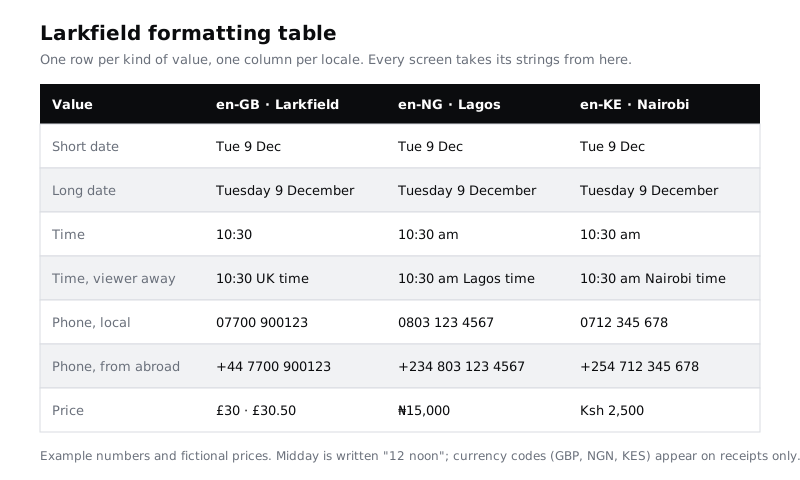
Under the table, add the rules that do not fit a cell, one line each:
- Midday is
12 noon; no slot at midnight. - The clinic's time is always shown; the patient's time is added only when it differs, on Confirm and Booked.
- Phone numbers are stored in E.164, shown local to people in the same country and with
+to everyone else, and never wrap. - Prices are never converted; codes appear on receipts only.
Then paste a copy of the table onto a page in the design file called Formats, next to the handoff notes, so developers find it without asking for the spreadsheet.
Check it worked
The Formats tab has the seven rows in the diagram, three filled locale columns with no empty cell, and the four rules beneath. Every row in your Values tab from the first step can be matched to a row in Formats.
Step 8 · Update the screens and read them as a stranger would
Go back through the Values tab row by row and change each value on the screens to what the Formats table says. Add a column, Done, and mark each row as you go. Then make the extra frames the decisions need: the Lagos version of Pick a time, Confirm / Booking from abroad, and the mobile field with the country selector.
Now test the result with people who read the formats differently from you. Show the Lagos Confirm frame and the UK Confirm frame to two or three people, ideally including someone who grew up with US dates and someone who books on a phone set to Lagos or Nairobi time. Ask them only: "When is this appointment, and what number will the reminder go to?" Write down their answers word for word.
Many patients will see these screens on a lower-cost Android phone at 360 pixels wide, often with large text turned on. Check the longest values in the table, such as +234 803 123 4567 and 10:30 am Lagos time, at that width: they must fit on one line or wrap before them, not inside them.
Check it worked
Every row in Values is marked Done. Each person you asked gave the appointment as Tuesday 9 December at 10:30 in the clinic's time, and read back the right phone number, without asking you a question. On a 360-pixel frame, no phone number, time or price is split across two lines.
Next steps
Formats are one part of getting a product ready for other countries. Design for translation and longer text prepares the same screens for French, Hausa and Swahili, including the note for translators about times and numbers. Write interface copy for labels, buttons and errors rewrites the strings around these values, including the mobile number error. For the field layout, keyboards and country selector on Your details, see Design a mobile form people can finish.
Part of these paths
Related tutorials
- Design for translation and longer textYou will have the Larkfield Clinic booking screens tested with pseudo-localised text up to twice as long, fixed wherever they broke, and a localisation note that tells translators what each string is for and how much room it has.
- Write interface copy for labels, buttons and errorsYou will have every string on three Larkfield Clinic booking screens rewritten to four rules and tested aloud, in a string table showing old and new side by side, plus a five-line voice guide the team can write new screens from.
- Design a mobile form people can finishYou will have cut a 21-field clinic registration form down to a five-field phone screen in one column, with labels above fields, the right keyboard for each input, sensible defaults and one clear button, plus a before and after showing fields and estimated taps cut and a note of every field you deferred.
Need this done for you?
Padding does this work for growing companies, from the first diagnosis to a system that keeps working.
Get new tutorials